 AI Tutor
Pick any list of the characteristics of cloud computing online and you will find a different number each time. One page lists five, another lists ten, a third lists fifteen. The confusion is real, and it causes trouble in exams and interviews, where a question may ask you to pick the characteristics from a list of options that mixes real characteristics with benefits and service models.
The way out is to start from the source. The US National Institute of Standards and Technology (NIST) published a definition of cloud computing in Special Publication 800-145, and most textbooks and certification courses follow it. NIST names five essential characteristics: on demand self service, broad network access, resource pooling, rapid elasticity and measured service. Everything else that people call a feature, such as security, automation or lower cost, is either a result of these five or a separate idea.
This guide explains each of the five in plain words with an example and a way to recognise it. Then it shows two of them in numbers, using a small model you can run yourself. Most pages describe elasticity and pooling only in words. Here you will see how many servers a shop needs with and without elasticity, and how sharing a pool changes the total. After that, we separate the five characteristics from the extra features people often add, from the three service models and from the four deployment models and finish with ten practice questions in the style of exam papers.
What Cloud Computing Means in the NIST Definition
NIST describes cloud computing as a model for enabling convenient, on demand network access to a shared pool of configurable computing resources, such as networks, servers, storage, applications and services, that can be provisioned and released with minimal management effort or provider interaction. In simpler words: instead of buying and running your own servers, you use computing power that a provider owns, over the internet and you take what you need when you need it.
The five characteristics are the test. If a service has all five, it fits the NIST definition of cloud. If it lacks them, it may be hosting or a managed service, but not cloud in the NIST sense. A rented server that takes three days and a phone call to set up and is billed as a fixed yearly fee fails the first, fourth and fifth tests.
The Five Essential Characteristics of Cloud Computing
| Characteristic | In one line | How to spot it |
|---|---|---|
| On demand self service | You provision resources yourself, without asking the provider’s staff | You click or call an API and the server exists a few minutes later |
| Broad network access | Services are reached over the network with standard tools | Works from a phone, laptop or office computer through a browser or API |
| Resource pooling | The provider serves many customers from a shared pool | You do not choose the physical machine, and capacity is moved between customers by demand |
| Rapid elasticity | Capacity grows and shrinks quickly, often automatically | You can go from 2 servers to 20 for a sale and back again |
| Measured service | Usage is metered and reported | The bill follows what you used, and you can see usage reports |
Each Characteristic Explained
1. On demand self service
You get computing resources when you ask for them, without a person at the provider doing the work. In the past, a new server meant filling a request, waiting for approval and waiting for delivery. In cloud, you use a web console, a command line tool or an API, and the resource is ready in minutes.
Example: A developer needs a test database for one afternoon. She creates it from the console, uses it, and deletes it in the evening. No ticket, no phone call.
What it is not: A service where you email a request and wait for staff to set it up. That may be good hosting, but it is not self service.
2. Broad network access
Services are available over the network and can be used from many kinds of devices through standard mechanisms, such as a web browser or an API call. NIST mentions mobile phones, tablets, laptops and workstations.
Example: A sales manager checks a dashboard on her phone in a taxi and on her laptop in the office. Same service, different devices.
What it is not: An application that works only on one office computer on a private network cable. Cloud also needs a good network. If the connection is down, you cannot reach the service.
3. Resource pooling
The provider combines computing resources into a shared pool and serves many customers from it. This is called a multi tenant model. Physical and virtual resources are assigned and reassigned according to demand. Customers usually do not know or control the exact physical location of their resources, though some providers let you choose a region or country.
Example: Your company and a hundred others run applications on the same physical hardware, kept apart by software. When your load drops, that capacity can serve someone else.
Why it matters: Pooling is what makes cloud cheaper than owning hardware. Different customers peak at different times, so the provider needs far less total capacity than all the individual peaks added together. The model later in this post shows this in numbers.
4. Rapid elasticity
Capacity can be added and removed quickly, and sometimes automatically, so it follows demand. To the customer, the available capacity often looks unlimited, and it can be bought in any amount at any time. NIST says capabilities can be elastically provisioned and released, to scale outward and inward with demand.
Example: An online shop runs 2 servers at night, 10 at lunchtime and 10 during a sale evening, then goes back to 2.
Elasticity vs scalability: People mix the two words. Scalability means a system can handle more load if you add resources. Elasticity means it adds and removes them quickly to match the load. A system can be scalable without being elastic, for example if you must order and install new servers by hand.
5. Measured service
Cloud systems measure resource use, such as storage, processing, bandwidth or active user accounts, and control and report it. Both provider and customer can see usage. This is what allows a pay for what you use bill.
Example: A report shows that your application used 135 server hours yesterday, and the bill is based on those hours.
What it is not: A flat yearly fee for a fixed server, whether you use it or not. Some cloud services do offer commitments and reserved capacity at a lower rate, but the usage is still measured.
Two of Them in Numbers: Elasticity and Pooling
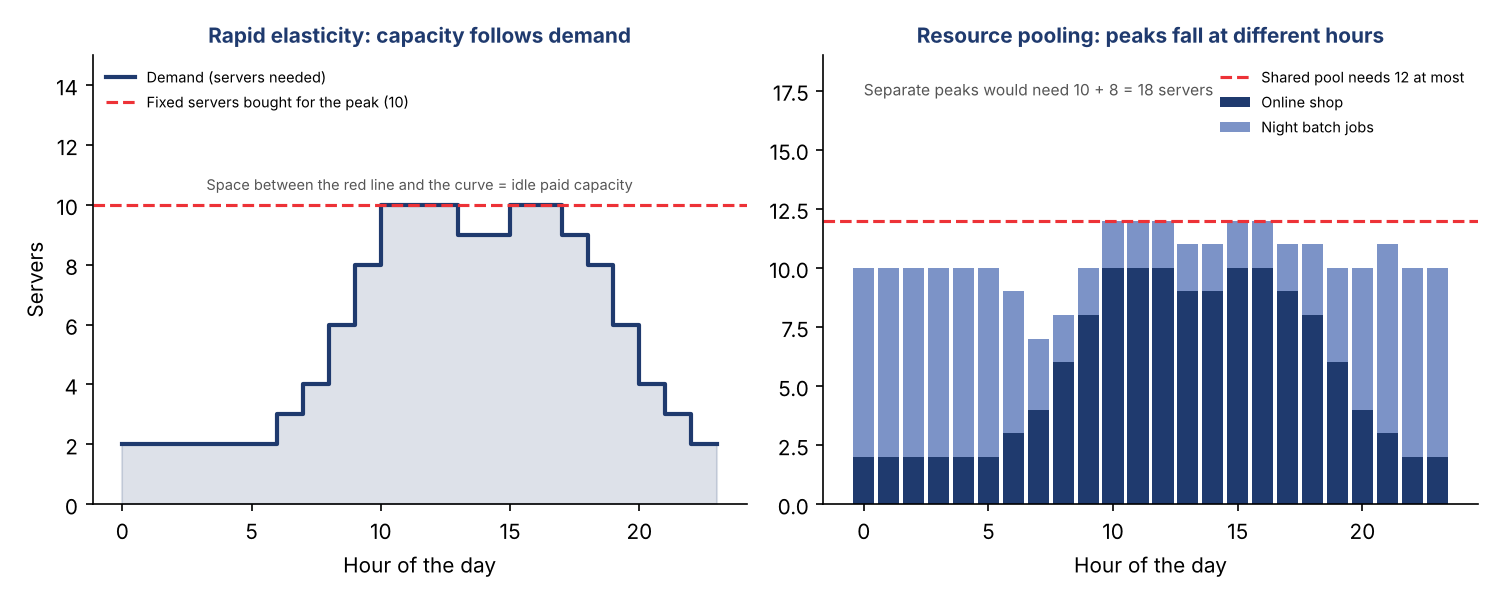
Words are easy to forget. Numbers stay in the mind. The model below uses made up demand for one day, in servers needed each hour. It is for teaching and uses no real prices. The code is plain Python with no libraries. The file is cloud_capacity_demo.py, sent with this post and the output below is its real output.
Rapid elasticity and measured service
Check by hand. The peak is 10 servers, and 10 servers for 24 hours is 240 server hours. Adding the 24 hourly values gives 135. If you buy servers for the peak, you use only 56.2 percent of what you pay for. With elasticity, you pay for 135 server hours. Because the service is metered, the bill follows the 135 hours. If each server hour costs one unit (a made up price), the fixed plan costs 240 units and the metered plan costs 135. In real life, prices, minimum charges and commitments change the result, so this shows the idea and not a quote.
Resource pooling
The shop peaks at lunchtime. A second customer runs report jobs that peak at night. If each buys for its own peak, the total is 10 + 8 = 18 servers. In a shared pool, the combined demand never goes above 12 in any hour, so 12 servers are enough. That is a third less hardware for the same work. This is the idea behind resource pooling, and it is why a provider can offer lower prices than most single companies can manage alone. It only works because the peaks fall at different times. If both customers peaked at the same hour, the saving would be small.
Other Features People List and Why They are Not on the NIST List
Many pages add more items to reach a round number. These features are real, but they are not NIST essential characteristics. Treat them as benefits, design goals or provider practices.
| Often listed | What it really is | Link to the five |
|---|---|---|
| Cost savings, pay as you go | A benefit that follows from measured service, pooling and elasticity | Result of 3, 4 and 5 |
| Multi tenancy | The method behind resource pooling | Part of 3 |
| Scalability | A system quality. Elasticity is the quick, automatic form | Part of 4 |
| High availability and resilience | A design goal. Providers build it with extra copies of hardware and data, but it is not guaranteed by the definition | Separate |
| Security | A shared responsibility between provider and customer, not a built in guarantee | Separate |
| Automation | How elasticity and self service are delivered | Supports 1 and 4 |
| Work from any location | A result of broad network access | Result of 2 |
In an exam, if the question says “the five essential characteristics of cloud computing” or “according to NIST”, answer with the five. If it asks for “characteristics” in general and gives a long list, answer with the five and mention that others are benefits. If you write an article or answer an interview question, name the five first. Then add the extras as benefits.
Characteristics vs Service Models vs Deployment Models
Exam options often mix three different ideas. The characteristics describe how a cloud behaves. The service models describe what you get. The deployment models describe who can use the cloud.
| Group | Items (from NIST) | Answers the question |
|---|---|---|
| Essential characteristics | On demand self service, broad network access, resource pooling, rapid elasticity, measured service | How does a cloud behave? |
| Service models | Software as a Service (SaaS), Platform as a Service (PaaS), Infrastructure as a Service (IaaS) | What do you get from the provider? |
| Deployment models | Private, community, public and hybrid cloud | Who owns it and who can use it? |
So if an option says “IaaS” or “public cloud”, it is not a characteristic. This one habit answers many multiple choice questions correctly.
Practice Questions With Answers
Try each question first and then check the answer. All of them follow the NIST definitions.
| Question | Answer | Why |
|---|---|---|
| 1. Which of these is NOT an essential characteristic of cloud computing? (a) On demand self service (b) Resource pooling (c) Rapid elasticity (d) Fixed hardware ownership | (d) | Customers do not own the hardware. The other three are on the NIST list |
| 2. A user starts a new server from a web console without contacting the provider. Which characteristic is this? | On demand self service | The user provisions the resource alone |
| 3. Many customers share the same physical servers, and the provider moves capacity between them by demand. Which characteristic? | Resource pooling | Multi tenant sharing of a pool |
| 4. Capacity is raised for a festival sale and lowered afterwards. Which characteristic? | Rapid elasticity | Capacity follows demand quickly |
| 5. A bill is based on the hours of use recorded by the provider. Which characteristic? | Measured service | Usage is metered and reported |
| 6. A manager reads the same dashboard on a phone and on a laptop. Which characteristic? | Broad network access | Standard access from many devices |
| 7. True or false: you must have physical servers to use cloud computing. | False | The provider owns and runs the hardware. You use it over the network |
| 8. Which of these is a service model, not a characteristic? (a) IaaS (b) Measured service (c) Rapid elasticity (d) Resource pooling | (a) | IaaS is a service model |
| 9. Which of these is a deployment model? (a) Hybrid cloud (b) Resource pooling (c) PaaS (d) Measured service | (a) | Private, community, public and hybrid are the deployment models |
| 10. Select two fundamental characteristics: (a) Rapid elasticity (b) Fixed monthly capacity (c) Measured service (d) Manual purchase orders | (a) and (c) | Options (b) and (d) are the opposite of cloud behaviour |
How to Learn Cloud Computing?
- Learn the five characteristics and the service and deployment models first. They are the language of every cloud course and exam.
- Pick one provider such as AWS, Microsoft Azure or Google Cloud, and learn how it shows the five characteristics in its own services.
- Use the free tier carefully. Create a small server, watch the usage report, then delete it. Seeing the metered usage makes measured service real. Always check the provider’s current free tier rules and set a billing alert first, so a forgotten resource does not surprise you.
- Learn a little networking and Linux. Cloud work uses both.
- Prepare for a foundation certification if you want proof of knowledge. Our AWS certification path guide explains which exam to take first.
If you prefer guided learning, Prwatech runs an AWS training course in Bangalore and an AWS training course in Pune. Offline classes are held in Bangalore (BTM Layout) and Pune (Kharadi). Learners in other cities can join live online classes or study at their own pace. For the syllabus, batch dates and fees, please ask the Prwatech learning team through the demo class form below.
