 AI Tutor
If you search for a Tableau certification today, you will find old and new names mixed together. Older videos and courses talk about the Tableau Desktop Specialist and the Tableau Certified Data Analyst exams. The official pages now use names that start with “Salesforce Certified Tableau”, because Tableau certifications are now part of the Salesforce certification experience. That change confuses many learners, and it also changes the fee, the retake rules and how long the certificate lasts.
This guide sorts it out. It explains which Tableau certifications exist, what the two exams most learners ask about (Desktop Foundations and Data Analyst) cost and test, how retakes work, and how to plan your study hours by exam weight. It also includes a small tested example, written in pandas, of three ideas the Foundations exam names: how a number changes as you add a dimension, why an average of ratios is not a ratio of totals, and the difference between a date part and a date value. You do not need Tableau installed to run it.
Which Tableau Certifications Exist?
The Tableau certification page lists five certifications, all with names that begin “Salesforce Certified Tableau”. The Salesforce retake page also lists a sixth, the Tableau Next Consultant exam.
| Certification | Level on the Tableau page | Who it is for (our reading) |
|---|---|---|
| Desktop Foundations | Foundational | People who build charts and dashboards in Tableau Desktop |
| Data Analyst | Advanced | Analysts who connect, analyse and publish in Tableau |
| Server Administrator | Advanced | People who run Tableau Server |
| Consultant | Advanced | People who advise customers on Tableau projects |
| Architect | Advanced | People who design large Tableau deployments |
The third column is our reading of the names. We did not read the guides for Server Administrator, Consultant, Architect or Next Consultant, so this post does not describe their content. We focus on the first two because that is where most learners start, and where most searches go.
What Happened to Tableau Desktop Specialist?
Many learners still search for the Tableau Desktop Specialist certification. The old Desktop Specialist exam guide address on tableau.com now redirects to the Salesforce Certified Tableau Desktop Foundations exam guide. The Tableau certification page no longer lists Desktop Specialist. So the Desktop Foundations exam is the current entry level Tableau exam. No page we read states the rename in so many words, so treat it as our reading of those two facts and confirm with Salesforce if it matters for your plan.
One more point. The Foundations guide says the exam is currently tested on Tableau version 2022.3. Practise on a version close to that, and check the guide on the day you book to see if the version has changed.
Tableau Desktop Foundations at a Glance
| Item | What the Salesforce exam guide says |
|---|---|
| Questions | 40 multiple choice or multiple select, And up to 5 unscored questions |
| Duration | 70 minutes |
| Passing score | 48 percent for the English exam |
| Fee | ₹8,408 with 18 percent GST (our estimate, see the cost section) |
| Retake fee | Free |
| Delivery | Proctored, at a testing centre or online |
| Materials | No hard copy or online references allowed |
| Prerequisites | None. Recommended experience is at least 3 months applying Tableau Desktop skills |
| Renewal | No required maintenance “at this time”. The page does not state an expiry period |
The pass mark of 48 percent on 40 scored questions works out to 19.2, so you need about 19 to 20 correct answers. The guide does not say how the score is rounded. The questions run to 45 in 70 minutes, which is about 93 seconds each.
Tableau Data Analyst at a Glance
| Item | What the Trailhead prep guide says |
|---|---|
| Questions | 60 multiple choice or multiple select, plus 5 unscored questions |
| Duration | Not stated on the page we read. Check the full exam guide |
| Passing score | 65 percent, which is 39 of 60 scored questions |
| Fee | ₹22,420 with 18 percent GST (our estimate, see the cost section) |
| Retake fee | ₹11,210 with GST (our estimate) |
| Prerequisites | None required. The page says you should have the skills to pass the Desktop Foundations exam |
| Recommended experience | At least 6 months with Tableau, including Tableau Prep, Tableau Desktop, and Tableau Server or Tableau Cloud |
| Validity | One year. You must complete the Tableau certification maintenance module on Trailhead once a year, and if you miss the due date the certification expires |
The one year validity and the yearly maintenance module matter for your plan. If another article gives a different validity, check the Salesforce page, because certification rules change.
Exam Domains Compared
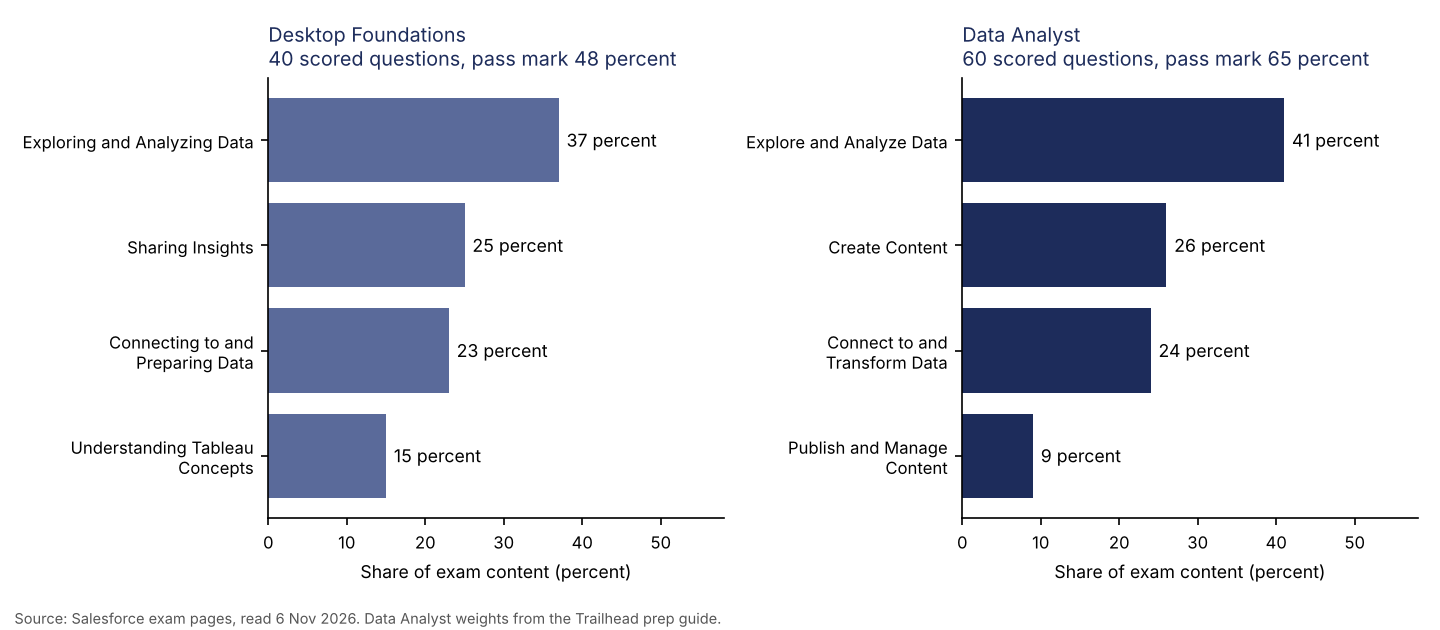
In both exams the exploring and analysing domain carries the most marks. The Data Analyst exam adds a smaller domain on publishing and managing content on Tableau Server and Tableau Cloud.
What the Desktop Foundations guide lists?
- Connecting to and Preparing Data (23 percent): live connections and extracts, relationships, joins and unions, renaming fields, aliases, geographic roles and data types.
- Exploring and Analyzing Data (37 percent): basic charts such as bar, line, scatter, map, dual axis and stacked bar, groups, sets, hierarchies, filters, sorting, reference lines, quick table calculations, bins, calculated fields and parameters.
- Sharing Insights (25 percent): formatting, dashboards with actions and layouts, stories, publishing or exporting workbooks and exporting to PowerPoint.
- Understanding Tableau Concepts (15 percent): dimensions versus measures, discrete versus continuous fields, date parts versus date values, and how default aggregation changes as dimensions are added.
For the Data Analyst exam we read only the domain names and weights, not the full topic lists. The Trailhead prep guide has a section for each domain, so use it as your checklist.
Cost, Retakes and Renewal
| Item | Desktop Foundations | Data Analyst |
|---|---|---|
| Exam fee | About ₹8,408 | About ₹22,420 |
| Retake fee | ₹0 (free) | About ₹11,210 |
| Total if you pass on attempt 1, 2 or 3 | About ₹8,408 in every case | About ₹22,420, ₹33,630 or ₹44,840 |
| Validity | No required maintenance at this time, expiry period not stated | One year, with a yearly maintenance module |
The rupee amounts are our estimate, not a Salesforce price. Salesforce lists its fees in US dollars, and we did not find an official rupee price. We converted at about ₹95 per USD and added 18 percent GST, the standard rate. Your bank may add a card or forex charge, and the rate moves every day, so the final amount can differ by a few hundred rupees. Check the amount at registration. The totals row is our arithmetic from the fee and retake price.
The Salesforce retake policy says you get 3 attempts at the same exam in each release cycle. After a first failed attempt you wait 24 hours, after a second you wait 14 days, and after a third you wait until the next release cycle starts. The retake price is 50 percent of the original price for most exams and Foundations exams are free to retake. Release cycle dates are subject to change, so read the policy page when you book.
About “free” Tableau certification: both exams carry a fee on the pages we read. The Foundations guide does list free study material, such as Tableau free how to training videos, product help and the Visual Analysis Best Practices Guidebook. A paid Trailhead Academy course is also named. So the study material can be free, but the exam is not.
A Tested Example of Three Exam Ideas
The file tableau_exam_concepts_demo.py, sent with this post, shows three ideas from the Foundations guide using a small table in pandas. It also prints the exam arithmetic and the study hours split used in this post. The data is made up. We ran it on Python 3.13 with pandas, and the output is real. It ends with “All checks passed”. It does not teach Tableau clicks. It shows the idea behind each question type.
The made up table has six orders, with the dimensions region and category, the measures sales and profit and an order date. Total sales are 2,000 and total profit is 260.
Idea 1: Aggregation changes when you add a dimension
A measure such as sales is added up at the level of the dimensions in the view. With region alone there are 2 marks. Add category and the same 2,000 splits into 4 marks. The totals stay the same, but the grain changes. The Foundations guide names this idea directly.
Idea 2: Average of ratios is not the ratio of totals
If you calculate profit divided by sales on each row and then average the results, you get 17.5 percent. If you add all the profit and divide by all the sales, you get 13.0 percent. The second one is the true profit ratio, because big orders count more. In Tableau this is the difference between a row level calculation and an aggregate calculation. It is a common source of wrong dashboards, so expect questions on it.
Idea 3: Date part vs date value
August 2025 and August 2026 are merged into one August bar when you use the month as a part. They stay apart when you use the month as a value. Same data, two different charts. The Foundations guide lists the difference between date parts and date values, and between discrete and continuous fields.
What this example does not show: how to build any view in Tableau, calculated field syntax, table calculations, level of detail expressions, dashboards, or anything on the Data Analyst exam. It checks the logic, and you still need hands on practice in the product.
Study Plan by Domain Weight
The plan splits an example number of study hours in proportion to the domain weights. The hours are our example, not a Salesforce recommendation. The script prints the same split. Change the totals to fit your own time.
| Desktop Foundations domain | Weight | Hours of 30 |
|---|---|---|
| Exploring and Analyzing Data | 37 percent | 11.1 |
| Sharing Insights | 25 percent | 7.5 |
| Connecting to and Preparing Data | 23 percent | 6.9 |
| Understanding Tableau Concepts | 15 percent | 4.5 |
| Data Analyst domain | Weight | Hours of 60 |
|---|---|---|
| Explore and Analyze Data | 41 percent | 24.6 |
| Create Content | 26 percent | 15.6 |
| Connect to and Transform Data | 24 percent | 14.4 |
| Publish and Manage Content on Tableau Server and Tableau Cloud | 9 percent | 5.4 |
Then follow this order. First, read the official exam guide and mark each topic as known or not known. Second, build one small dashboard for each domain from your own data, because the exam rewards people who have used the product. Third, spend most of your time on the exploring and analysing domain. Fourth, for the Data Analyst exam, practise publishing a workbook to Tableau Cloud or Tableau Server, even though that domain is only 9 percent. Fifth, review the questions you got wrong and write down why.
Which Exam Should You Take First?
This part is our judgement, based on the recommended experience in the guides. If you have under 3 months of Tableau use, build your skills first and aim for Desktop Foundations. If you have used Tableau Desktop for a few months and want to show broader skills, the Data Analyst exam asks for about 6 months with Tableau Prep, Tableau Desktop and Tableau Server or Tableau Cloud. The Data Analyst page itself says you should have the skills to pass Foundations first.
There is also a cost point. The Foundations fee is about ₹8,408 with free retakes, so the first exam carries low risk. The Data Analyst certificate needs a yearly maintenance module to stay valid, so be ready for that before you pay. A certificate shows what you know, and it does not replace projects. Pair it with two or three dashboards you can show, ideally built on a business question and not only a sample data set. Our guide to data analyst skills (link when live) lists what to build.
If you want guided learning, Prwatech runs a Tableau course in Bangalore, a Tableau course in Pune and an online Tableau course. The course pages mention a Prwatech course certificate. That is a different thing from the Salesforce Certified Tableau exams above, which you book and take separately through Salesforce. Offline classes are held in Bangalore (BTM Layout) and Pune (Kharadi). Learners in other cities can join live online classes or study at their own pace. Whether a course prepares you for a Salesforce exam, and the syllabus, batch dates and fees, are questions for the Prwatech learning team, so please ask them through the demo class form below.
