Python Operators
Python Operators Tutorial With Examples
Every program you write does the same few things with data. It adds numbers, compares two values, checks whether an item is in a list, or decides whether two conditions are both true. Each of these small actions is done by an operator, a symbol such as the plus sign, the equals sign or a word such as and.
An operator tells Python what to do with the values next to it. Those values are called operands. In the expression 20 + 3, the plus sign is the operator, and 20 and 3 are the operands. The whole thing is called an expression, and Python works out its value. You will use operators in the first program you write and in the ten thousandth, so it pays to learn them properly once.
In this tutorial, we go through all seven groups of Python operators: arithmetic, assignment, comparison, logical, identity, membership and bitwise. Every example uses the same two variables, x as 20 and y as 3, and shows the real output from Python 3.13. We then cover operator precedence, which decides what runs first, and the mistakes beginners make most often, such as comparing floats with the equals operator and confusing is with ==. We finish with a quick reference and the complete script.
Types of Operators in Python
Python groups its operators by the job they do. Here are the seven groups, with what each one answers.
| Group | What it does | Examples |
|---|---|---|
| Arithmetic | Does maths on numbers | + – * / % ** // |
| Assignment | Stores a value in a variable | = += -= *= and more |
| Comparison | Compares two values, gives True or False | == != > < >= <= |
| Logical | Combines conditions | and or not |
| Identity | Checks if two names point to the same object | is is not |
| Membership | Checks if a value is inside a collection | in not in |
| Bitwise | Works on the binary bits of whole numbers | & | ^ ~ << >> |
For every example below, we start with these two variables:
Arithmetic Operators in Python
Arithmetic operators do the maths you learned at school. Python has seven of them.
| Name | Symbol | Example | Result |
|---|---|---|---|
| Addition | + | x + y | 23 |
| Subtraction | – | x – y | 17 |
| Multiplication | * | x * y | 60 |
| Division | / | x / y | 6.666666666666667 |
| Modulus | % | x % y | 2 (the remainder) |
| Exponent | ** | x ** y | 8000 (20 to the power 3) |
| Floor division | // | x // y | 6 (the whole number part) |
Two points trip up beginners. First, the division operator always returns a float, even when the numbers divide evenly, so 8 divided by 2 gives 4.0 and not 4. Second, Python does not round on its own, so the division above prints 6.666666666666667. Use the round function when you want fewer decimals.
Floor Division and Modulus With Negative Numbers
Floor division rounds down toward minus infinity, not toward zero. That surprises people when a number is negative.
The result of minus 20 floor divided by 3 is minus 7, not minus 6, and the remainder is 1. Python keeps the rule that (a // b) * b + (a % b) always gives back a.
Assignment Operators in Python
The plain equals sign stores a value in a variable. The other assignment operators are shortcuts. They do an operation and store the result back in the same variable, so x += 5 means the same as x = x + 5. In the table, every row starts again with x as 20.
| Name | Symbol | Example | Same as | Result |
|---|---|---|---|---|
| Assign | = | x = 20 | x = 20 | 20 |
| Add and assign | += | x += 5 | x = x + 5 | 25 |
| Subtract and assign | -= | x -= 5 | x = x – 5 | 15 |
| Multiply and assign | *= | x *= 2 | x = x * 2 | 40 |
| Divide and assign | /= | x /= 2 | x = x / 2 | 10.0 |
| Modulus and assign | %= | x %= 3 | x = x % 3 | 2 |
| Floor divide and assign | //= | x //= 3 | x = x // 3 | 6 |
| Exponent and assign | **= | x **= 2 | x = x ** 2 | 400 |
| Bitwise AND and assign | &= | x &= 3 | x = x & 3 | 0 |
| Bitwise OR and assign | |= | x |= 3 | x = x | 3 | 23 |
| Bitwise XOR and assign | ^= | x ^= 3 | x = x ^ 3 | 23 |
| Right shift and assign | >>= | x >>= 2 | x = x >> 2 | 5 |
| Left shift and assign | <<= | x <<= 3 | x = x << 3 | 160 |
The bitwise rows give whole numbers, because those operators work on integers. The last six rows make sense after you read the bitwise section further down.
Comparison Operators in Python
Comparison operators compare two values and return True or False. You will use them in every if statement and every loop condition.
| Name | Symbol | Example | Result |
|---|---|---|---|
| Equal to | == | x == y | False |
| Not equal to | != | x != y | True |
| Greater than | > | x > y | True |
| Less than | < | x < y | False |
| Greater than or equal to | >= | x >= y | True |
| Less than or equal to | <= | x <= y | False |
One equals sign stores a value, and two equals signs compare. Mixing them up is a very common first error.
Logical Operators in Python
Logical operators combine conditions. The word and gives True only when both sides are true. The word or gives True when at least one side is true. The word not flips the answer.
| Operator | Meaning | Example |
|---|---|---|
| and | True if both conditions are true | x > 10 and y < 5 |
| or | True if at least one condition is true | x > 10 or y > 5 |
| not | Reverses the result | not x > 10 |
and and or Return an Operand, Not Just True or False
With conditions, and and or give True or False. With plain values, they return one of the two values themselves. Python treats 0, empty text, an empty list and None as false, and everything else as true.
Here, x and 0 gives 0 because x is true, so Python moves to the second value and returns it. And x or 0 gives 20, because x is already true and Python stops there. Python also stops early when the answer is known. That is called short circuit evaluation, and it lets you write safe checks such as len(items) > 0 and items[0] == 5, where the second part never runs if the list is empty.
Identity Operators in Python
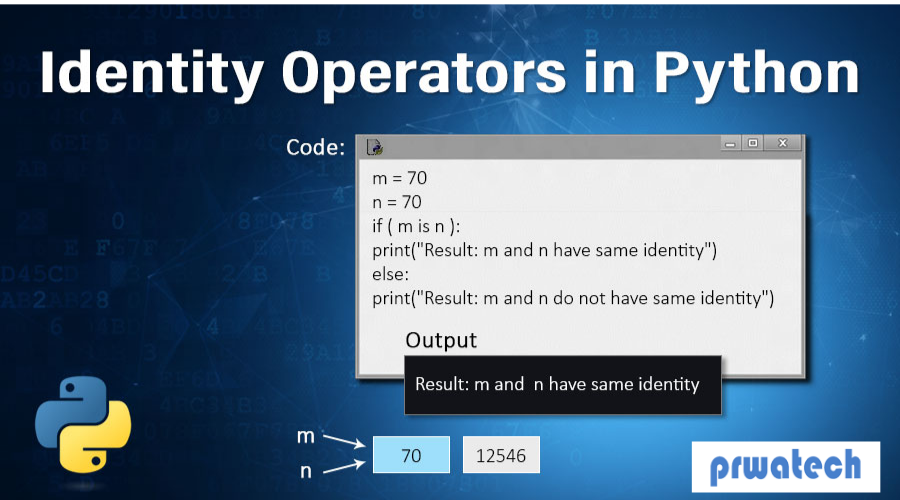
Identity operators check whether two names point to the same object in memory. That is different from asking whether two values look equal.
| Operator | Meaning | Example |
|---|---|---|
| is | True if both names point to the same object | p is q |
| is not | True if they point to different objects | p is not r |
The names p and q point to the same list, so p is q is True. The name r is a separate list that holds the same values, so p == r is True, but p is r is False. In short, == asks whether the values are equal, and is asks whether it is the very same object.
The most useful everyday use of is is the check against None:
Avoid using is to compare numbers or text. Python sometimes reuses small objects, so the answer can change from one case to another. Use == for values.
Membership Operators in Python
Membership operators check whether a value is present inside a collection such as a string, list, tuple, set or dictionary.
| Operator | Meaning | Example |
|---|---|---|
| in | True if the value is found in the collection | 3 in [1, 2, 3] |
| not in | True if the value is not found | “z” not in “apple” |
For a dictionary, in checks the keys and not the values, which is why 1 in the dictionary gives False. Using in with a plain number on the right raises an error, because a number is not a collection:
Bitwise Operators in Python
Bitwise operators work on the individual bits, the ones and zeros, of whole numbers. You will not need them every day, but they appear in permissions, flags, networking, hardware code and interview questions. Here is a worked example using 12 and 10.
| Name | Symbol | What it does | Example and result |
|---|---|---|---|
| Bitwise AND | & | 1 only where both bits are 1 | 12 & 10 gives 8 (1000) |
| Bitwise OR | | | 1 where at least one bit is 1 | 12 | 10 gives 14 (1110) |
| Bitwise XOR | ^ | 1 where the bits differ | 12 ^ 10 gives 6 (0110) |
| Bitwise NOT | ~ | Flips every bit | ~12 gives minus 13 |
| Left shift | << | Moves bits left, fills with zeros | 12 << 2 gives 48 |
| Right shift | >> | Moves bits right | 12 >> 2 gives 3 |
The tilde operator is bitwise NOT, not NOR. For whole numbers, ~a equals minus a minus 1, which is why ~12 gives minus 13. A left shift by 2 multiplies by 4, and a right shift by 2 divides by 4 and drops the remainder.
Operator Precedence in Python
When an expression has more than one operator, Python does not just read left to right. It follows precedence rules, the same idea as BODMAS in maths. Here they are, from highest to lowest.
| Order | Operators | Note |
|---|---|---|
| 1 | ( ) parentheses | Always runs first |
| 2 | ** | Right to left |
| 3 | +x -x ~x (unary) | Sign and bitwise NOT |
| 4 | * / // % | Left to right |
| 5 | + – | Left to right |
| 6 | << >> | Shifts |
| 7 | & then ^ then | | Bitwise, in this order |
| 8 | == != > < >= <= is is not in not in | Comparisons |
| 9 | not then and then or | Logical, in this order |
Look at the second line. The exponent runs right to left, so 2 ** 3 ** 2 is 2 ** 9, which is 512. And -3 ** 2 gives minus 9, because the exponent runs before the minus sign. When in doubt, use brackets. They cost nothing and make the code easy to read.
Chained Comparisons
Python lets you chain comparisons the way you write them in maths. This is cleaner than joining two checks with and.
The first chain asks whether 2 is greater than 1 and also less than 3. Use it for range checks, such as 0 <= marks <= 100.
Common Mistakes With Python Operators
Comparing Floats With ==
Decimal numbers are stored in binary, so some cannot be held exactly. This gives a result that surprises everyone once.
Round the numbers first, or use the isclose function from the math module.
Mixing Up Division and Floor Division
Use the division operator for an exact answer, and floor division when you need a whole number, such as the number of full pages or full boxes.
Using is Instead of ==
Use == to compare values. Keep is for None and for cases where you truly want to know whether two names share one object.
Using = Instead of ==
A single equals sign stores a value. Writing if x = 20 gives a SyntaxError. Write if x == 20.
Quick Reference
| Group | Operators | Returns |
|---|---|---|
| Arithmetic | + – * / % ** // | A number |
| Assignment | = += -= *= /= %= //= **= &= |= ^= >>= <<= | Nothing, it stores a value |
| Comparison | == != > < >= <= | True or False |
| Logical | and or not | An operand, or True or False |
| Identity | is is not | True or False |
| Membership | in not in | True or False |
| Bitwise | & | ^ ~ << >> | A whole number |
Complete Script to Run Yourself
Here is the script that produces every output on this page. Copy it into a file, run it with Python 3, and compare the results line by line.
Operators are small, but they sit inside almost every line you will write. Learn the seven groups, remember that and and or return operands, that the division operator gives a float, and that is is not the same as ==, and you will avoid most beginner bugs. Run the script above, change the numbers, and watch what happens. Then move on to Python conditions and loops, where these operators do the real work.
