Apache Spark Kafka Usecase
Apache Kafka Use Case Tutorial
Welcome to the world of advanced Tutorials on the use case for apache spark. Are you looking forward to the Use case example of the Kafka Platform? Or looking for some help on the use case for Kafka streams? Then you’ve landed on the Right Path which providing advanced tutorial Based concepts on the Apache Kafka Use Case Examples. In this tutorial, one can easily explore apache Apache Spark real-world Use Cases with step by step explanation.
If you are the one who wanted to become an expert in Apache spark? Or the one who wanted to explore the technology like a Pro under the certified experts with world-class classroom training environment, then asks your Apache spark training institute experts who offer advanced Apache spark training. Follow the below-mentioned Apache spark use case tutorial and enhance your skills to become a professional Spark Developer.
Apache Kafka Use Case
The examples below walk through core Kafka operations using the command line tools that ship with Kafka: creating a topic, sending and receiving messages, replicating a topic across brokers, and deleting a topic.
Case 1. One producer and one consumer
Create a topic named Hello Kafka:
bin/Kafka-topics.sh –>create –>zookeeper localhost:2181 –>replication-factor 1 –>partitions 1 –>topic Hello-Kafka

bin/Kafka-console-producer.sh –broker-list localhost:9092 –topic Hello-Kafka
Start a producer and write a message to that topic:

Run the consumer
bin/Kafka-console-consumer.sh –bootstrap-server localhost:9092 –topic test –from-beginning
Start a consumer to read messages from the same topic, from the beginning:

Case 2: Creating a Replicated Topic
This case creates a topic with a replication factor of 2, meaning each message is kept on two brokers instead of one. A replication factor of 2 needs at least two brokers running to succeed, which is what Case 3, right after this one, sets up. If you try this on a single broker setup, Kafka will reject it with a replication factor error, so come back to this step once your second broker is running.
bin/Kafka-topics.sh –create –zookeeper localhost:2181 –replication-factor 2 –partitions 1 –topic Multibrokerapplication

bin/Kafka-console-producer.sh –broker-list localhost:9092 –topic Multibrokerapplication

bin/Kafka-console-consumer.sh –bootstrap-server localhost:9092 –topic institute –from-beginning

Case 3: Setting Up a Multi Broker Cluster
The classic way to add a second broker on the same machine was to copy server.properties into a new file, such as server-one.properties, and give it its own broker ID, port, and log directory. That approach was built for ZooKeeper based Kafka. In current KRaft based Kafka, there is no ZooKeeper config to point additional brokers at, so the setup steps differ: each node in a KRaft cluster needs its storage formatted with a shared cluster ID using the kafka-storage.sh tool, and node roles, broker, controller or both, are set directly in that node’s own properties file instead of being copied from a ZooKeeper connected template.
Because this setup process genuinely changed rather than just moving a flag, I am not going to give you specific KRaft cluster commands here without the ability to verify them step by step against a live cluster. The official Apache Kafka quickstart documentation walks through the current KRaft multi broker setup with commands maintained directly by the Kafka project, and is the more reliable source to follow for this specific case.
The screenshots below are kept from the original tutorial as a reference for the ZooKeeper era process, useful for understanding the shape of the older approach, but they should not be followed step by step on a current Kafka installation.

Now edit these new files and set the following properties:
config/server-one.properties
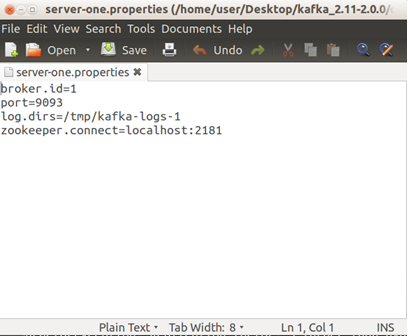
We already have Zookeeper and our single node started, so we just need to start the two new nodes
bin/Kafka-server-start.sh config/server-one.properties

Now create a new topic with a replication factor of three:
bin/Kafka-topics.sh –create –zookeeper localhost:2181 –replication-factor 2 –partitions 1 –topic Multibrokerapplication
bin/Kafka-topics.sh –describe –zookeeper localhost:2181 –topic Multibrokerapplication

bin/kafka-console-producer.sh –broker-list localhost:9092 –topic Multibrokerapplication
bin/kafka-console-consumer.sh –bootstrap-server localhost:9092 –from-beginning –topic Multibrokerapplication
Case 4: Deleting a Topic
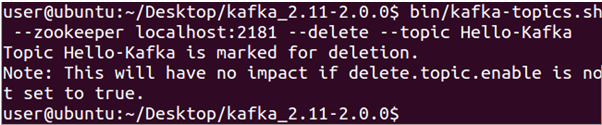
The live page shows three screenshots for this case but never actually gives the delete command itself. To delete a topic:
bin/kafka-topics.sh –>delete –>bootstrap-server localhost:9092 –>topic Multibrokerapplication
Note that topic deletion needs to be enabled on the broker, through the delete.topic.enable setting, which defaults to true in current Kafka versions. If a delete appears to do nothing, this setting is the first thing to check.


Common Mistakes to Avoid
- Using –zookeeper on a current Kafka install. It no longer exists as of Kafka 4.0. Use –bootstrap-server for every topic management command.
- Setting a replication factor higher than your number of running brokers. Kafka cannot replicate a topic across more brokers than actually exist, and will reject the request outright.
- Producing to one topic name and consuming from another. It sounds obvious written out, but a small typo in a topic name is one of the most common reasons a consumer appears to receive nothing.
Copying commands from an old tutorial or slide deck without checking the flags against your installed Kafka version. Kafka’s command line tools have changed meaningfully over the years, and a command that worked in an older training video may no longer work today.
That covers core Kafka use cases from a single producer and consumer through a replicated, multi broker topic. To go further, explore Prwatech’s Apache Spark training program, which includes placement assistance.
