Elasticsearch
What is Elasticsearch? A Beginner Introduction to the Elastic Stack
Think about the search box on a large shopping site. You type three misspelt words, and in a fraction of a second you get the right products, sorted by how well they match. A normal database table can do exact matches quickly, but it struggles with this kind of fuzzy, ranked text search over millions of rows. Elasticsearch exists to do it well.
Today it does more than product search. Teams use it to search documents, to read through server logs, to watch application performance and to find security threats. The same engine sits behind all of these, and a small group of tools around it collects the data and shows it on screens.
This page is the starting point for our Elasticsearch series. It explains what Elasticsearch is, how it finds results so fast, what it is used for, how Logstash, Kibana and the other tools fit around it, and where it is a poor choice. No installation is needed to follow it.
What is Elasticsearch?
Elasticsearch is a distributed search and analytics engine. The Elastic documentation also calls it a scalable data store and a vector database. It is built on Apache Lucene, a search library, and it was first released in 2010. You talk to it through a REST API, which means you send requests over HTTP and get answers back.
The company behind it is Elastic, which was earlier called Elasticsearch N.V. The docs say you can search, index, store and analyze data of all shapes and sizes in near real time. Near real time means that a new document becomes searchable after a short delay, not at the same instant.

Is It a NoSQL Database?
You will often see it called a NoSQL database, and the old version of this page said so. That is only partly useful. It does store data as JSON documents instead of rows in tables, which is the NoSQL style. But Elastic itself describes it as a search and analytics engine, and it is built for searching and counting, not for acting as the main store of a banking system. It is also not free of structure. Every index has a mapping that says what type each field has. Elasticsearch can create the mapping for you from the first document, but the mapping is still there. Our index configuration guide covers this.
Key Features
| Feature | What it means for you |
|---|---|
| Fast full text search | It breaks text into terms and looks them up in an inverted index, so results come back quickly even for large data |
| Near real time | New documents become searchable after a short delay, which is usually fine for logs and search pages |
| Distributed and scalable | Data is split into shards and spread across nodes. You add nodes to handle more data |
| Fault tolerant | Replica shards are copies. If a node fails, a copy on another node can serve the data |
| JSON and REST API | You send and read JSON over HTTP, so any language or a simple tool such as curl can use it |
| Many data types | Text, numbers, dates, locations and vectors, in structured or unstructured data |
| Language support | Text analysis can be set up for many languages, so searches match different word forms. You choose the analyzer for each field |
| Analytics | Aggregations count, group and average your data. See our aggregations guide |
How a Search Works in Simple Words?
When you add a document, Elasticsearch does not simply store the text. For text fields, the docs explain that it uses text analysis, which splits the text into tokens, and then builds an inverted index. An inverted index is like the index at the back of a book. Instead of reading every page to find a word, you look the word up and it tells you which pages hold it.
A search for the word helmet therefore does not scan every document. It looks up helmet in the index, gets the list of matching documents, and scores them so the best matches come first. That is why search stays fast as data grows.
Behind this sit the ideas covered in our basic concepts guide: documents live in indices, an index is split into shards, and shards have replicas. Come back to that page after this one.
What is Elasticsearch Used For?
The Elastic docs group the main uses into three areas.
| Area | Examples |
|---|---|
| Search | Full text search on a website, enterprise search over documents, geospatial search, vector, semantic and hybrid search, and retrieval for generative AI apps |
| Observability | Logs, metrics and traces, application performance monitoring and real user monitoring |
| Security | Security information and event management, endpoint security and threat hunting |
For a learner, the two easiest places to start are website search and log analysis. Both need only a few documents to practise on.
What is the Elastic Stack (ELK)?
Elasticsearch is the centre, but a real project also needs ways to get data in and to look at results. The Elastic Stack is the set of tools made for this. You may still hear the older name ELK stack, which stands for Elasticsearch, Logstash and Kibana. Newer docs also list Beats, Elastic Agent and Fleet.
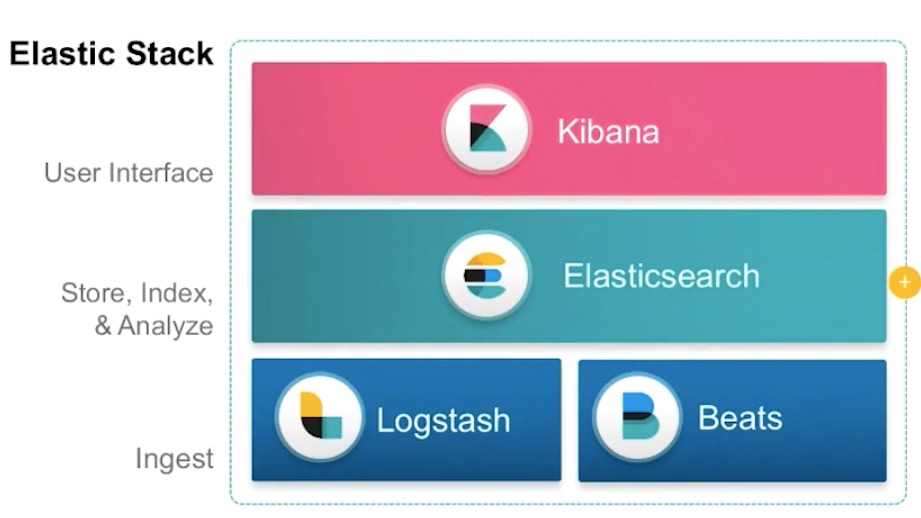
| Tool | Role |
|---|---|
| Elasticsearch | Stores and searches the data. You reach it through a REST API |
| Logstash | Collects data from many sources, changes it and sends it on to a place you choose, often Elasticsearch |
| Kibana | The web screen where you explore data, build charts and dashboards, and manage Elasticsearch. Dev Tools lives here |
| Beats | Light programs you install on servers. They ship logs, metrics and other data to Elasticsearch |
| Elastic Agent | One agent on a host that collects logs, metrics and other data, with integrations for new sources |
| Fleet | A central console to manage your Elastic Agents, their policies and upgrades |
The docs describe the flow in four steps: sources, ingest, store, consume. Data starts at your servers or apps. Elastic Agent, Beats or Logstash bring it in. Elasticsearch stores it. Kibana or a client program reads it back. For learning, you only need Elasticsearch and Kibana. Our Windows install guide sets up both.
Is Elasticsearch Open Source?
This is a fair question, because the answer changed. In August 2024, Elastic announced that it was adding the GNU Affero General Public License v3, called AGPL, as an option for the free Elasticsearch and Kibana source code. The Open Source Initiative approves AGPL as open source. The code is also available under the Server Side Public License 1.0 and the Elastic License 2.0. The client libraries stay under Apache 2.0.
In plain terms, you can learn and run it freely. If you plan to offer Elasticsearch as a service to others, or to change and distribute it, read the licence terms first or ask a lawyer. This is not legal advice.
When Elasticsearch is Not the Right Tool
This is my view from how the engine works, not a rule from Elastic. Think twice before using it in these cases.
- As the only copy of important records. It is built for search and analysis. Keep your system of record in a database made for transactions, and send a copy to Elasticsearch for search.
- For heavy joins across tables. Relational databases are made for that.
- For a very small dataset. If a few hundred rows need a simple filter, a normal database query is easier to run.
Where to Go Next?
- Read the basic concepts guide, to learn about nodes, indices, shards and replicas.
- Install Elasticsearch and Kibana on Windows with our install guide.
- Create an index and add documents with the index configuration and document API guides.
- Try searching with the Query DSL guide, then counting with the aggregations guide.
Elasticsearch is easy to understand once you see the pattern: data goes in as documents, an index makes search fast, and the other tools bring data in and show it back. Start with the installation and try a few requests of your own.
