Aggregations in ElasticSearch:
Aggregations in Elasticsearch: Types, Syntax and Examples
Aggregations are one of Elasticsearch’s most powerful features outside plain full-text search. They let you summarise and analyse data directly inside your index like group records, calculate statistics, and answer questions instead of scanning documents one by one.
Because Elasticsearch runs this across a distributed index rather than a single table, it computes aggregations far faster than a traditional RDBMS running the equivalent GROUP BY logic. That speed is a big reason Elasticsearch is used for big data analytics, not only search.
What is an “aggs” Query in Elasticsearch?
Every aggregation runs inside the aggs (short for aggregations) parameter of a search request. You give each aggregation a name, then define what it should compute, for example, grouping documents, calculating a metric, or both together in the same query.
Types of Aggregations in Elasticsearch
- Bucket aggregationsgroup documents into buckets based on field values, ranges or other criteria, the rough equivalent of SQL’s GROUP BY.
- Metric aggregationscompute a single statistic, such as avg, sum, min, max or count, from a numeric field.
- Pipeline aggregationsrun on the output of other aggregations rather than on raw documents, useful for things like moving averages or cumulative sums.
Most real queries combine a bucket aggregation with one or more metric aggregations, which is exactly what the three examples below show.
Example 1: Grouping Documents With a Bucket Aggregation
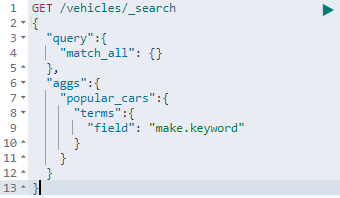
The query below defines a bucket aggregation named popular_cars inside the aggs component. It groups documents by the make field, so each distinct car make becomes its own bucket, with a count of how many documents fall into it.
Example 2: Running Multiple Aggregations Together
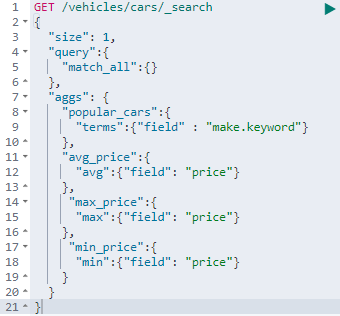
An aggs component isn’t limited to one aggregation. It can hold several, each independent of the others. In the example below, popular_cars (a bucket aggregation) runs alongside avg_price, max_price, and min_price, three separate metric aggregations, all inside the same request.
Example 3: Nesting an Aggregation Inside Another
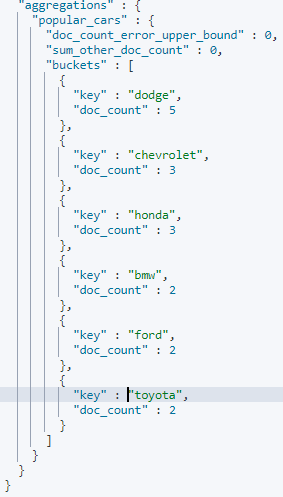
Aggregations can also be nested, so one runs inside the scope of another. Here, popular_cars still groups documents by make, but inside each bucket we add a second aggregation called stats_price using the stats clause. The stats aggregation returns the average, minimum, maximum, and sum of the price field, but scoped only to the documents inside that specific make’s bucket, not the whole index.
Why Aggregations Matter for Big Data Analytics?
Because bucket, metric, and pipeline aggregations can be combined and nested this way, a single Elasticsearch query can replace what would otherwise need several SQL queries plus application-side processing to group and summarise. That’s the main reason aggregations are why teams reach for Elasticsearch on large, fast-moving datasets.
This covers the core aggregation types and syntax in Elasticsearch. To go deeper into building full-scale search and analytics pipelines, explore Prwatech’s Big Data training program, which includes placement assistance.
