Install and Run Python on Windows
How to Install and Run Python on Windows, Mac and Ubuntu
Every Python programmer starts in the same place: a fresh computer with no Python on it, and a download page with more buttons than you expected. The install is easy, but one small step, ticking a single box on Windows, decides whether the next ten minutes go smoothly or end with the words “python is not recognized as an internal or external command”.
Python is free, and it runs on Windows, Mac and Linux. To write and run programs, you install the Python interpreter, which is the program that reads your code and carries it out. You then check that it works by opening a terminal and running a small program.
In this guide, we cover installing and running Python on Windows, Mac and Ubuntu, one system at a time. For Windows, we show both the new Python install manager and the traditional installer, including the PATH step that causes most problems. We then show how to check your version, run your first program, create a virtual environment, and fix the common errors. The first program and the virtual environment steps were run on Ubuntu 24.04, and the other steps follow the official Python documentation.
Python Installation on Windows, Ubuntu and Mac
The steps differ a little on each system, so pick the section that matches your computer.

Which Python Version Should You Install?
Python 3.15.0 is the newest release. The python.org release page marks it as stable, and gives 9 October 2026 as its release date. Older versions such as Python 3.6.7 no longer get security fixes, so do not use them.
Take the latest version unless a course or a company tells you otherwise. Some libraries take a few months to support a brand new version, so if something does not install, Python 3.14 is a safe fallback. Python 2 is long gone, and nothing in this guide applies to it.
| System | What you need |
|---|---|
| Windows | Windows 10 or newer for Python 3.15. Windows 8.1 can use Python 3.12, and Windows 7 can use Python 3.8 |
| Mac | The installer supports macOS 10.15 and later, on both Intel and Apple Silicon Macs |
| Ubuntu | Python usually comes preinstalled. Ubuntu 24.04 ships Python 3.12 |
How to Install Python on Windows
There are two ways. The Python install manager is the one the official docs recommend now. The traditional installer still works for Python 3.15, although it is deprecated. Pick one.
Option 1: Python Install Manager (Recommended)
- Open the Python downloads page on the python.org website, and download the Python install manager. You can also get it from the Microsoft Store, and the official docs say the two are identical.
- Run the file you downloaded and choose Install. From the Store, click Install.
- The first time you install a Python version, you may be asked to add a folder to your PATH. This is optional. If you want to type
pythonin a terminal, say yes. - Open a terminal, either the Command Prompt or PowerShell, and type
python. If you see the version and a prompt that looks like three arrow signs, Python works.
To see which versions the manager has installed, run py list in the terminal. The manager can also install a version for you, with a command such as py install 3.15.
Option 2: The Traditional Installer
Use this if you prefer the classic installer, or you are following a course that uses it. The screenshots below come from an older Python installer, so your screens may look a little different, but the steps are the same.
Step 1: Run the Installer
Download the Windows installer from the downloads page. Choose the 64 bit installer for any modern computer. Double click the file you downloaded. The first screen offers two choices: Install Now, and Customize installation. Install Now is the simple choice. It does not need administrator rights, and it installs Python in your own user folder. Choose Customize installation if you want to see the options, as in the next steps.

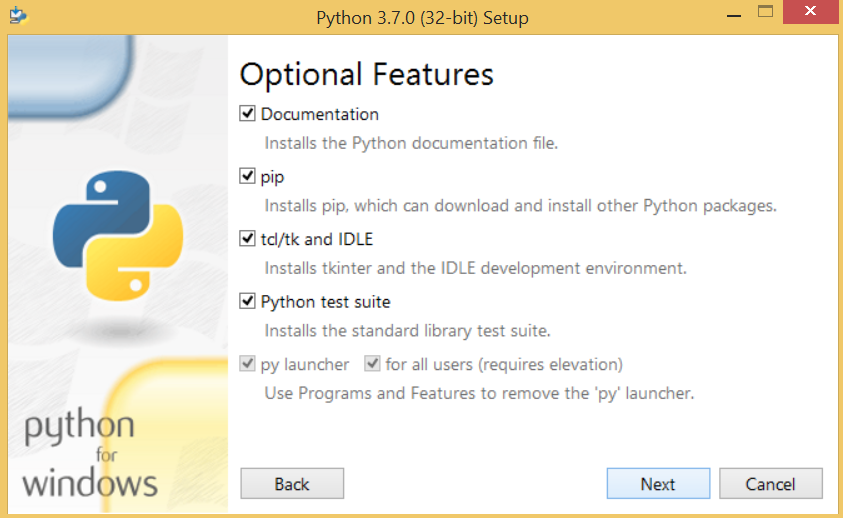
Step 2: Optional Features
If you chose Customize, the next screen lists the optional features. These include the documentation, pip (the package installer), IDLE (a simple editor) and the py launcher. They are optional, but the default selection is good, and you should leave it as it is. Click Next.
Step 3: Advanced Options and the PATH Box
The next screen lists advanced options. This is where the biggest beginner problem is solved. Make sure the box named Add python.exe to PATH is ticked. On some versions it is on the first screen, and on others it is on this one. The wording can differ a little.
You do not need to tick install for all users. That option needs administrator rights and puts Python in the Program Files folder. A normal single user install is fine for learning.

Step 4: Install
Click Install, and wait. When it finishes, you see a message that setup was successful. Click Close.

Step 5: Try Python in the Command Prompt
Open the Command Prompt. Press the Windows key, type cmd, and press Enter. Then type the command below and press Enter.
Your version number will match the one you installed. If you see it, you are done, and you can skip to the section on running your first program. If you see this error instead, the PATH box was not ticked:
This means Windows does not know where Python is, because the path was not set. The fix is in the next steps, and it is the same whichever install method you used.

Step 6: Open the Environment Variables Window
To add Python to the PATH by hand, open the Windows search box, type environment variables, and choose Edit the system environment variables. In the window that opens, click the Environment Variables button.


Step 7: Edit the Path Variable
In the top part of the window, called User variables, look for a variable named Path. It almost always exists already. Select it and click Edit. Do not make a new variable named PATH. Adding a new one can hide or break the old one. Instead, add new lines to the existing list.

Step 8: Add the Python Folders
Click New, and add the folder where Python is installed. Click New again, and add its Scripts folder, which holds tools such as pip. With the Install Now option, the folders are usually inside your user folder, in AppData, Local, Programs, Python. The exact name depends on your version, so the safest way is to look for yourself in File Explorer, find the folder that holds python.exe, and copy its address from the address bar. Then click OK on every window.
These are examples. Replace YourName and the version number with your own.

Step 9: Restart the Command Prompt and Test
Close every Command Prompt window, and open a new one. An already open window does not see the change. Then run:
Both should show the version. The second one uses the py launcher, which is installed with Python and works even when PATH is not set. If you type python and it opens the Microsoft Store, that is a Windows shortcut, and not Python. Use py instead, or turn off the shortcut in the Windows settings for app execution aliases.

How to Install Python on Mac
Newer Macs come with a Python 3 that Apple uses for its own tools. The official docs say to never change or delete that copy. Install your own from python.org, and the two live side by side.
- Open the macOS downloads page on python.org, and download the latest installer, a file that ends in
.pkg. One installer works on both Intel and Apple Silicon Macs. - Double click the file and follow the steps. You need an administrator account on the Mac.
- When it ends, open the Python folder inside Applications. Double click
Install Certificates.command. This opens a Terminal window and installs the certificates Python needs to download things safely. Wait for the message that says it is complete. Many guides skip this step, and it is the reason for the common SSL error that readers hit later. - Open Terminal, and type the command below. The command on a Mac is
python3, notpython.
Homebrew is another way to install Python on a Mac, using the command brew install python. It is not maintained by the Python team, so the python.org installer is the safest choice for a beginner. The python.org page also warns that IDLE and some other programs that use Tk windows can hang on a very new macOS release, so read the notes on the download page.
How to Install Python on Ubuntu
Ubuntu already includes Python 3, so first check what you have.
If you see a version, Python is installed. Ubuntu 24.04 ships Python 3.12. To install Python and the two helper packages you will need, run the commands below. The first line refreshes the package list, and the second installs Python, pip for packages, and venv for virtual environments.
On Ubuntu, the command is python3. If you type only python, you may see a command not found message, because Ubuntu does not add that name by default.
Need a Newer Version on Ubuntu?
The version in Ubuntu is usually older than the newest release. A common way to get a newer one is the deadsnakes repository, which is run by volunteers and is not an official Python source, so check that you are comfortable with it. Another way is to build Python from the source code, in which case you must run make altinstall and not make install. The second command can overwrite the Python that Ubuntu uses for its own tools, and break things.
Replace 3.12 with the version you want. If the editor named IDLE is missing, install it with sudo apt install idle.
Run Your First Python Program
Installing is only half the job. Prove that it works by running a program. Open any text editor, type the program below, and save it as hello.py.
Open the terminal in the folder where you saved the file. On Windows, use py or python. On Mac and Ubuntu, use python3.
The name Asha is what we typed at the question. If you see your own name in the last lines, Python is working.
The Interactive Shell
You can also type Python commands one at a time. Type python (or python3), and press Enter. You will see a prompt with three arrow signs. Type a line and press Enter, and Python answers at once. To leave, type exit() and press Enter.
IDLE
IDLE is a simple editor that comes with Python on Windows and Mac. Search for it in the Start menu, or open it from the Python folder in Applications. It is enough for your first scripts. Later, try a full editor, such as VS Code or PyCharm.
Create a Virtual Environment
A virtual environment is a private copy of Python for one project, so the packages for one project do not clash with another. It is a good habit from day one. These commands create one, turn it on, and check that it is active. The check printed True when we ran it.
On Windows, the same idea uses two different lines, with py in place of python3, and with the activate script in the Scripts folder.
When the environment is active, its name appears at the start of your prompt. Type deactivate to leave it.
Common Problems and Fixes
| Problem | What to try |
|---|---|
| python is not recognized as an internal or external command | PATH is not set. Reinstall with the PATH box ticked, or add the folders by hand as in steps 6 to 8. Then open a new Command Prompt |
| Typing python opens the Microsoft Store | Python is not installed, or the Store shortcut comes first. Install Python, or use the py command |
| python3: command not found on Windows | On Windows the command is python or py. The name python3 is for Mac and Linux |
| python: command not found on Ubuntu | Use python3, or install the package named python-is-python3 |
| The version is not the one I installed | Another Python comes earlier in the PATH, or on Mac you are using the Apple copy. Check with where python on Windows, or which python3 on Mac and Ubuntu |
| pip is not recognized | Run it through Python instead, with python -m pip install package_name |
| An SSL certificate error on Mac | Run Install Certificates.command in the Python folder in Applications |
| The installer fails on an old Windows | Python 3.15 needs Windows 10 or newer. Use Python 3.12 on Windows 8.1, or Python 3.8 on Windows 7 |
Common Mistakes When Installing Python
- Not ticking the PATH box. It is the cause of most installation problems on Windows.
- Installing an old version. Python 3.6 and 3.7 are no longer supported.
- Making a new PATH variable. Edit the Path that exists, and add lines to it.
- Testing in an old window. Close the Command Prompt and open a new one after changing the PATH.
- Deleting or changing Apple’s Python on a Mac. Install your own, and leave Apple’s alone.
- Using make install on Ubuntu. Use make altinstall when building from source.
- Installing packages without a virtual environment. Make one for every project.
Python Tutorial for Beginners
Once Python is installed and running, the best next step is to write real code. A video can help you see the whole flow.
Installing Python comes down to three things: take a current version, make sure the system can find it, and run a small program to prove it. Tick the PATH box on Windows, run the certificates step on a Mac, and use python3 on Ubuntu. Once the four lines of output from hello.py appear, you are ready to start learning. Next, set up an editor such as PyCharm, and move on to Python variables and data types.
