☰

Python Pandas Tutorial

Python Pandas Tutorial for Beginners: Series, DataFrames and Real Examples

A marks sheet, a sales report, a list of customers. Most of the data you meet at work sits in rows and columns. Pandas is the Python library that handles such tables the way a spreadsheet would, but with code that you can repeat, test and share. Cleaning a column, joining two tables or finding the average by group takes one line.

Pandas is the most used Python library for data analysis. It builds on NumPy, and libraries such as Matplotlib, Seaborn and scikit learn work with its tables directly. Learn pandas well, and you can read a file, fix it, summarise it and prepare it for a chart or a model.

This tutorial takes you from installation to real work. We cover the two main structures, Series and DataFrame, then summary statistics, loops, text methods, window functions, SQL style queries and joins. We also look at missing data, and at what changed in pandas 3.0, which affects code written in older tutorials. Every example was run on pandas 3.0.5, and the output you see is the real output.

What is Pandas in Python?

Pandas is a free, open source Python library for working with data. It was started by Wes McKinney in 2008, while he was a researcher at AQR Capital Management, and was released as open source in 2009. The name comes from panel data, a term from economics for data that follows the same things over time. It is also a play on Python data analysis.

Pandas helps you do five main jobs with data: load it, clean it, change its shape, explore it and prepare it for modelling. It is used in finance, economics, science, marketing and many other fields.

Features of Pandas

  • Loading data from CSV, Excel, SQL databases, JSON and more.
  • Handling missing data with simple methods to find, fill or drop it.
  • Reshaping data with pivot, merge and concat.
  • Selecting data by label or by position.
  • Adding and removing columns in one line.
  • Grouping data with groupby, to count, add or average by category.
  • Time series tools such as rolling averages and date ranges.

How to Install Pandas

One command works on Windows, Mac and Linux. Open a terminal, or Command Prompt on Windows, and run:

terminal
pip install pandas

If pip is not found, use python3 or py before it, as in python -m pip install pandas. Then check the version:

python
import pandas as pd
import numpy as np

print(pd.__version__)
output
3.0.5

Your version may be a little different. The pandas 3.0 release notes say pandas 3 supports Python 3.11 and higher, and needs NumPy 1.26 or later. If you use PyCharm, you can also install it from File, then Settings, then your project, then Python Interpreter, and the plus button. The standard short name for pandas is pd, and everybody expects it.

Data Structures in Pandas

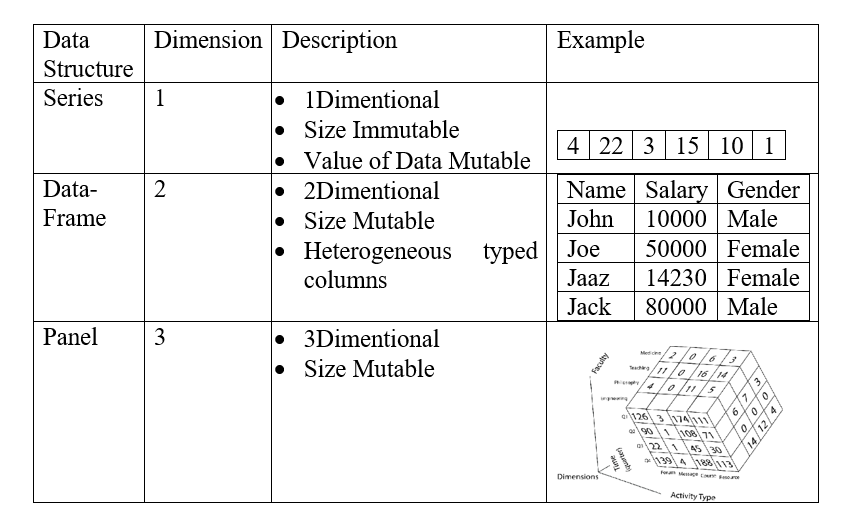
Pandas has two main data structures. A Series is one column of labelled values. A DataFrame is a table of rows and columns, and each column is a Series. Older tutorials also list Panel as a third structure, but Panel is gone, and we explain that below.

Python Pandas Tutorial for Beginners

Mutability

The values inside both a Series and a DataFrame can be changed. A DataFrame can also grow, because you can add and remove columns. For a Series, treat the size as fixed, and build a new one with pd.concat if you need more items.

Series in Pandas

A Series is a one dimensional labelled array. Each value has a label, called the index. If you do not give labels, pandas uses 0, 1, 2 and so on. The syntax is pd.Series(data, index, dtype, copy).

Create a Series From a List

python
marks = pd.Series([72, 88, 91, 65])
print(marks)
output
0    72
1    88
2    91
3    65
dtype: int64

The left column is the index, and the right column is the values. The last line shows the data type, int64.

Give the Index Your Own Labels

python
marks = pd.Series([72, 88, 91, 65], index=["Asha", "Ravi", "Meena", "Kabir"])
print(marks)
print(marks["Ravi"])
print(marks.iloc[2])
output
Asha     72
Ravi     88
Meena    91
Kabir    65
dtype: int64
88
91

Create a Series From a NumPy Array

Pass the array to pd.Series. Use brackets in print(s), because Python 3 needs them.

python
a = np.array([1, 4, 5, 6, 7])
s = pd.Series(a)
print(s)
output
0    1
1    4
2    5
3    6
4    7
dtype: int64

Create a Series From a Dictionary

The keys become the index. The order of the dictionary is kept, and the keys are not sorted.

python
d = {"a": "add", "s": "sub", "d": "dvd"}
s = pd.Series(d)
print(s)
output
a    add
s    sub
d    dvd
dtype: str

Create a Series From a Single Value

A single value is repeated to match the index.

python
s = pd.Series(4, index=[0, 1, 2])
print(s)
output
0    4
1    4
2    4
dtype: int64

Access Data in a Series by Position

python
s = pd.Series([1, 4, 5, 6, 7])
print(s[2])
print(s.iloc[2])
output
5
5

Here the labels and the positions are the same, so both lines give 5. When the labels are words, as in the marks example, use .iloc to be sure that you mean position, and use the label for the name.

DataFrames in Pandas

A DataFrame is a two dimensional table. Each column can hold a different type. The syntax is pd.DataFrame(data, index, columns, dtype, copy). Note that the argument is columns with an s, and that the NumPy function for a range of numbers is np.arange.

Create a DataFrame From a List

Pass the list, and name the column:

python
data = [9, 2, 3, 4, 5]
df1 = pd.DataFrame(data, columns=["value"])
print(df1)
output
   value
0      9
1      2
2      3
3      4
4      5

Create a DataFrame From a Dictionary

This is the most common way. Each key is a column name, and each value is a list. A dictionary of single values fails:

python
pd.DataFrame({"a": "add", "s": "sub", "d": "dvd"})
output
ValueError: If using all scalar values, you must pass an index

Use lists as the values, and pandas builds the table.

python
df = pd.DataFrame({
    "name": ["Asha", "Ravi", "Meena", "Kabir"],
    "course": ["Python", "SQL", "Python", "Excel"],
    "marks": [72, 88, 91, 65],
})
print(df)
output
    name  course  marks
0   Asha  Python     72
1   Ravi     SQL     88
2  Meena  Python     91
3  Kabir   Excel     65

You can also build a table from a list of dictionaries, where each dictionary is one row.

python
rows = [
    {"name": "Asha", "marks": 72},
    {"name": "Ravi", "marks": 88},
]
print(pd.DataFrame(rows))
output
   name  marks
0  Asha     72
1  Ravi     88

Create a DataFrame From Series

A dictionary of Series works well, and the rows are matched by their index labels. Where a label is missing, pandas fills it with NaN.

python
d = {
    "one": pd.Series([2, 3, 4], index=["a", "b", "c"]),
    "two": pd.Series([2, 3, 4, 5], index=["a", "b", "c", "d"]),
}
dfs = pd.DataFrame(d)
print(dfs)
output
   one  two
a  2.0    2
b  3.0    3
c  4.0    4
d  NaN    5

Create a DataFrame From a NumPy Array

Pass a real NumPy array, with a list of column names:

python
arr = np.array([[1, 2, 3], [4, 5, 6]])
print(pd.DataFrame(arr, columns=["x", "y", "z"]))
output
   x  y  z
0  1  2  3
1  4  5  6

Create a DataFrame From Another DataFrame

To build one from another, pass it in. By default the data is not shared in pandas 3.0 because of copy on write, which we explain at the end.

python
copy_df = pd.DataFrame(df)
print(copy_df.equals(df))
output
True

Add a Column

Assign a Series to a new column name, or use existing columns. The rows are matched by index label, so the missing label d gets NaN.

python
dfs["three"] = pd.Series([100, 200, 300], index=["a", "b", "c"])
print(dfs)
dfs["four"] = dfs["one"] + dfs["three"]
print(dfs)
output
   one  two  three
a  2.0    2  100.0
b  3.0    3  200.0
c  4.0    4  300.0
d  NaN    5    NaN
   one  two  three   four
a  2.0    2  100.0  102.0
b  3.0    3  200.0  203.0
c  4.0    4  300.0  304.0
d  NaN    5    NaN    NaN

Delete a Column

There are three ways. del is a statement, and pop is a method that also gives back the column. The method drop is worth knowing too, because it gives you a new table and leaves the old one as it is.

python
del dfs["one"]
print(dfs)
popped = dfs.pop("two")
print(popped)
print(dfs)
print(dfs.drop(columns=["four"]))
output
   two  three   four
a    2  100.0  102.0
b    3  200.0  203.0
c    4  300.0  304.0
d    5    NaN    NaN
a    2
b    3
c    4
d    5
Name: two, dtype: int64
   three   four
a  100.0  102.0
b  200.0  203.0
c  300.0  304.0
d    NaN    NaN
   three
a  100.0
b  200.0
c  300.0
d    NaN

What Happened to Panel?

Panel was a three dimensional container with items, major axis and minor axis. It was deprecated in pandas 0.20 and removed in 0.25. On current pandas it does not exist, so any code that uses it fails:

python
pd.Panel(np.random.rand(2, 3, 4))
output
AttributeError: module 'pandas' has no attribute 'Panel'

For data with more than two dimensions, use a DataFrame with a MultiIndex, or the xarray library.

Series Basic Functions

These attributes and methods tell you about a Series. They run on a fixed Series, so that you can compare your result.

python
s = pd.Series([10, 20, 30, 40, 50, 60, 70, 80, 90])
print(s.axes)
print(s.empty)
print(s.ndim)
print(s.size)
print(s.values)
print(s.head(3))
print(s.tail(3))
output
[RangeIndex(start=0, stop=9, step=1)]
False
1
9
[10 20 30 40 50 60 70 80 90]
0    10
1    20
2    30
dtype: int64
6    70
7    80
8    90
dtype: int64
Series attributes and methods
Name What it gives
axes The list of row labels
empty True if the Series has no items
ndim The number of dimensions, always 1 for a Series
size The number of items
values The items as a NumPy array
head(n) The first n items
tail(n) The last n items

Basic DataFrame Functions

These work on a DataFrame. A plain dictionary has none of them, and gives this error:

python
data = {"Name": ["Tom", "Dick", "Harry"], "Age": [20, 21, 19]}
data.T
output
AttributeError: 'dict' object has no attribute 'T'

Wrap the dictionary in pd.DataFrame first, and write axes with an s:

python
data = {"Name": ["Tom", "Dick", "Harry"], "Age": [20, 21, 19]}
people = pd.DataFrame(data)
print(people.T)
print(people.axes)
print(people.dtypes)
print(people.empty)
print(people.ndim)
print(people.shape)
print(people.size)
print(people.values)
print(people.head(2))
print(people.tail(2))
output
        0     1      2
Name  Tom  Dick  Harry
Age    20    21     19
[RangeIndex(start=0, stop=3, step=1), Index(['Name', 'Age'], dtype='str')]
Name      str
Age     int64
dtype: object
False
2
(3, 2)
6
[['Tom' 20]
 ['Dick' 21]
 ['Harry' 19]]
   Name  Age
0   Tom   20
1  Dick   21
    Name  Age
1   Dick   21
2  Harry   19
DataFrame attributes and methods
Name What it gives
T The table flipped, so rows become columns
axes The row labels and the column labels
dtypes The data type of each column
empty True if the table has no data
ndim The number of dimensions, 2 for a table
shape The number of rows and columns
size The number of cells
values The data as a NumPy array
head(n) and tail(n) The first or last n rows

In pandas 3.0, the Name column shows the type str. Older versions showed object. We explain this at the end.

Descriptive Statistics in Pandas

Here is a table of names, ages and ratings for 12 people. Twelve summary methods follow.

python
stats = pd.DataFrame({
    "Name": ["Tomy", "Jimy", "Ricky", "Viny", "Steven", "Smithen",
             "Jacky", "Lee", "Dravid", "Gaspery", "Betin", "Andru"],
    "Age": [22, 23, 26, 21, 30, 29, 23, 34, 40, 30, 51, 46],
    "Rating": [5.23, 3.44, 3.95, 2.66, 4.20, 4.6, 6.8, 1.78, 3.98, 4.80, 4.10, 3.65],
})
print(stats.head())
output
     Name  Age  Rating
0    Tomy   22    5.23
1    Jimy   23    3.44
2   Ricky   26    3.95
3    Viny   21    2.66
4  Steven   30    4.20

Many of these methods work only on numbers. On a table with a text column, they give an error on current pandas:

python
stats.mean()
output
TypeError: Cannot perform reduction 'mean' with string dtype

There are two fixes. Pick the number columns first, or use numeric_only=True. Here are the twelve methods on the number columns:

python
num = stats[["Age", "Rating"]]
print(num.count())
print(num.sum())
print(num.mean())
print(num.median())
print(num.mode())
print(num.std().round(3))
print(num.min())
print(num.max())
print(num.prod())
print(num.cumsum().head(3))
print(num.cumprod().head(3))
output
Age       12
Rating    12
dtype: int64
Age       375.00
Rating     49.19
dtype: float64
Age       31.250000
Rating     4.099167
dtype: float64
Age       29.50
Rating     4.04
dtype: float64
     Age  Rating
0   23.0    1.78
1   30.0    2.66
2    NaN    3.44
3    NaN    3.65
4    NaN    3.95
5    NaN    3.98
6    NaN    4.10
7    NaN    4.20
8    NaN    4.60
9    NaN    4.80
10   NaN    5.23
11   NaN    6.80
Age       9.790
Rating    1.259
dtype: float64
Age       21.00
Rating     1.78
dtype: float64
Age       51.0
Rating     6.8
dtype: float64
Age       5.291495e+17
Rating    1.263793e+07
dtype: float64
   Age  Rating
0   22    5.23
1   45    8.67
2   71   12.62
     Age    Rating
0     22   5.23000
1    506  17.99120
2  13156  71.06524
Summary methods
Method What it gives
count How many values are not missing
sum The total
mean The average
median The middle value
mode The most common value. It can give more than one
std The standard deviation, a measure of spread
min and max The smallest and the largest value
prod The product of all values
cumsum and cumprod The running total and the running product

The method abs gives the absolute value, and it works on numbers only. Skip it for a table with text.

For a quick summary of every number column, use describe:

python
print(stats.mean(numeric_only=True))
print(stats.describe().round(2))
output
Age       31.250000
Rating     4.099167
dtype: float64
         Age  Rating
count  12.00   12.00
mean   31.25    4.10
std     9.79    1.26
min    21.00    1.78
25%    23.00    3.60
50%    29.50    4.04
75%    35.50    4.65
max    51.00    6.80

Iterating Over a Pandas Table

Iterating over a Series gives its values. Iterating over a DataFrame gives the column names. Loops over rows are usually slow, so use them only for small tables, or when you cannot do the job with a built in method. The three methods are items, iterrows and itertuples.

items

This goes column by column. The older name iteritems was removed in pandas 2.0, and gives this error now:

python
stats.iteritems()
output
AttributeError: 'DataFrame' object has no attribute 'iteritems'

Use items instead:

python
for col, values in stats.head(3).items():
    print(col, list(values))
output
Name ['Tomy', 'Jimy', 'Ricky']
Age [22, 23, 26]
Rating [5.23, 3.44, 3.95]

iterrows

This goes row by row, and gives the index and the row. Mind the spelling, iterrows with an s.

python
for index, row in stats.head(3).iterrows():
    print(index, row["Name"], row["Age"])
output
0 Tomy 22
1 Jimy 23
2 Ricky 26

itertuples

This is faster than iterrows, and gives each row as a named tuple.

python
for row in stats.head(3).itertuples():
    print(row)
output
Pandas(Index=0, Name='Tomy', Age=22, Rating=5.23)
Pandas(Index=1, Name='Jimy', Age=23, Rating=3.44)
Pandas(Index=2, Name='Ricky', Age=26, Rating=3.95)

Working With Text in Pandas

Pandas has string methods that work on a whole column at once. They sit behind the str accessor, and they skip missing values. Here is a Series with one missing value and one number in quotes:

python
s = pd.Series(["Tom", "Dick", "Harry", "Allen", np.nan, "6234", "SteveJobs"])
print(s)
output
0          Tom
1         Dick
2        Harry
3        Allen
4          NaN
5         6234
6    SteveJobs
dtype: str

Note the last line. In pandas 3.0 the type is str. In older versions, you would see object. Now the common methods:

python
print(s.str.lower().tolist())
print(s.str.upper().tolist())
print(s.str.len().tolist())
output
['tom', 'dick', 'harry', 'allen', nan, '6234', 'stevejobs']
['TOM', 'DICK', 'HARRY', 'ALLEN', nan, '6234', 'STEVEJOBS']
[3.0, 4.0, 5.0, 5.0, nan, 4.0, 9.0]

The missing value gives NaN in the length result, and stays missing in the case methods. A few more methods on a cleaner Series:

python
t = pd.Series(["  Tom ", "Dick Smith", "harry@mail.com"])
print(t.str.strip().tolist())
print(t.str.split(" ").tolist())
print(t.str.contains("@").tolist())
print(t.str.replace("@", "$").tolist())
print(t.str.repeat(2).tolist())
print(t.str.count("i").tolist())
print(t.str.startswith("D").tolist())
print(t.str.endswith("m").tolist())
print(t.str.find("a").tolist())
print(t.str.swapcase().tolist())
print(t.str.islower().tolist())
print(pd.Series(["6234", "abc"]).str.isnumeric().tolist())
print(pd.Series(["a", "b", "c"]).str.cat(sep="-"))
output
['Tom', 'Dick Smith', 'harry@mail.com']
[['', '', 'Tom', ''], ['Dick', 'Smith'], ['harry@mail.com']]
[False, False, True]
['  Tom ', 'Dick Smith', 'harry$mail.com']
['  Tom   Tom ', 'Dick SmithDick Smith', 'harry@mail.comharry@mail.com']
[0, 2, 1]
[False, True, False]
[False, False, True]
[-1, -1, 1]
['  tOM ', 'dICK sMITH', 'HARRY@MAIL.COM']
[False, False, True]
[True, False]
a-b-c

A few points that trip up beginners:

  • contains needs a pattern, such as contains("@").
  • swapcase needs brackets, as in swapcase(). Without them you get the method, and not the result.
  • isupper checks if the text is in capitals, and upper changes it. They are not the same.
  • The method is isnumeric. A method called numeric does not exist.
  • cat joins the items with the separator that you give. If you give none, it joins them with no space.

The wrong name gives this error:

python
s.str.numeric()
output
AttributeError: 'StringMethods' object has no attribute 'numeric'

The method get_dummies turns a text column that has several tags in one cell into a table of ones and zeros. It needs a separator in the text, and does not work on free text. Here is an example with a vertical bar as the separator:

python
print(pd.Series(["a|b", "a", "b|c"]).str.get_dummies())
output
   a  b  c
0  1  1  0
1  1  0  0
2  0  1  1

Window Functions in Pandas

Window functions smooth data, and make trends easier to see. They are common in time series, such as daily sales or prices. The number of rows must match the number of dates. If it does not, pandas stops with an error:

python
np.random.seed(1)
pd.DataFrame(np.random.randn(10, 4), index=pd.date_range("2026-02-02", periods=5), columns=["W", "X", "Y", "Z"])
output
ValueError: Shape of passed values is (10, 4), indices imply (5, 4)

Random numbers also change from one run to another unless you set a seed. Here the data is fixed, with 6 rows and 6 dates, so that you can match every number.

python
dates = pd.date_range("2026-02-02", periods=6)
w = pd.DataFrame(
    {"W": [10, 12, 11, 15, 14, 18], "X": [5, 6, 8, 7, 9, 10]},
    index=dates,
)
print(w)
output
             W   X
2026-02-02  10   5
2026-02-03  12   6
2026-02-04  11   8
2026-02-05  15   7
2026-02-06  14   9
2026-02-07  18  10

rolling

Rolling takes a moving window of a set size. With window=4 each result is the mean of the current and the three rows before it, which is four values. The first three rows are NaN, because there are not yet four values.

python
print(w.rolling(window=4).mean())
output
               W    X
2026-02-02   NaN  NaN
2026-02-03   NaN  NaN
2026-02-04   NaN  NaN
2026-02-05  12.0  6.5
2026-02-06  13.0  7.5
2026-02-07  14.5  8.5

Check the first number by hand. The mean of 10, 12, 11 and 15 is 12.0, which matches.

expanding

Expanding takes all rows from the start up to the current row. With min_periods=3 it starts giving results at the third row.

python
print(w.expanding(min_periods=3).mean().round(3))
output
                 W      X
2026-02-02     NaN    NaN
2026-02-03     NaN    NaN
2026-02-04  11.000  6.333
2026-02-05  12.000  6.500
2026-02-06  12.400  7.000
2026-02-07  13.333  7.500

Check the third row. The mean of 10, 12 and 11 is 11.0, which matches.

ewm

Ewm is the exponentially weighted mean. Recent rows get more weight than old ones. The setting com=0.5 sets how fast the weight falls off.

python
print(w.ewm(com=0.5).mean().round(3))
output
                 W      X
2026-02-02  10.000  5.000
2026-02-03  11.500  5.750
2026-02-04  11.154  7.308
2026-02-05  13.750  7.100
2026-02-06  13.917  8.372
2026-02-07  16.643  9.459

Using SQL Style Queries in Pandas

If you know SQL, many pandas jobs will look familiar. To keep the code simple and make it run anywhere, here is a small table with the same columns as the well known tips dataset.

python
tips = pd.DataFrame({
    "total_bill": [16.99, 10.34, 21.01, 23.68, 24.59, 25.29, 8.77, 26.88],
    "tip": [1.01, 1.66, 3.50, 3.31, 3.61, 4.71, 2.00, 3.12],
    "sex": ["Female", "Male", "Male", "Male", "Female", "Male", "Male", "Male"],
    "smoker": ["No", "No", "No", "No", "No", "No", "No", "Yes"],
    "time": ["Dinner", "Dinner", "Dinner", "Lunch", "Dinner", "Lunch", "Dinner", "Dinner"],
})
print(tips.head())
output
   total_bill   tip     sex smoker    time
0       16.99  1.01  Female     No  Dinner
1       10.34  1.66    Male     No  Dinner
2       21.01  3.50    Male     No  Dinner
3       23.68  3.31    Male     No   Lunch
4       24.59  3.61  Female     No  Dinner
SQL ideas and pandas code
SQL idea Pandas code
SELECT columns tips[[“total_bill”, “tip”]]
WHERE tips[tips[“time”] == “Dinner”]
GROUP BY with COUNT tips.groupby(“sex”).size()
TOP N rows tips.nlargest(3, “tip”)

SELECT

python
print(tips[["total_bill", "tip", "smoker", "time"]].head(5))
output
   total_bill   tip smoker    time
0       16.99  1.01     No  Dinner
1       10.34  1.66     No  Dinner
2       21.01  3.50     No  Dinner
3       23.68  3.31     No   Lunch
4       24.59  3.61     No  Dinner

WHERE

python
print(tips[tips["time"] == "Dinner"].head(5))
output
   total_bill   tip     sex smoker    time
0       16.99  1.01  Female     No  Dinner
1       10.34  1.66    Male     No  Dinner
2       21.01  3.50    Male     No  Dinner
4       24.59  3.61  Female     No  Dinner
6        8.77  2.00    Male     No  Dinner

GROUP BY

The size method counts the rows in each group, and the second line takes the mean of one column.

python
print(tips.groupby("sex").size())
print(tips.groupby("sex")["tip"].mean().round(2))
output
sex
Female    2
Male      6
dtype: int64
sex
Female    2.31
Male      3.05
Name: tip, dtype: float64

TOP N

python
print(tips.nlargest(3, "tip"))
output
   total_bill   tip     sex smoker    time
5       25.29  4.71    Male     No   Lunch
4       24.59  3.61  Female     No  Dinner
2       21.01  3.50    Male     No  Dinner

Reading a CSV File

In real work, the table comes from a file. The method is read_csv. Here the file text is held in memory, so that you can run it without a file. With a real file, pass its name, as in pd.read_csv("marks.csv").

python
from io import StringIO

csv_text = "name,marks\nAsha,72\nRavi,88\nMeena,91\n"
print(pd.read_csv(StringIO(csv_text)))
output
    name  marks
0   Asha     72
1   Ravi     88
2  Meena     91

SQL Joins in Pandas With merge

The function merge joins two tables on a shared column, just like a SQL join. Here are two tables with five rows each, joined on subject_id.

python
left = pd.DataFrame({
    "id": [1, 2, 3, 4, 5],
    "Name": ["Ali", "Any", "Amen", "Arik", "Amy"],
    "subject_id": ["sub1", "sub2", "sub4", "sub6", "sub5"],
})
right = pd.DataFrame({
    "id": [1, 2, 3, 4, 5],
    "Name": ["Bil", "Briany", "Bany", "Brycy", "Betten"],
    "subject_id": ["sub2", "sub4", "sub3", "sub6", "sub5"],
})

Inner Join

Keeps only the rows that have a match in both tables.

python
print(pd.merge(left, right, on="subject_id", how="inner"))
output
   id_x Name_x subject_id  id_y  Name_y
0     2    Any       sub2     1     Bil
1     3   Amen       sub4     2  Briany
2     4   Arik       sub6     4   Brycy
3     5    Amy       sub5     5  Betten

Left Join

Keeps every row of the left table. Where there is no match, the right side shows NaN.

python
print(pd.merge(left, right, on="subject_id", how="left"))
output
   id_x Name_x subject_id  id_y  Name_y
0     1    Ali       sub1   NaN     NaN
1     2    Any       sub2   1.0     Bil
2     3   Amen       sub4   2.0  Briany
3     4   Arik       sub6   4.0   Brycy
4     5    Amy       sub5   5.0  Betten

Right Join

Keeps every row of the right table.

python
print(pd.merge(left, right, on="subject_id", how="right"))
output
   id_x Name_x subject_id  id_y  Name_y
0   2.0    Any       sub2     1     Bil
1   3.0   Amen       sub4     2  Briany
2   NaN    NaN       sub3     3    Bany
3   4.0   Arik       sub6     4   Brycy
4   5.0    Amy       sub5     5  Betten

Outer Join

Keeps all rows from both tables.

python
print(pd.merge(left, right, on="subject_id", how="outer"))
output
   id_x Name_x subject_id  id_y  Name_y
0   1.0    Ali       sub1   NaN     NaN
1   2.0    Any       sub2   1.0     Bil
2   NaN    NaN       sub3   3.0    Bany
3   3.0   Amen       sub4   2.0  Briany
4   5.0    Amy       sub5   5.0  Betten
5   4.0   Arik       sub6   4.0   Brycy

Choosing Clear Suffixes

Both tables have the columns id and Name. Pandas keeps both, and adds _x and _y, as you can see in the results above. You can choose clearer names with the suffixes argument:

python
print(pd.merge(left, right, on="subject_id", how="inner",
               suffixes=("_left", "_right")))
output
   id_left Name_left subject_id  id_right Name_right
0        2       Any       sub2         1        Bil
1        3      Amen       sub4         2     Briany
2        4      Arik       sub6         4      Brycy
3        5       Amy       sub5         5     Betten

Handling Missing Data

Real data always has gaps. Three methods cover most cases. isna finds the gaps, fillna fills them, and dropna removes the rows that have them.

python
m = pd.DataFrame({"name": ["Asha", "Ravi", "Meena"], "marks": [72, None, 91]})
print(m.isna().sum())
print(m.fillna(0))
print(m.dropna())
output
name     0
marks    1
dtype: int64
    name  marks
0   Asha   72.0
1   Ravi    0.0
2  Meena   91.0
    name  marks
0   Asha   72.0
2  Meena   91.0

Fill with zero only when zero makes sense. For marks, a missing value is not a mark of zero, so dropping the row or filling with the mean may fit better. Decide by the meaning of the data.

What Changed in Pandas 3.0

Pandas 3.0 came out in January 2026, and the latest release at the time of writing is 3.0.6, from 17 September 2026. A lot of older tutorials were written before it. These are the changes that matter to beginners, as listed in the official release notes.

A Dedicated String Type

A column of text now has the type str, and not object. The release notes say it can hold only strings or missing values.

python
print(pd.Series(["a", "b"]).dtype)
output
str

Copy on Write

The result of an indexing operation now always behaves as if it were a copy. Changing one never changes another. The release notes say chained assignment stops working, and the SettingWithCopyWarning is removed.

python
x = pd.DataFrame({"a": [1, 2, 3]})
y = x["a"]
y.iloc[0] = 99
print(x["a"].tolist())
print(y.tolist())
output
[1, 2, 3]
[99, 2, 3]

The table x stayed the same when the new Series y changed. In older pandas, this could change both, which caused many silent bugs. If you wrote code such as df["a"][mask] = value, replace it with the loc form:

python
z = pd.DataFrame({"a": [1, 2, 3], "b": [10, 20, 30]})
z.loc[z["a"] > 1, "b"] = 0
print(z)
output
   a   b
0  1  10
1  2   0
2  3   0

Other Changes to Know

  • Python 3.11 or higher is needed, with NumPy 1.26 or higher.
  • Strings now convert to dates at a finer unit than before, so the results of to_datetime can have a different type. Be careful when you turn dates into integers, because the numbers can be 1000 times smaller.
  • The release notes advise upgrading to pandas 2.3 first, fixing the warnings, and only then moving to 3.0.

This list is not complete. For a project at work, read the full release notes before you upgrade.

Common Pandas Errors and How to Fix Them

Pandas errors and fixes
Error Usual cause Fix
SyntaxError on print df Python 2 style print Write print(df)
SyntaxError on a curly quote Code copied from a web page or a Word file Type straight quotes in your editor
NameError: name pd is not defined The import uses another name Use import pandas as pd
ValueError: If using all scalar values, you must pass an index A dictionary of single values Use lists as values, or pass an index
ValueError: Shape of passed values More rows of data than index labels Make the index the same length as the data
TypeError: Cannot perform reduction mean with string dtype A number method on a text column Select the number columns, or use numeric_only=True
AttributeError: no attribute iteritems A method removed in pandas 2.0 Use items
AttributeError: module pandas has no attribute Panel Panel was removed Use a DataFrame with a MultiIndex
AttributeError: dict has no attribute T A dictionary used as a table Wrap it with pd.DataFrame

Practice Exercises

  1. Build a DataFrame of five students with a name, a course and marks. Print the average mark per course with groupby.
  2. Add a column called grade. Give Pass if marks are 70 or more, and Needs work if not. Use np.where.
  3. Add one missing mark and fill it with the mean of the column.
  4. Build a second table of courses and their teachers, and merge it with the first on the course name. Try an inner and a left join.
  5. Make a column of daily sales for 10 days, and compute a 3 day rolling mean.

Complete Script to Run Yourself

Here is the full script that was used to test every example on this page. It ran on pandas 3.0.5 and NumPy 2.5.3. The blocks that show an error are written to fail on purpose, so run those one at a time, or wrap them in try and except.
python
# ver
import pandas as pd
import numpy as np

print(pd.__version__)

# s_list
marks = pd.Series([72, 88, 91, 65])
print(marks)

# s_idx
marks = pd.Series([72, 88, 91, 65], index=["Asha", "Ravi", "Meena", "Kabir"])
print(marks)
print(marks["Ravi"])
print(marks.iloc[2])

# s_arr
a = np.array([1, 4, 5, 6, 7])
s = pd.Series(a)
print(s)

# s_dict
d = {"a": "add", "s": "sub", "d": "dvd"}
s = pd.Series(d)
print(s)

# s_const
s = pd.Series(4, index=[0, 1, 2])
print(s)

# s_pos
s = pd.Series([1, 4, 5, 6, 7])
print(s[2])
print(s.iloc[2])

# df_list
data = [9, 2, 3, 4, 5]
df1 = pd.DataFrame(data, columns=["value"])
print(df1)

# df_dict_err
pd.DataFrame({"a": "add", "s": "sub", "d": "dvd"})

# df_dict
df = pd.DataFrame({
    "name": ["Asha", "Ravi", "Meena", "Kabir"],
    "course": ["Python", "SQL", "Python", "Excel"],
    "marks": [72, 88, 91, 65],
})
print(df)

# df_rows
rows = [
    {"name": "Asha", "marks": 72},
    {"name": "Ravi", "marks": 88},
]
print(pd.DataFrame(rows))

# df_series
d = {
    "one": pd.Series([2, 3, 4], index=["a", "b", "c"]),
    "two": pd.Series([2, 3, 4, 5], index=["a", "b", "c", "d"]),
}
dfs = pd.DataFrame(d)
print(dfs)

# df_arr
arr = np.array([[1, 2, 3], [4, 5, 6]])
print(pd.DataFrame(arr, columns=["x", "y", "z"]))

# df_copy
copy_df = pd.DataFrame(df)
print(copy_df.equals(df))

# col_add
dfs["three"] = pd.Series([100, 200, 300], index=["a", "b", "c"])
print(dfs)
dfs["four"] = dfs["one"] + dfs["three"]
print(dfs)

# col_del
del dfs["one"]
print(dfs)
popped = dfs.pop("two")
print(popped)
print(dfs)
print(dfs.drop(columns=["four"]))

# ser_attr
s = pd.Series([10, 20, 30, 40, 50, 60, 70, 80, 90])
print(s.axes)
print(s.empty)
print(s.ndim)
print(s.size)
print(s.values)
print(s.head(3))
print(s.tail(3))

# df_attr
data = {"Name": ["Tom", "Dick", "Harry"], "Age": [20, 21, 19]}
people = pd.DataFrame(data)
print(people.T)
print(people.axes)
print(people.dtypes)
print(people.empty)
print(people.ndim)
print(people.shape)
print(people.size)
print(people.values)
print(people.head(2))
print(people.tail(2))

# dict_err
data = {"Name": ["Tom", "Dick", "Harry"], "Age": [20, 21, 19]}
data.T

# stats_setup
stats = pd.DataFrame({
    "Name": ["Tomy", "Jimy", "Ricky", "Viny", "Steven", "Smithen",
             "Jacky", "Lee", "Dravid", "Gaspery", "Betin", "Andru"],
    "Age": [22, 23, 26, 21, 30, 29, 23, 34, 40, 30, 51, 46],
    "Rating": [5.23, 3.44, 3.95, 2.66, 4.20, 4.6, 6.8, 1.78, 3.98, 4.80, 4.10, 3.65],
})
print(stats.head())

# stats_all
num = stats[["Age", "Rating"]]
print(num.count())
print(num.sum())
print(num.mean())
print(num.median())
print(num.mode())
print(num.std().round(3))
print(num.min())
print(num.max())
print(num.prod())
print(num.cumsum().head(3))
print(num.cumprod().head(3))

# stats_err
stats.mean()

# stats_ok
print(stats.mean(numeric_only=True))
print(stats.describe().round(2))

# iter_items
for col, values in stats.head(3).items():
    print(col, list(values))

# iter_rows
for index, row in stats.head(3).iterrows():
    print(index, row["Name"], row["Age"])

# iter_tuples
for row in stats.head(3).itertuples():
    print(row)

# iter_err
stats.iteritems()

# str_setup
s = pd.Series(["Tom", "Dick", "Harry", "Allen", np.nan, "6234", "SteveJobs"])
print(s)

# str_basic
print(s.str.lower().tolist())
print(s.str.upper().tolist())
print(s.str.len().tolist())

# str_more
t = pd.Series(["  Tom ", "Dick Smith", "harry@mail.com"])
print(t.str.strip().tolist())
print(t.str.split(" ").tolist())
print(t.str.contains("@").tolist())
print(t.str.replace("@", "$").tolist())
print(t.str.repeat(2).tolist())
print(t.str.count("i").tolist())
print(t.str.startswith("D").tolist())
print(t.str.endswith("m").tolist())
print(t.str.find("a").tolist())
print(t.str.swapcase().tolist())
print(t.str.islower().tolist())
print(pd.Series(["6234", "abc"]).str.isnumeric().tolist())
print(pd.Series(["a", "b", "c"]).str.cat(sep="-"))

# str_dummies
print(pd.Series(["a|b", "a", "b|c"]).str.get_dummies())

# str_err
s.str.numeric()

# win_setup
dates = pd.date_range("2026-02-02", periods=6)
w = pd.DataFrame(
    {"W": [10, 12, 11, 15, 14, 18], "X": [5, 6, 8, 7, 9, 10]},
    index=dates,
)
print(w)

# rolling
print(w.rolling(window=4).mean())

# expanding
print(w.expanding(min_periods=3).mean().round(3))

# ewm
print(w.ewm(com=0.5).mean().round(3))

# win_err
np.random.seed(1)
pd.DataFrame(np.random.randn(10, 4), index=pd.date_range("2026-02-02", periods=5), columns=["W", "X", "Y", "Z"])

# sql_setup
tips = pd.DataFrame({
    "total_bill": [16.99, 10.34, 21.01, 23.68, 24.59, 25.29, 8.77, 26.88],
    "tip": [1.01, 1.66, 3.50, 3.31, 3.61, 4.71, 2.00, 3.12],
    "sex": ["Female", "Male", "Male", "Male", "Female", "Male", "Male", "Male"],
    "smoker": ["No", "No", "No", "No", "No", "No", "No", "Yes"],
    "time": ["Dinner", "Dinner", "Dinner", "Lunch", "Dinner", "Lunch", "Dinner", "Dinner"],
})
print(tips.head())

# sql_select
print(tips[["total_bill", "tip", "smoker", "time"]].head(5))

# sql_where
print(tips[tips["time"] == "Dinner"].head(5))

# sql_group
print(tips.groupby("sex").size())
print(tips.groupby("sex")["tip"].mean().round(2))

# sql_top
print(tips.nlargest(3, "tip"))

# sql_csv
from io import StringIO

csv_text = "name,marks\nAsha,72\nRavi,88\nMeena,91\n"
print(pd.read_csv(StringIO(csv_text)))

# join_setup
left = pd.DataFrame({
    "id": [1, 2, 3, 4, 5],
    "Name": ["Ali", "Any", "Amen", "Arik", "Amy"],
    "subject_id": ["sub1", "sub2", "sub4", "sub6", "sub5"],
})
right = pd.DataFrame({
    "id": [1, 2, 3, 4, 5],
    "Name": ["Bil", "Briany", "Bany", "Brycy", "Betten"],
    "subject_id": ["sub2", "sub4", "sub3", "sub6", "sub5"],
})

# join_left
print(pd.merge(left, right, on="subject_id", how="left"))

# join_right
print(pd.merge(left, right, on="subject_id", how="right"))

# join_outer
print(pd.merge(left, right, on="subject_id", how="outer"))

# join_inner
print(pd.merge(left, right, on="subject_id", how="inner"))

# join_suffix
print(pd.merge(left, right, on="subject_id", how="inner",
               suffixes=("_left", "_right")))

# panel_err
pd.Panel(np.random.rand(2, 3, 4))

# missing
m = pd.DataFrame({"name": ["Asha", "Ravi", "Meena"], "marks": [72, None, 91]})
print(m.isna().sum())
print(m.fillna(0))
print(m.dropna())

# str_dtype
print(pd.Series(["a", "b"]).dtype)

# cow
x = pd.DataFrame({"a": [1, 2, 3]})
y = x["a"]
y.iloc[0] = 99
print(x["a"].tolist())
print(y.tolist())

# chain_fix
z = pd.DataFrame({"a": [1, 2, 3], "b": [10, 20, 30]})
z.loc[z["a"] > 1, "b"] = 0
print(z)

Popular Tags:

Python Pandas Tutorial  for Beginners Python Pandas Tutorials