Bucket Object Versioning and Object Holds
Cloud Storage Bucket Versioning and Object Holds
Versioning and object holds both protect data in a Cloud Storage bucket, but they solve different problems. Versioning keeps every previous version of an object around when it gets overwritten or deleted, so you can recover an earlier copy later. An object hold does something different, it locks a specific object so it cannot be deleted or replaced at all while the hold is active, regardless of versioning.
Versioning is what you want for accidental overwrite protection during normal day to day use. Object holds are what you want when a specific object legally or contractually cannot be touched, such as a document under litigation hold or a record tied to a compliance requirement.
This covers turning versioning on and off, listing an object’s version history, setting a default hold policy for a bucket, and placing or releasing a hold on an individual object.
What HOLD_TYPE Actually Means
Cloud Storage supports two distinct kinds of hold, and the placeholder HOLD_TYPE in the commands below refers to one of these two words:
- event, for an event based hold. This ties an object’s retention to something that has not happened yet, such as a loan being paid off. Releasing an event based hold restarts the object’s retention period from that moment, if the bucket also has a retention policy.
- temp, for a temporary hold. This is a simple, direct lock with no connection to retention timing, commonly used for legal holds during an investigation. Releasing it has no effect on any retention period, the object can be deleted or replaced immediately once released.
An object can carry either type, both at once, or neither.
Step by Step Process of Bucket Versioning
Step 1: Enable Versioning on a Bucket
gsutil versioning set on gs://BUCKET_NAME
The current equivalent:
gcloud storage buckets update gs://BUCKET_NAME –versioning

Step 2: Check Whether Versioning Is Enabled
gsutil versioning get gs://BUCKET_NAME

Step 3: List Every Version of an Object
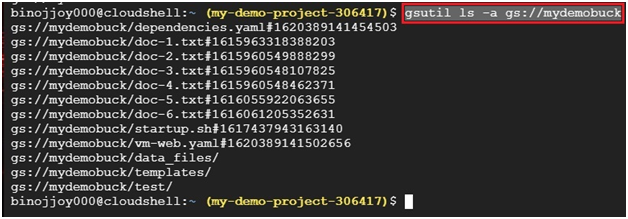
gsutil ls -a gs://BUCKET_NAME
This lists both the live version and every noncurrent version still being kept, along with each one’s generation number, which you use to reference a specific past version.
Step 4: Disable Versioning
gsutil versioning set off gs://BUCKET_NAME
Turning versioning off does not delete any versions that already exist, it only stops new noncurrent versions from being created going forward.

Step 4: Set a Default Event Based Hold for New Objects
gsutil retention event-default set gs://BUCKET_NAME
The current equivalent:
gcloud storage buckets update gs://BUCKET_NAME –default-event-based-hold
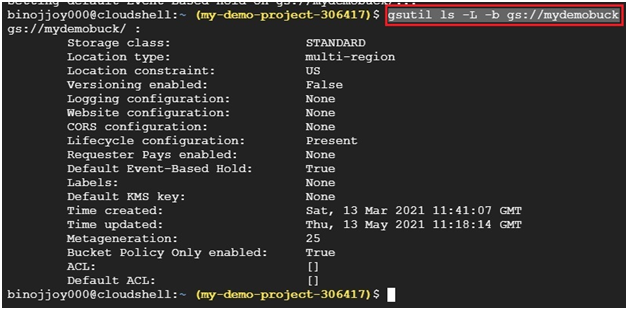
This applies an event based hold automatically to every new object added to the bucket from this point forward. It does not apply retroactively to objects already in the bucket.

Step 6: Check the Default Hold Setting
gsutil ls -L -b gs://BUCKET_NAME
Step 7: Disable the Default Hold
gsutil retention event-default release gs://BUCKET_NAME

Step 8: Place a Hold on One Object
gsutil retention HOLD_TYPE set gs://BUCKET_NAME/OBJECT_NAME
Replace HOLD_TYPE with either event or temp, as covered above.

Step 9: Release a Hold on One Object
gsutil retention HOLD_TYPE release gs://BUCKET_NAME/OBJECT_NAME

Versioning Has a Storage Cost
Every noncurrent version versioning keeps is still an object taking up space, and you are billed for it the same as any other stored data. Left unmanaged, a frequently updated bucket can quietly accumulate a large number of old versions over time. A lifecycle rule that automatically deletes noncurrent versions after a set number of days, or once a certain number of newer versions exist, is the usual way to keep this in check without giving up the protection versioning offers.
Common Mistakes to Avoid
- Leaving versioning on indefinitely with no lifecycle rule. Old versions keep costing you storage until something removes them.
- Confusing event based holds with temporary holds. Use temp for a straightforward legal hold, and event only when the hold is genuinely tied to a future event that should restart a retention clock.
- Assuming disabling versioning deletes existing noncurrent versions. It does not, it only stops creating new ones.
- Writing new scripts around gsutil today without a plan to move to gcloud storage before it is dropped from the default Cloud CLI bundle after March 2027.
That covers enabling versioning, understanding the two hold types, and keeping both under control. To go further, explore Prwatech’s Google Cloud training program, which includes placement assistance.
