External IP address in GCP
How to Reserve and Release a Static External IP Address in GCP
Every virtual machine that talks to the internet needs an external IP address. In Google Cloud that address can come in two forms, and the difference matters more than most people expect. One kind changes whenever the machine stops and starts. The other stays yours until you let it go.
If you host a website, a database that partners connect to, or anything a firewall or DNS record points at, a changing address is a problem. You would be updating records and allowlists every time a machine restarts. A static external IP address solves that, but it also comes with a price tag if you forget about it, and Google charges more for a reserved address that is sitting unused than for one in use.
This guide explains the two kinds of external address and then shows you how to reserve a static address, attach it to a machine, convert between the types and release an address you no longer need. We follow the original console steps with all screenshots kept in place, repeat them with gcloud, and finish with the cost details, common mistakes and a short FAQ.
Ephemeral and Static External IP Addresses
| Point | Ephemeral | Static |
|---|---|---|
| Lifetime | Tied to the machine. Released when the machine stops or is deleted | Reserved to your project until you release it |
| Changes on restart | Yes, usually | No |
| Cost | Charged while the machine is running | Charged while in use, and at a higher rate if reserved but unused |
| Good for | Temporary or test machines | Websites, partner access, DNS records, allowlisted services |
My advice: use ephemeral addresses for throwaway machines and static ones for anything other people or systems must find at the same address. For web traffic behind a load balancer, you reserve a static address for the load balancer instead of the individual machines.
Prerequisites:
- A Google Cloud account with a project that has billing enabled.
- The Compute Engine API enabled in that project.
- A role that can create addresses, such as Compute Network Admin.
- A virtual machine to attach the address to, if you want to try the attach steps.
Reserve a Static External IP Address in the Console
Menu labels move from time to time, so use the wording below as a guide.
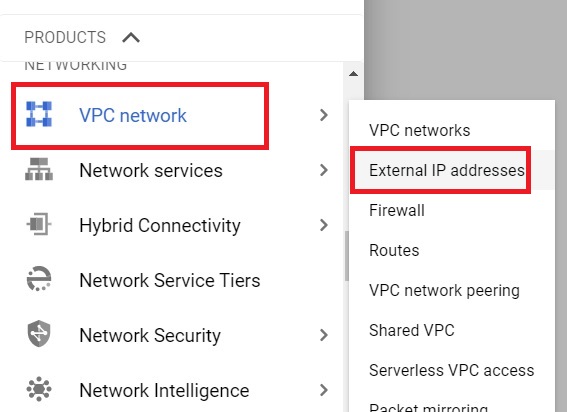
1. Sign in to the Google Cloud console. Open the navigation menu, choose VPC network and then IP addresses. In older versions this page was called External IP addresses.
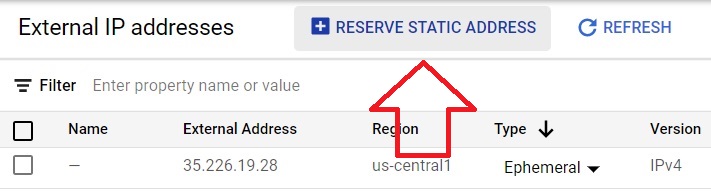
2. Click Reserve external static address. The button label may read Reserve external in newer consoles.
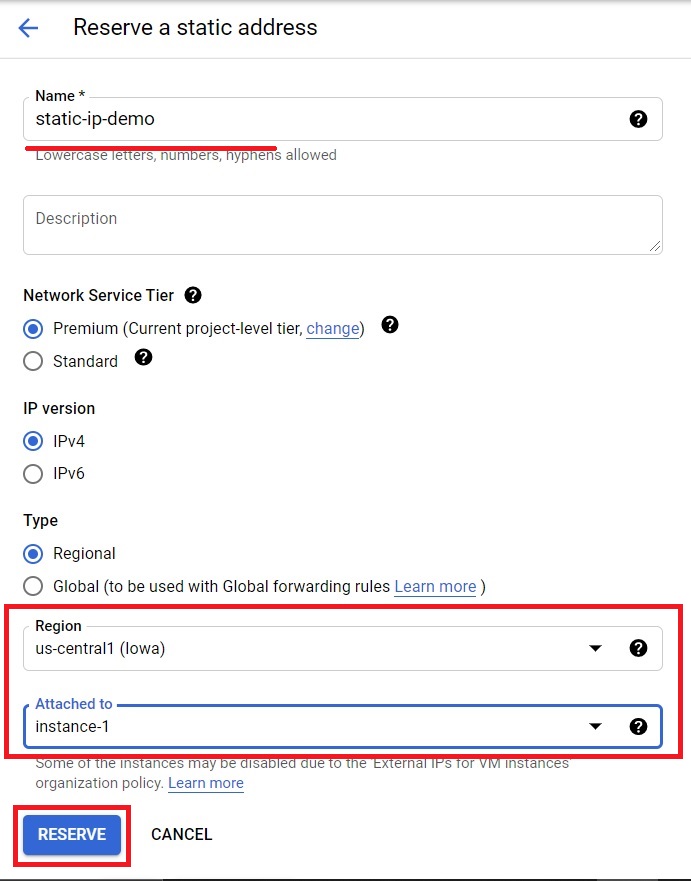
3. Give the address a clear name. Choose the IP version, which will be IPv4 for most cases, and the type. Choose Regional unless the address is for a global load balancer. Select the region, which must match the region of the machine you want to attach it to. The form may also ask for a network service tier. Premium is the default.
4. Optionally, pick a virtual machine from the Attached to list. Then click Reserve.
Switch a Machine Between Ephemeral and Static
Existing machines can change from one type to the other without being rebuilt.
1. Open the IP addresses page and find the machine whose address you want to change.
2. Use the Changeoption on that machine external address.

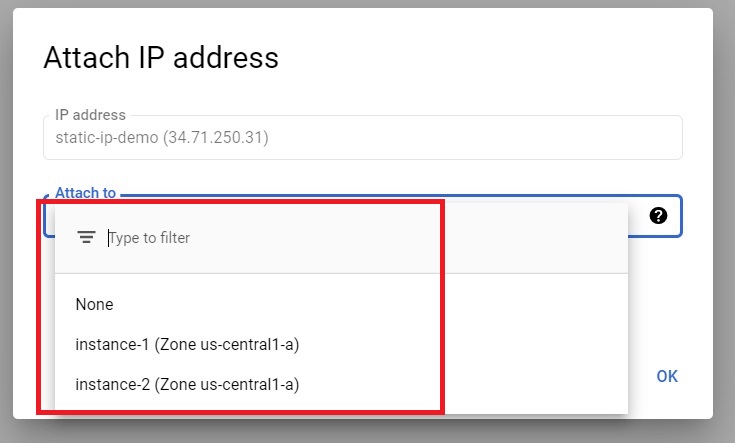
3. Pick the new setting from the list. Choose a reserved static address to make the machine use it. Choose None to detach it from the machine. Choose ephemeral if you want a temporary address again.
Another route is to promote the current ephemeral address. On the IP addresses page, open the actions menu for the address and choose Promote to static address. Give it a name and click Reserve. The address stays attached to the machine, and Google says the promotion does not drop packets sent to it.
Release a Static External IP Address
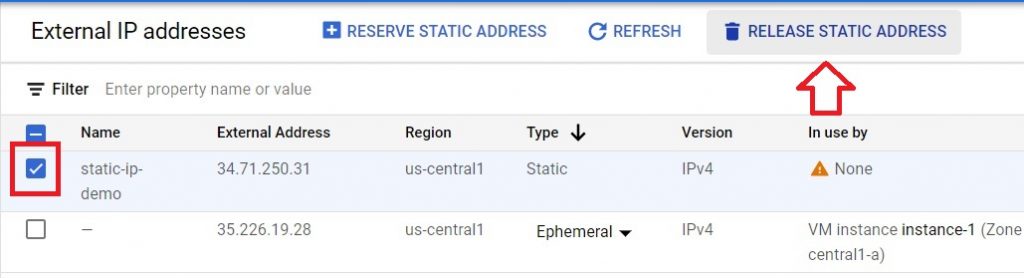
An address you no longer need should be released, because a reserved address keeps billing. First detach it from any machine that uses it, using None in the previous step. Then select the address on the IP addresses page and click Release static address.
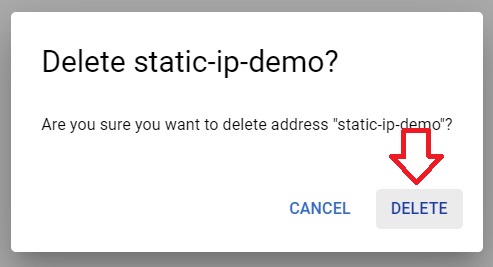
Confirm the deletion when asked.
Do It With gcloud
Reserve a regional static address:
gcloud compute addresses create web-ip –region=us-central1
Check which address you were given:
gcloud compute addresses describe web-ip –region=us-central1
To attach it to an existing machine, remove the current access configuration and add one that uses the reserved address. Replace the placeholder with the address you got above:
gcloud compute instances delete-access-config web-vm –zone=us-central1-a –access-config-name=”External NAT”
gcloud compute instances add-access-config web-vm –zone=us-central1-a –access-config-name=”External NAT” –address=RESERVED_IP
To promote the current ephemeral address of a machine to static instead, create a reserved address using that same IP:
gcloud compute addresses create web-ip –addresses=CURRENT_EPHEMERAL_IP –region=us-central1
List your addresses, and release one when you finish with it:
gcloud compute addresses list
gcloud compute addresses delete web-ip –region=us-central1
What External IP Addresses Cost
Based on Google’s pricing page when I checked, the external IPv4 rates for a standard virtual machine look like this. Always confirm current figures and your region before you budget.
| Situation | Rate per hour | Roughly per month |
|---|---|---|
| Static or ephemeral address in use on a standard machine | $0.005 | About $3.65 |
| Static address reserved but not attached | $0.01 | About $7.30 |
| Address in use on a Spot or preemptible machine | $0.0025 | About $1.83 |
The monthly column assumes about 730 hours in a month. Ephemeral addresses are counted while the machine runs. Static addresses are counted as in use while attached, even when the machine is stopped. External IPv6 addresses are listed as free of charge. Unused addresses add up quietly, so check your list of addresses every month.
Common Mistakes to Avoid
- Reserving an address and forgetting it.An unattached static address costs more than one in use. Delete what you do not need.
- Choosing the wrong region.A regional address can only attach to a machine in the same region.
- Using a global address for a single machine.Global addresses are meant for global load balancers.
- Expecting an ephemeral address to survive a stop.It is released when the machine stops. Promote it first if you need it to stay.
- Copying commands with curly quotes or a long dash.Pasting from a web page can change the quote marks and the double dash before a flag. Type them by hand if a command fails oddly.
A static external IP address is a small convenience that is easy to leave running by mistake. Reserve the ones you need, name them clearly, and review the list each month so that none sit unused.
