Setting NFS ports
How to Set Fixed NFS Ports for Firewalls on Linux
The Network File System, usually called NFS, lets one Linux machine share a folder that other machines mount as if it were local. It is widely used for shared storage on servers, and it works well until a firewall gets in the way. Then you discover that NFS is not one service listening on one port.
The core service, nfsd, uses port 2049, and the port mapper uses port 111. But older NFS versions also depend on helper services for mounting, file locking and crash recovery, and by default these pick random ports each time they start. A firewall cannot allow ports it cannot predict. The fix is to pin each helper service to a fixed port, then allow exactly those ports and nothing else.
This guide shows you how to do that on a Debian or Ubuntu style server. We start with which NFS version you are using, because that decides whether you need this at all. Then we pin the statd, lockd and mountd ports, verify the result, and open the matching firewall rule in Google Cloud. All the original screenshots stay in place, followed by common mistakes and a short FAQ.
Do You Need Fixed Ports? NFSv3 and NFSv4
Before you change anything, check which NFS version your clients use. It changes the amount of work enormously.
| Point | NFSv4 | NFSv3 |
|---|---|---|
| Ports needed | TCP 2049 for normal use | 111, 2049, plus mountd, statd and lockd |
| Helper services | Built in, no separate ports | Separate services on random ports by default |
| Fixed port setup | Not needed | Needed for firewalls |
| Firewall rule | One port | Several ports |
My advice: if your clients can use NFSv4, use it and open only port 2049. Everything below is for the case where you must keep NFSv3, for example for older clients or software that requires it.
Prerequisites:
- A Linux VM acting as the NFS server, on Debian or Ubuntu. The paths below follow that layout.
- The NFS server packages installed and the share already working without a firewall.
- SSH access to the server and a user who can run sudo.
- Permission to create firewall rules in your Google Cloud project.
- A scratch machine to test on first. Changing NFS ports on a live server drops active mounts.
Run every command in this guide on the NFS server itself, not in Cloud Shell. Cloud Shell is a separate machine, so editing its files has no effect on your server.
Step by Step Process on How to Set Fixed NFS Ports
Step 1: Set the statd Port
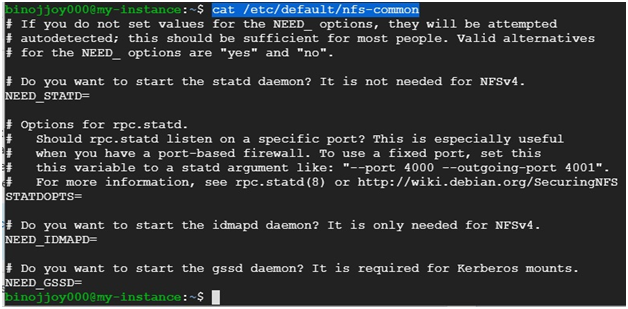
The statd service tracks which clients have mounted the share, so that locks can be recovered after a restart. First look at its current options:
cat /etc/default/nfs-common
Find the line that sets STATDOPTS. If it is empty, statd chooses a random port.
Open the file for editing:
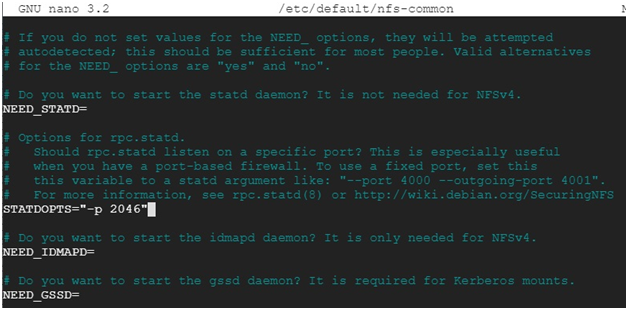
sudo nano /etc/default/nfs-common

Set the option so statd always listens on port 2046:
STATDOPTS=”-p 2046″
Save with Ctrl and X, then Y, then Enter.
Step 2: Set the lockd Ports
The lockd service handles file locking. It is part of the kernel, so its ports are set through module options. First check whether the options file already exists:
cat /etc/modprobe.d/lock.conf
If you see No such file or directory, the file does not exist yet, and you will create it in the next command.

Create or edit the file:
sudo nano /etc/modprobe.d/lock.conf

Add these two lines, then save the file:
options lockd nlm_tcpport=4045
options lockd nlm_udpport=4045

Module options are read when the lockd module loads. That means a reboot, or at least a full NFS restart with the module reloaded, is needed before the new ports take effect.
Step 3: Verify Both Files
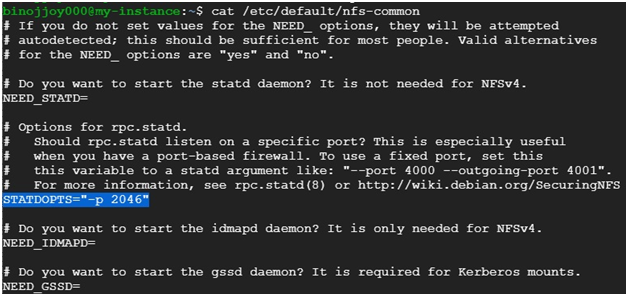
Run the two cat commands again and confirm the values stuck:
cat /etc/default/nfs-common
cat /etc/modprobe.d/lock.conf
Open
$ cat /etc/modprobe.d/lock.conf
It’ll display the updated lock.conf file

Step 4: Pin the mountd Port
The mountd service handles the initial mount request, and it is the third helper that picks a random port. Pin it in the NFS server defaults file:
sudo nano /etc/default/nfs-kernel-server
Set the option to a fixed port that does not clash with the others:
RPCMOUNTDOPTS=”–port 4046″
Without this step, one of your four ports is still unpredictable and the firewall rule will break mounts.
Step 5: Restart and Confirm the Ports
Restart the services, or reboot so the lockd module options apply:
sudo systemctl restart nfs-kernel-server rpcbind
Then ask the port mapper which ports each service is using:
rpcinfo -p
You should see the ports you chose listed against the status, lock manager and mount services. If any show a random high port, that service did not pick up its setting. Newer distributions can also read these values from the file /etc/nfs.conf, so check your release notes if a setting seems ignored.
Open the Ports in a Google Cloud Firewall Rule
Fixed ports are only useful if the firewall allows them. In Google Cloud, create an ingress rule that allows the NFS ports, and limit the source to your own network instead of the whole internet:
gcloud compute firewall-rules create allow-nfs –network=default –direction=INGRESS –action=allow –rules=tcp:111,udp:111,tcp:2049,udp:2049,tcp:2046,udp:2046,tcp:4045,udp:4045,tcp:4046,udp:4046 –source-ranges=10.128.0.0/9 –target-tags=nfs-server
Then add the nfs-server network tag to your NFS server VM. The source range above is the usual range for the default network. Replace it with the range of your own subnet. Never use 0.0.0.0/0 for NFS, because NFS was not designed to face the public internet.
If you only need NFSv4, the rule shrinks to a single port:
gcloud compute firewall-rules create allow-nfsv4 –network=default –direction=INGRESS –action=allow –rules=tcp:2049 –source-ranges=10.128.0.0/9 –target-tags=nfs-server
Common Mistakes to Avoid
- Editing the files in Cloud Shell.Run the commands on the NFS server VM.
- Forgetting mountd.The original only pins two services, so one random port is left.
- Not restarting or rebooting.Module options for lockd apply only when the module loads.
- Choosing clashing ports.Each service needs its own port number, and none should collide with something already listening.
- Opening NFS to the whole internet.Limit the source range to your private network.
- Copying commands with curly quotes or a long dash.Pasting from a web page can change quote marks in the option lines. Paste into a plain text editor first.
With statd, lockd and mountd pinned, your NFS firewall rule can be short and exact. Test a mount from a client, confirm with rpcinfo, and then tighten the source range to only the machines that need access.