Creating VPC Network
How to Create a Custom VPC Network in Google Cloud
Every resource you run in Google Cloud that needs to talk to something else, whether a virtual machine, a database or a Kubernetes cluster, does so over a network. That network is called a Virtual Private Cloud, usually shortened to VPC. Think of it as your own private slice of Google’s network, where you decide the address ranges, which parts can talk to each other, and what is allowed in from outside.
A VPC network is a global resource, which means one network can span every Google Cloud region. It is divided into subnets, and each subnet belongs to a single region. Every project starts with a ready made network named default, but serious work normally needs a network you design yourself. The choices you make when you create it, especially the IP ranges, are the hardest ones to change later.
This guide explains the difference between auto mode and custom mode networks, then walks you through creating a custom VPC network and its first subnet in the console, with every original screenshot kept in place. After that we cover how to pick an IP range, what firewall rules you need next, how to do the same job with gcloud, and then common mistakes and a short FAQ.
Auto Mode or Custom Mode?
| Point | Auto mode | Custom mode |
|---|---|---|
| Subnets | One per region, created automatically, using ranges inside 10.128.0.0/9 |
None until you create them |
| New regions | Subnets are added automatically | You add them when you need them |
| IP range control | Limited, ranges are chosen for you | Full control |
| Best for | Learning and quick tests | Production, connecting to on premises networks, planned addressing |
| Switching | Can be converted to custom | Cannot be converted back to auto |
My advice: use custom mode for anything beyond a throwaway test. Auto mode ranges can clash with your office network or another cloud later, and the conversion only goes one way. Google’s own documentation recommends custom mode for most production use.
Prerequisites:
- A Google Cloud account with a project that has billing enabled.
- The Compute Engine API enabled in that project.
- A role that can create networks, such as Compute Network Admin.
- A plan for your IP ranges, covered below. Spend five minutes on this before you click anything.
Choose Your IP Range Before You Start
Each subnet needs an IP range written in CIDR format, such as 10.10.0.0/24. A few rules save you trouble later:
- Use private ranges.The standard ones are 10.0.0.0/8, 172.16.0.0/12 and 192.168.0.0/16.
- Avoid overlaps.Ranges must not overlap with other subnets in the network, or with any network you plan to connect through a VPN or peering, including your office.
- Size it for growth.A /24 holds 256 addresses, but Google keeps four of them in every primary range, leaving 252 usable. A /20 gives you far more room.
- Leave space.You can expand a subnet range later, but you cannot shrink it, so start sensible instead of tiny or huge.
Create a VPC Network Using the Console
Menu labels move from time to time, so treat the wording below as a guide.
1. Open the Google Cloud console.
2. Open the navigation menu, choose VPC network and then VPC networks.
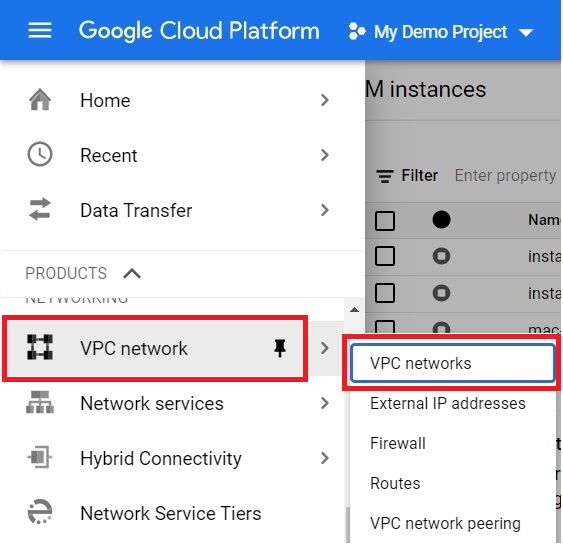
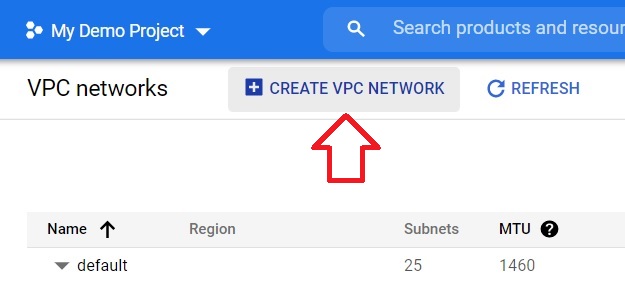
3. Click Create VPC network.
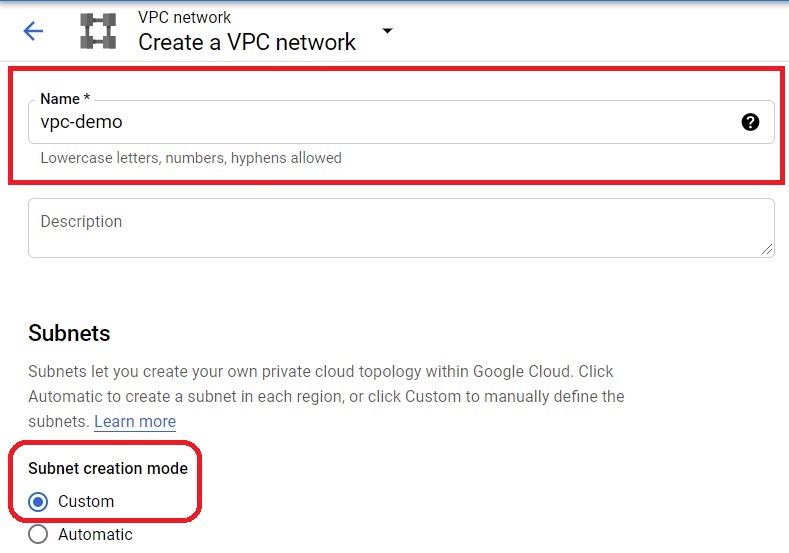
4. Enter a name for the network, such as my-vpc. Set the subnet creation mode to Custom, which means no subnets are created until you add them.
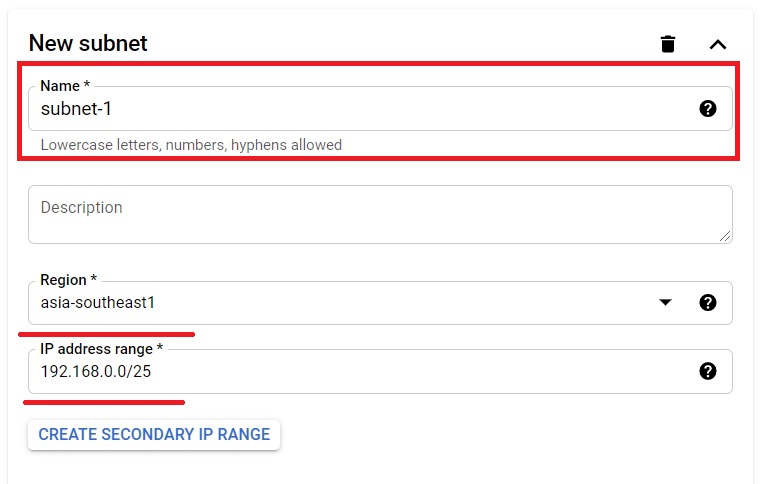
5. Under New subnet, enter a subnet name, choose a region and enter the IP range you planned. The subnet will exist only in that region.
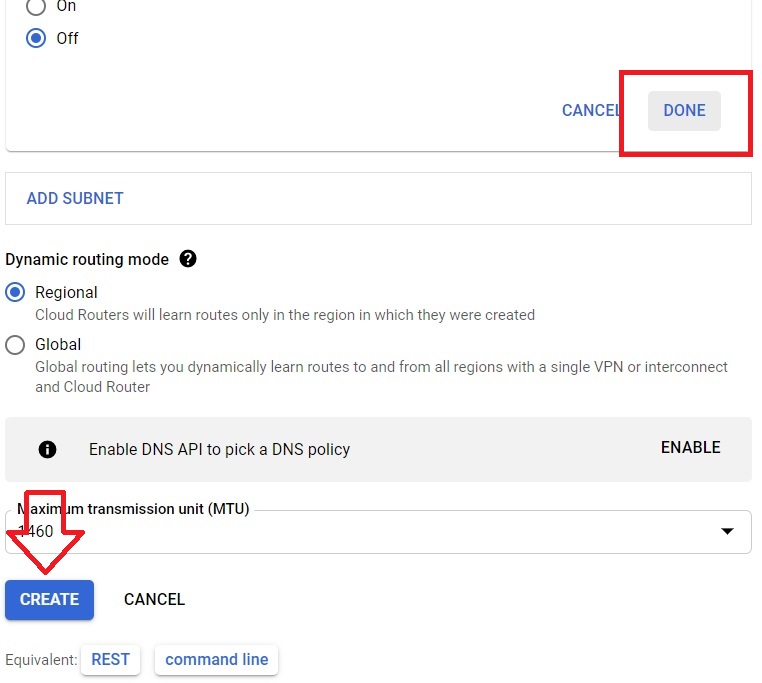
6. Click Done to save the subnet, then click Create.
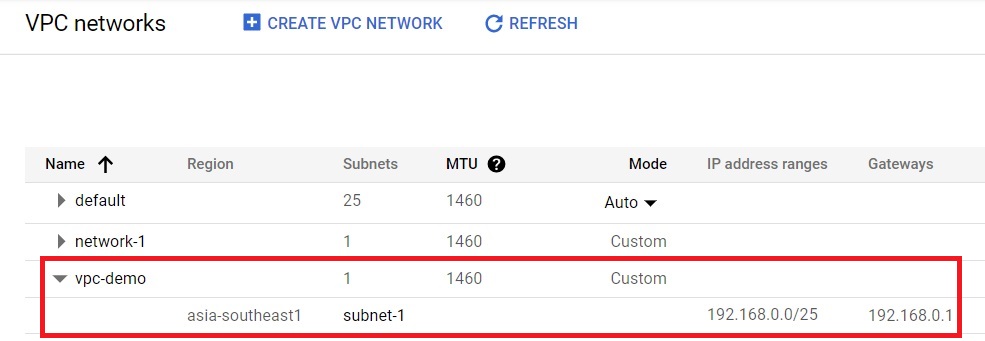
7. Wait a moment. The new network appears in the list of VPC networks, which means it has been created.
Add Firewall Rules, or Nothing Can Connect
Every VPC network has an implied rule that blocks all incoming traffic and allows all outgoing traffic. A new custom network has no rules that open anything, so machines inside it cannot be reached, not even from each other, until you add rules. Start with one that lets machines in the subnet talk to each other:
gcloud compute firewall-rules create my-vpc-allow-internal –network=my-vpc –direction=INGRESS –action=allow –rules=tcp,udp,icmp –source-ranges=10.10.0.0/24
Add a separate, narrow rule for SSH or web traffic when you need it. Our guide to launching an instance in a VPC network shows exactly how.
Do It With gcloud
Create the network in custom mode:
gcloud compute networks create my-vpc –subnet-mode=custom
Add a subnet in the region you want:
gcloud compute networks subnets create my-subnet –network=my-vpc –range=10.10.0.0/24 –region=us-central1
Confirm both exist:
gcloud compute networks list
gcloud compute networks subnets list –network=my-vpc
If a subnet runs short of addresses, expand it. This can only make the range larger:
gcloud compute networks subnets expand-ip-range my-subnet –region=us-central1 –prefix-length=23
When you finish with a test network, delete the subnet first and then the network:
gcloud compute networks subnets delete my-subnet –region=us-central1
gcloud compute networks delete my-vpc
What Does a VPC Network Cost?
As far as I know, the network itself does not carry a charge. You pay for what runs in it, such as virtual machines, external IP addresses, VPN tunnels and network traffic that leaves a region or Google Cloud. I could not confirm this on the Google page I checked, so please confirm it against the current pricing page before publishing.
Common Mistakes to Avoid
- Overlapping ranges.Two networks that need to connect later cannot share addresses. Plan ranges across your whole organisation.
- Picking a range that is too small.You can expand but never shrink a subnet.
- Forgetting firewall rules.The network blocks incoming traffic by default, so nothing connects until you allow it.
- Putting everything in the default network.It is open to many things and its ranges are chosen for you. Build your own for real work.
- Copying commands with curly quotes or a long dash.Pasting from a web page can change the double dash before a flag into a single long character. Type the flags by hand if a command fails oddly.
