Categorical Data Encoding
Categorical Data Encoding in Machine Learning

A spreadsheet of patients might say Gender is female, region is northwest and Diabetes is yes. To a person, that is perfectly clear. To most machine learning algorithms, it is gibberish. Algorithms do arithmetic, and arithmetic needs numbers. Before the model can learn anything, every piece of text has to be converted into a number.
That conversion is called categorical data encoding, and the way you do it matters more than most beginners expect. A careless choice can give the model a false idea that one category is bigger than another, or can blow up your dataset with thousands of extra columns. The right choice depends on the type of category, how many of them there are, and which model you plan to use.
In this tutorial, we explain the types of categorical data and the four main encoding methods: label, one hot, ordinal and binary. We run all of them on a small patient table with real Python code that was tested, show the exact results as text, and finish with a simple guide for choosing between them, the mistakes to avoid and a short FAQ.
What is Categorical Data?
Categorical data is data that falls into groups instead of measuring an amount. There are two kinds:
- Nominal datahas no order. Examples are gender, city, colour and region. Northwest is not larger than southeast.
- Ordinal datahas a natural order. Examples are small, medium and large, or low, medium and high. The gaps between them are not necessarily equal, but the order is real.
This difference decides which encoding is correct, so keep it in mind.
Why do We Need to Encode Categorical Data?
- Most algorithms need numbers.Linear and logistic regression, SVM, KNN and neural networks cannot read text at all.
- Some tools accept text but encode it for you.Certain tree libraries do this internally. It is still wise to know what happens.
- The encoding changes the result.The same data encoded two ways can give models with different accuracy.
- It keeps meaning intact.Good encoding keeps the real relationships and does not invent false ones.
Types of Categorical Data Encoding
No single method fits every case. Here is the quick comparison before we go through each one.
| Method | How it works | Best for | Main risk |
|---|---|---|---|
| Label encoding | One whole number per category | Target labels, or tree based models | Implies a false order |
| One hot encoding | One 0 or 1 column per category | Nominal data with few categories | Too many columns |
| Ordinal encoding | Numbers that follow a real order | Ordered categories | Wrong if no order exists |
| Binary encoding | Category number written in binary, split into columns | Nominal data with many categories | Less readable |
Our Example Data
We will use a small table of 10 patients with five columns: age, Gender, BMI, Diabetes and region. Gender has 2 values, Diabetes has 2 values and region has 4. Here is the setup, which also loads the libraries that the original page forgot to import.
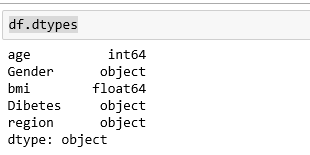
The data is loaded and ready. Check the data types of each column with df.dtypes. Age and BMI are numbers. Gender, Diabetes and region are text, so they need encoding.
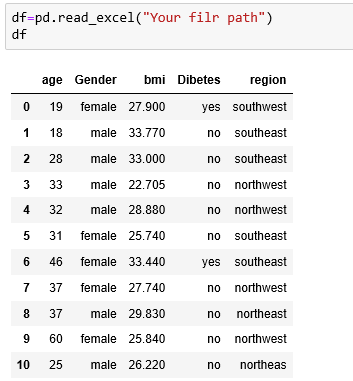
Then check the data types of columns in df
df.dtypes
Output:
Label Encoding in Machine Learning
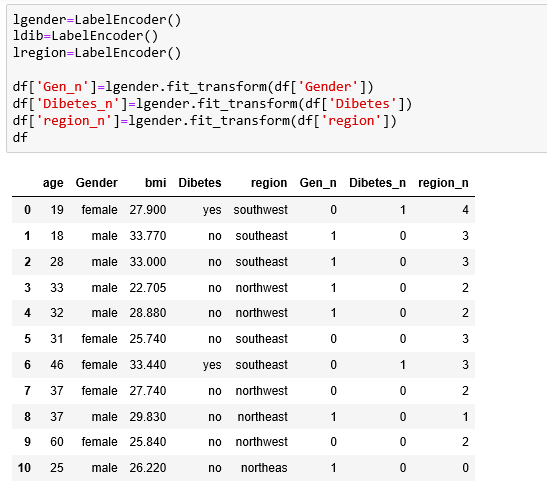
Label encoding gives every category its own whole number. By default the numbers are assigned in alphabetical order. Gender becomes 0 for female and 1 for male. Diabetes becomes 0 for no and 1 for yes.
Label Encoding With pandas
First, change the column type to category, and check that it worked. Then take the codes with cat.codes.

Here is the result for the first rows:
Look at the region column. It has four values, and alphabetical order gives northeast 0, northwest 1, southeast 2 and southwest 3. The original page says southwest is 4, which is wrong, because counting starts at zero.
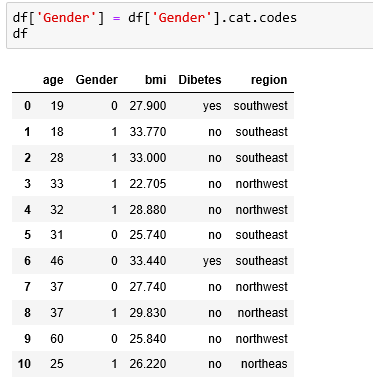
As we can see in the result the column has been converted into 0 and 1 (female – 0, male – 1). In this manner, we can apply the cat.codes to all columns.
In the above case, the columns were limited and we could count the categories in each column easily. But the solution gets critical if the number of columns and categories gets increased. So in that case scikit-learn’s Label Encoder comes in picture.
For this, we have to import LabelEncoder from sklearn.preprocessing

he Catch With Label Encoding
Label encoding has a serious side effect. The numbers imply an order and a distance. A model like linear regression or KNN will treat southwest, at 3, as three times as large as northwest, at 1, and as being closer to southeast than to northeast. For a nominal feature like region, none of that is true. The codes are only labels. They do not show weight or importance, which the original page wrongly suggests at one point.
Label encoding is safe in two cases. One is when you encode the target column, the thing you want to predict. The other is when you use tree based models, such as decision trees and random forests, which split on thresholds and are much less bothered by the false order.
One Hot Encoding in Machine Learning
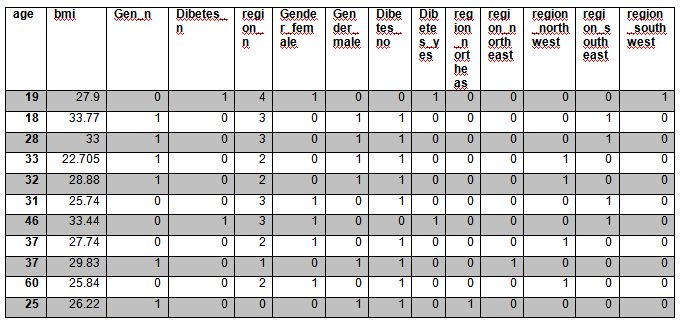
One hot encoding removes the false order. It creates a new column for each category, with 1 where the category applies and 0 where it does not. Each row has exactly one 1 in each group of columns, which is where the name comes from.
The table started with 5 columns and now has 10. Gender made 2 columns, Diabetes made 2 and region made 4. The original page has a typo, Dibetes, that would make this step fail. The correct spelling is Diabetes.
The Dummy Variable Trap
Look at Gender_female and Gender_male. If you know one, you know the other, since a patient who is not male must be female. Keeping both columns adds duplicate information, which can cause trouble in linear and logistic regression. This is called the dummy variable trap. The fix is to drop one column per feature, and scikit learn does it with drop set to first. With that setting, the columns become:
Now Gender and Diabetes need one column each, and region needs three, not four. Tree based models do not need this step.
The Downside: Too Many Columns
One hot encoding grows with the number of categories. A column with 100 cities creates 100 new columns, and one with 10,000 product codes creates 10,000. That makes the data large, slow and sparse. For columns like that, consider binary encoding or another method.
Ordinal Encoding
When categories do have a real order, you should keep it. Ordinal encoding lets you state the order yourself, so small, medium and large become 0, 1 and 2, in that order. If you used plain label encoding, alphabetical order would give large 0, medium 1 and small 2, which is backwards.
That is the result for the list small, large, medium, small, large, when the order small, medium, large is given to OrdinalEncoder. Use ordinal encoding only when the order is real. Never force an order on region or colour.
Binary Encoding in Machine Learning
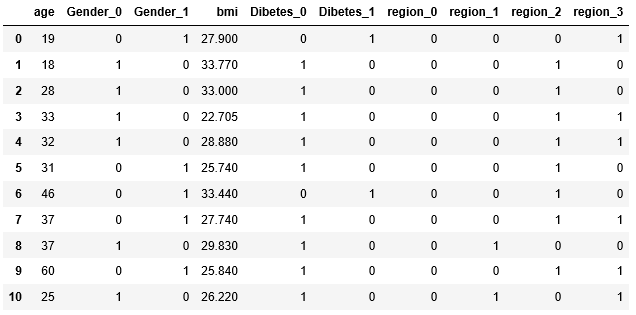
Binary encoding is a middle path for columns with many categories. It first gives each category a number, then writes that number in binary, and then puts each binary digit in its own column. It needs far fewer columns than one hot encoding.
It lives in the category_encoders library, which you install once from the command line with pip install category_encoders. That is a shell command, so it does not go inside a Python block.
Here is the region column after binary encoding. Four regions need only 3 columns here:
| region | region_0 | region_1 | region_2 |
|---|---|---|---|
| southwest | 0 | 0 | 1 |
| southeast | 0 | 1 | 0 |
| northwest | 0 | 1 | 1 |
| northeast | 1 | 0 | 0 |
The numbers follow the order in which each region first appears in the data. The ranking is arbitrary, so binary encoding still creates some false closeness between categories that share digits. It is a trade of a little accuracy for a lot of size.
The saving grows fast. For 100 categories, one hot encoding needs 100 columns, and binary encoding needs only 7. For 1,000 categories it needs 10.
| Number of categories | Label | One hot | Binary |
|---|---|---|---|
| 4 | 1 column | 4 columns | 3 columns |
| 100 | 1 column | 100 columns | 7 columns |
| 1,000 | 1 column | 1,000 columns | 10 columns |
An important correction to the original code: the binary step must run on the original data, not on the output of get_dummies, because by then the original columns are gone.
Which Encoding Should You Use?
| Your situation | Use | Why |
|---|---|---|
| Target column to predict | Label encoding | The model needs class numbers, order does not matter |
| Nominal feature, few categories, linear or distance based model | One hot encoding | No false order |
| Ordered feature such as size or grade | Ordinal encoding | Keeps the real order |
| Nominal feature with many categories | Binary encoding | Far fewer columns |
| Tree based model, any feature | Label or ordinal encoding | Trees are not bothered by the number order |
Common Mistakes to Avoid
- Label encoding a nominal feature for a linear or distance model.It creates a false order.
- Encoding before splitting the data, then fitting on everything.Fit encoders on training data only, then apply them to test data. A category that appears only in test data needs a plan.
- Running one method on the output of another. Each method should start from the original columns.
- Falling into the dummy variable trap. Drop one column per feature for linear models.
- One hot encoding a column with thousands of values. Use binary encoding or group the rare values.
- Forcing order on unordered data. Never use ordinal encoding for region or colour.
- Typing column names by hand and misspelling them. Copy them from the data.
Encoding turns a table that people can read into a table that models can learn from. Start by asking whether your categories have an order, then count how many there are. Use one hot for a few unordered categories, ordinal for ordered ones, and binary when the count grows large. Run the program above on your own data and see how each choice changes your columns.
