Principle Component Analysis Tutorial
Principal Component Analysis Tutorial With Python
Real datasets are rarely small. A customer table may have fifty columns, a medical record hundreds of measurements, an image thousands of pixel values. Many of those columns move together, repeating the same information in slightly different ways. Feeding all of them to a model makes it slower, harder to interpret and sometimes worse, because noise piles up along with signal. You also cannot plot data that lives in fifty dimensions.
Principal component analysis, usually shortened to PCA, is the most widely used way to deal with this. It takes your original columns and builds a smaller set of new ones, called principal components, that keep as much of the useful variation as possible. Ten components might capture most of what thirty original columns held. Two components let you draw the whole dataset on a flat chart.
This tutorial explains PCA in plain language first, with an everyday picture to hold on to, and only then moves to the mathematics. We cover the key terms, the five steps PCA follows, and a complete Python example with scikit learn on a real dataset, including how to choose the number of components and how to read the results. We finish with limitations, applications, common mistakes and a short FAQ.
What is Principal Component Analysis?
PCA is a method of dimensionality reduction. The dimensions of a dataset are its columns, which are also called features. Reducing dimensions means describing the same data with fewer columns while losing as little information as possible.
The best way to picture it is a shadow. Imagine a three dimensional object, such as a pen, lit from different angles. Some angles throw a long, informative shadow. Others throw a tiny dot that hides almost everything about the pen. PCA searches for the angles that give the most informative shadows. The first principal component is the direction in which your data is most spread out. The second is the next most spread out direction at a right angle to the first, and so on.
Information here means variance, which is how much the data varies. Directions with large variance carry the differences between your data points. Directions with tiny variance are mostly noise or repeated information.
Feature Extraction, Not Feature Elimination
There are two broad ways to cut down the number of features:
- Feature eliminationsimply drops columns that seem unimportant. What remains are original columns, so they are easy to explain, but whatever the dropped columns knew is lost.
- Feature extractionbuilds new columns by combining the old ones. Nothing is thrown away in the combining, and the weakest new columns are dropped afterwards.
PCA is feature extraction. Every principal component is a weighted mix of all the original features. This is its strength, because it keeps information from every column, and also its weakness, because the new features are harder to explain in business language.
When Should You Use PCA?
- You have many features and many of them are correlated.
- You want to plot high dimensional data in two or three dimensions.
- You want to speed up a model or reduce overfitting.
- You want to remove noise, as in image compression.
- You do not need to explain the model in terms of the original columns.
Avoid PCA when you must explain results using the original features, for example a credit score where regulators want to know which inputs mattered. Also be careful when your features are not numeric or have a strongly non linear structure.
The Key Terms Behind PCA
| Term | Meaning |
|---|---|
| Variance | How spread out the values of one feature are |
| Correlation | How strongly two features move together |
| Covariance matrix | A table showing how every pair of features varies together |
| Orthogonal | At a right angle. Principal components are orthogonal, so they carry no repeated information |
| Eigenvector | A direction that a transformation only stretches, without turning it. In PCA, each eigenvector of the covariance matrix is a principal component direction |
| Eigenvalue | How much the eigenvector stretches. In PCA, it tells you how much variance that component captures |
| Principal component | A new feature built along an eigenvector, ranked by how much variance it explains |
An eigenvector v and its eigenvalue lambda for a matrix A satisfy this equation, which is the heart of the method:
A v = lambda v
To find the eigenvalues, mathematicians solve the characteristic equation, where I is the identity matrix:
det(A – lambda I) = 0
You will never solve these by hand on a real dataset, because libraries do it for you. What matters is the meaning. The covariance matrix describes how your features vary together, its eigenvectors give the directions of greatest spread, and its eigenvalues rank those directions by importance.
How PCA Works?
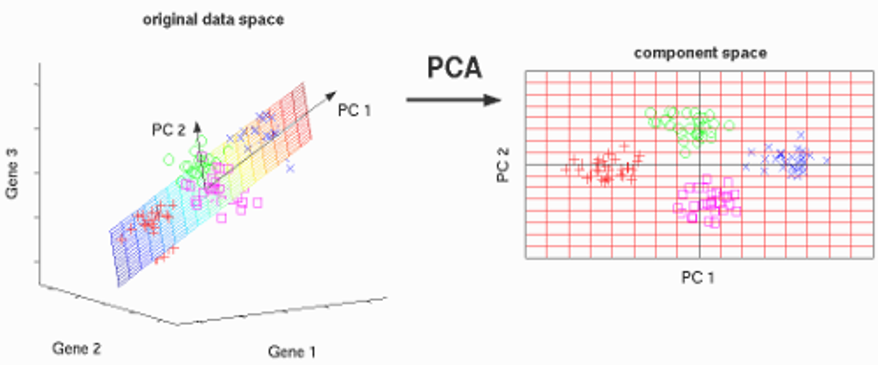
PCA follows five steps. They are easiest to understand with two features, but they work the same way for any number.
- Standardise the data. Subtract each feature’s average, and divide by its standard deviation, so that every feature has an average of zero and the same scale. Without this, a feature measured in thousands will drown out one measured in decimals.
- Build the covariance matrix. Calculate how every pair of features varies together.
- Find the eigenvalues and eigenvectors. These give the directions of greatest variance and how much each one explains.
- Choose the components. Sort the eigenvectors by eigenvalue, from largest to smallest, and keep the top few. These form the feature vector.
- Form the principal components. Project the standardised data onto the chosen eigenvectors. The result is your new, smaller dataset.

In words, the new data is the standardised data multiplied by the chosen eigenvectors. Each row keeps its place, but each column is now a principal component.
PCA in Python Step by Step
We will use the breast cancer dataset that ships with scikit learn. It has 569 patients and 30 measurements per patient, and a label that says whether the tumour was malignant or benign. The goal is to squeeze 30 columns into 2 so we can plot them.
First, load the data and check its shape:
from sklearn.datasets import load_breast_cancer
data = load_breast_cancer()
X, y = data.data, data.target
print(X.shape)
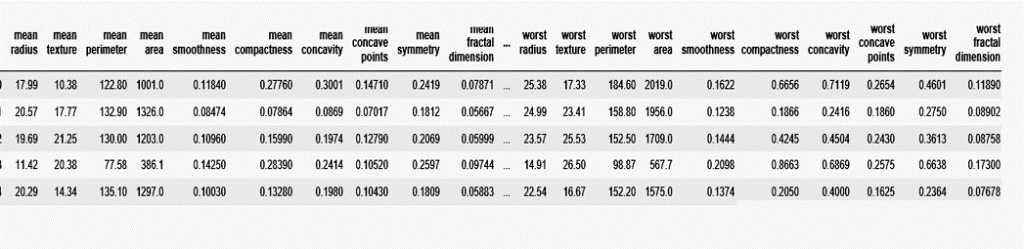
Now here is the complete program, which standardises the data, runs PCA, draws the scatter plot and answers two practical questions.
import numpy as np
import matplotlib.pyplot as plt
from sklearn.datasets import load_breast_cancer
from sklearn.preprocessing import StandardScaler
from sklearn.decomposition import PCA
data = load_breast_cancer()
X, y = data.data, data.target
print(“Original shape:”, X.shape)
X_scaled = StandardScaler().fit_transform(X)
pca = PCA(n_components=2)
X_pca = pca.fit_transform(X_scaled)
print(“Reduced shape:”, X_pca.shape)
print(“Variance explained:”, np.round(pca.explained_variance_ratio_, 3))
print(“Total:”, round(pca.explained_variance_ratio_.sum(), 3))
plt.scatter(X_pca[:, 0], X_pca[:, 1], c=y, cmap=”coolwarm”, s=12)
plt.xlabel(“First principal component”)
plt.ylabel(“Second principal component”)
plt.savefig(“pca_scatter.png”, dpi=120)
full = PCA().fit(X_scaled)
cumulative = np.cumsum(full.explained_variance_ratio_)
print(“Components for 95 percent:”, int(np.argmax(cumulative >= 0.95)) + 1)
top = np.argsort(np.abs(pca.components_[0]))[::-1][:3]
print(“Top features in PC1:”, [str(data.feature_names[i]) for i in top])
Running it prints the following:
Original shape: (569, 30)
Reduced shape: (569, 2)
Variance explained: [0.443 0.19 ]
Total: 0.632
Components for 95 percent: 10
Top features in PC1: [‘mean concave points’, ‘mean concavity’, ‘worst concave points’]
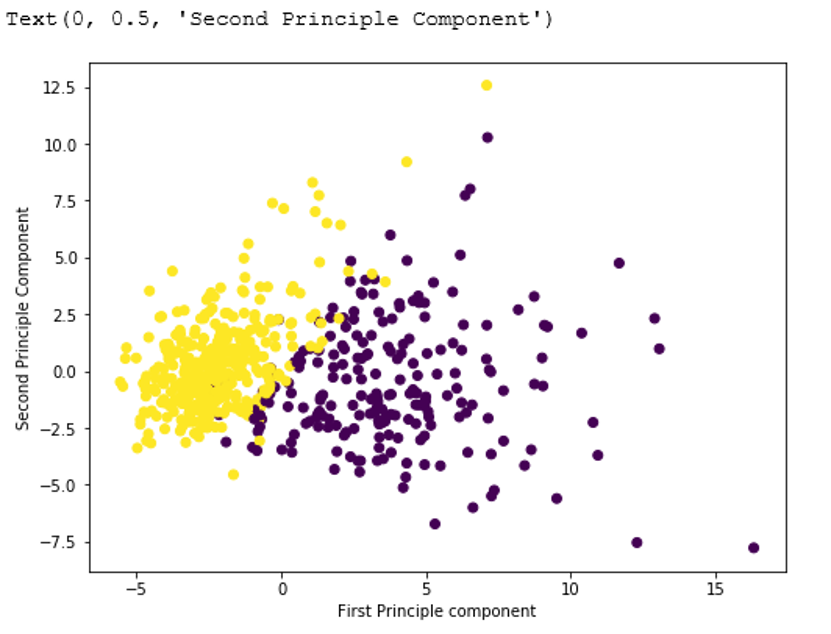
The scatter plot shows two fairly distinct groups, even though PCA never saw the labels. That tells you the malignant and benign tumours differ in a way that two components can already show.
Reading the Results
- Explained variance ratio. The first component explains about 44 percent of the variance and the second about 19 percent, so together they keep about 63 percent. Roughly a third of the information is left behind.
- How many components to keep. A common rule is to keep enough components to explain around 95 percent of the variance. Here that needs 10 components, so 30 columns become 10 with little loss.
- Component weights. The weights, also called loadings, show how much each original feature contributes to a component. They are stored in the components attribute.
print(pca.components_)
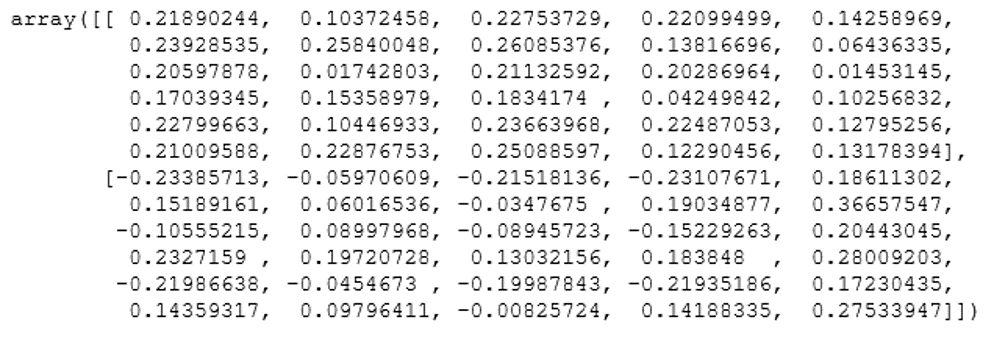
A common mistake is to treat this output as the reduced data. It is not. The array holds one row per component and one column per original feature, so here it has 2 rows and 30 columns. The reduced data is the result of fit_transform, stored above in X_pca, which has 569 rows and 2 columns.
You can also ask scikit learn to choose the number of components for you by passing a fraction:
pca = PCA(n_components=0.95, svd_solver=”full”)
X_reduced = pca.fit_transform(X_scaled)
print(pca.n_components_)
Limitations of PCA
- It is linear. PCA finds straight line directions. Data curved in complicated ways needs other methods.
- It is sensitive to scale. PCA centres your data but does not scale it, so standardise first when features use different units.
- It is harder to explain. Each component mixes all the original features.
- Outliers can distort it. A few extreme points can pull the directions.
- Variance is not always relevance. The direction with the most variance is not always the one that matters for your prediction.
Applications of PCA
- Image compression and computer vision. Storing a few components per image instead of every pixel.
- Facial recognition. The classic eigenfaces approach describes faces with a small set of components.
- Summarising many correlated assets or interest rates with a few underlying factors.
- Reducing thousands of gene measurements to a few components for plotting and analysis.
- Data mining and visualisation. Drawing high dimensional data in two or three dimensions.
- Psychology and surveys. Condensing many questionnaire answers into a few underlying traits.
Common Mistakes to Avoid
- Forgetting to standardise. The feature with the biggest numbers wins.
- Treating components_ as the reduced data. Use the output of fit_transform.
- Fitting PCA on all the data before splitting. Fit on the training set only, then apply it to the test set, or information leaks.
- Keeping too few components. Check the explained variance before choosing.
- Spelling it Principle. The word is Principal.
PCA turns a wide, tangled dataset into a short list of components that keep most of the story. Standardise first, check the explained variance, keep the components you need, and remember that the weights tell you what each new feature is made of. Try it on a dataset from your own work next.
