Machine Learning Tutorial For Beginners
Machine Learning Tutorial for Beginners
Your phone suggests the next word before you type it. Your email app moves junk into a separate folder without being told which messages are junk. A map app estimates your arrival time using traffic from a thousand other drivers. None of these were programmed with a fixed list of rules. They learned from examples. That is machine learning.
Machine learning is a branch of computer science in which computers learn patterns from data and use them to make predictions or decisions, instead of following rules that a programmer wrote by hand. The more good examples a model sees, the better it tends to get. It is behind recommendations, fraud alerts, voice assistants, medical image reading and predictions of machine failure in factories.
This tutorial is built for a complete beginner. We explain what machine learning is and how it differs from artificial intelligence and deep learning, then the four types of learning with an example of each. Then we walk through the full process, step by step, from collecting data to making a prediction. A complete Python program shows every step running on real data, with the output. We finish with the common algorithms, the measures used to judge a model, the most frequent mistakes and a learning path for what to study next.
Introduction to Machine Learning
In traditional programming, you give the computer data and rules, and it gives you answers. In machine learning, you give the computer data and the answers, and it works out the rules. Those learned rules are called a model, and the model can then predict answers for new data it has never seen.
| Traditional programming | Machine learning | |
|---|---|---|
| You supply | Data and rules | Data and answers |
| The computer produces | Answers | Rules, which form the model |
| Good for | Clear, fixed logic, such as tax calculation | Patterns too complex to write down, such as spam |
| Improves with | A programmer changing the code | More and better data |
How is Machine Learning Different From AI and Deep Learning?
- Artificial intelligenceis the broad goal of making machines act intelligently.
- Machine learningis a way of reaching that goal, by learning from data.
- Deep learningis a part of machine learning that uses many layered neural networks. It is the technique behind image and speech recognition and large language models.
Think of three circles, one inside another: AI is the largest, machine learning sits inside it, and deep learning sits inside machine learning.
Types of Machine Learning
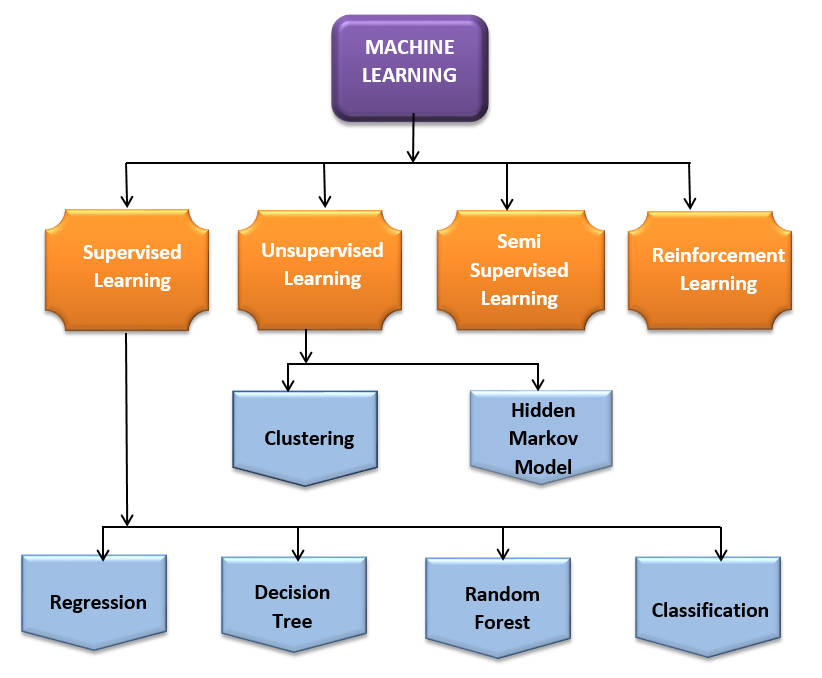
There are four main types. The difference between them is what kind of data the model learns from.
Supervised Learning
The model learns from labelled data, where every example comes with the correct answer. It makes a prediction, compares it with the right answer, and adjusts. There are two kinds. Classification predicts a category, such as spam or not spam. Regression predicts a number, such as the price of a house.
Unsupervised Learning
The model gets unlabelled data, with no answers, and looks for structure on its own. A common task is clustering, which groups similar items. A shop can group customers by buying habits without being told what the groups should be.
Semi Supervised Learning
This mixes a small amount of labelled data with a large amount of unlabelled data. It is useful when labelling is expensive. For example, a doctor may label a few hundred scans, while thousands more remain unlabelled.
Reinforcement Learning
A program, called an agent, learns by trial and error. It takes actions, receives rewards for good ones and penalties for bad ones, and learns to collect the most reward over time. The reward may come later, which is called a delayed reward. A program that learns to play a game, or a robot that learns to walk, are examples.
| Type | Data | Goal | Example |
|---|---|---|---|
| Supervised | Labelled | Predict a label or number | Spam filter, price prediction |
| Unsupervised | Unlabelled | Find groups and patterns | Customer segments |
| Semi supervised | A few labelled, many unlabelled | Learn when labels are scarce | Medical scan labelling |
| Reinforcement | Rewards from actions | Maximise total reward | Game playing, robots |
Machine Learning Process Steps
Almost every machine learning project follows the same path. The steps are repeated, and a poor result sends you back to an earlier step.
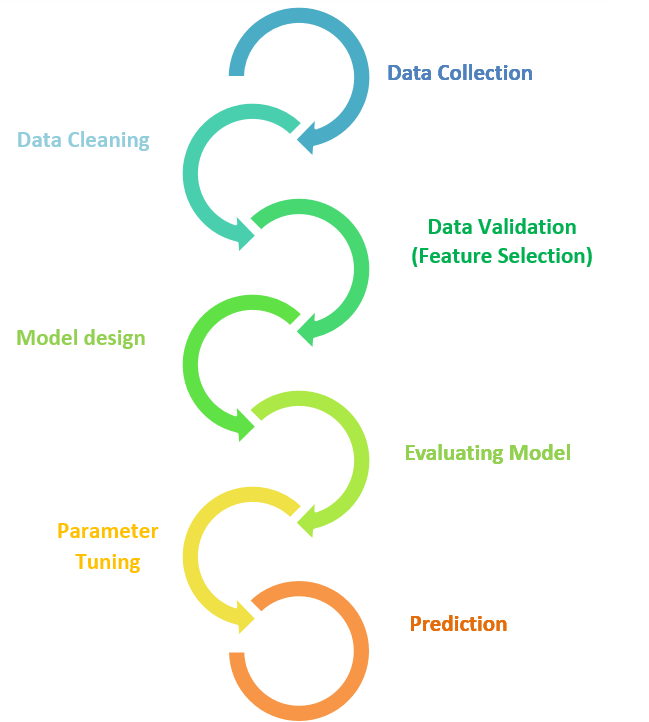
Steps Involved in Machine Learning
Step 1: Data Collection
Every project starts with data. It may come from your own records, sensors, surveys, or public sources such as Kaggle and the UCI Machine Learning Repository. More data helps, but good data matters more. The data should be relevant to the question and similar to what the model will see in real use.
Step 2: Data Cleaning
Real data is messy. Cleaning means removing duplicates, fixing errors, handling missing values and making formats consistent. Models trained on messy data learn the mess. Our guides on data cleaning, outliers and categorical data encoding cover each of these in detail.
Step 3: Feature Selection and Data Validation
Features are the input columns the model learns from. Not all of them help. Some are irrelevant, and some repeat each other. Feature selection keeps the ones that best predict the target. Data validation is a separate check that the data is correct and complete. The two are related but different, and the original page mixed them up.
Step 4: Model Design
Choose an algorithm that suits the problem. A category to predict means a classification algorithm. A number to predict means regression. No labels means clustering. Start simple, such as logistic regression or a decision tree, and move to something more complex only if you need to.
Step 5: Training and Evaluating the Model
Split the data into a training set and a test set. The model learns from the training set. The test set stays untouched until the end, and then it measures how the model does on data it has never seen. A split of about 70 percent for training and 30 percent for testing is common, and so is 80 and 20. These are habits, not rules. With small data, cross validation is better, because it tests on several different splits.
Step 6: Parameter Tuning
Many algorithms have settings that you choose before training, such as the number of neighbours in KNN, the depth of a tree, or the learning rate. These are called hyperparameters, and the original page calls them functional parameters, which is not the standard term. Tuning means trying different values, using cross validation, and keeping the ones that work best.
Step 7: Prediction
Finally, use the trained model on new data to make predictions. Keep watching performance after launch. Real data changes over time, so a model that worked last year may slowly get worse. If results are poor, go back and improve the data, the features or the model.
Machine Learning in Python: From Data to Prediction
This program follows the steps above on the Iris dataset, which comes with scikit learn. It has 150 flowers, each with 4 measurements, from three species. It trains a supervised model, tests it, tunes it, makes a prediction, and then runs an unsupervised clustering on the same measurements without using the labels.
Steps 1 to 4: Load, Split, Train and Evaluate
- Cross validation gave 0.914,an estimate from five different splits of the training data.
- The test set gave 0.978,which is 44 correct out of 45 flowers. One virginica flower was called versicolor.
- The two numbers differ.That is normal. A test set of 45 is small, and one flower is worth about 2.2 points, so do not read much into the gap.
- Accuracy is only one view.The report shows precision and recall for each species, so you can see where the mistakes were.
Steps 5 and 6: Tune and Predict
Tuning picked 11 neighbours, and the cross validation score rose from 0.914 to 0.924. On the test set, accuracy stayed at 0.978, so tuning did not change the final result here. That is a useful lesson: tuning is not magic, and gains are often small when the model is already good. The new flower, with a petal length of 1.4, was predicted to be setosa.
Unsupervised Learning: Finding Groups Without Labels
KMeans was asked for three groups and given no labels at all. It found groups of 62, 50 and 38 flowers. The true split is 50, 50 and 50, so the groups it found are close but not exact. This is typical for unsupervised learning. It finds structure, but without labels you cannot be sure it matches the real categories.
Common Machine Learning Algorithms
| Algorithm | Type | Good for |
|---|---|---|
| Linear regression | Supervised, regression | Predicting a number from inputs, as a baseline |
| Logistic regression | Supervised, classification | Yes or no predictions with probabilities |
| Decision tree | Supervised, both | Easy to explain, rule like decisions |
| Random forest | Supervised, both | Strong all round results on tables of data |
| K nearest neighbors | Supervised, both | Simple, small data, recommendations |
| Support vector machine | Supervised, mostly classification | Many features, small to medium data |
| Naive Bayes | Supervised, classification | Text and spam filtering |
| K means | Unsupervised | Grouping similar items |
| Principal component analysis | Unsupervised | Reducing the number of features |
| Boosting methods | Supervised, both | Top accuracy on tables of data |
Each of these has its own full tutorial in the Machine Learning section of this blog.
How Do You Measure a Model?
| Measure | What it tells you | Use it for |
|---|---|---|
| Accuracy | Share of predictions that are correct | Balanced classes. Misleading when one class is rare |
| Precision | Of the items flagged positive, how many really are | When false alarms are costly |
| Recall | Of the real positives, how many were found | When missing a case is costly |
| R squared | Share of variation the model explains | Regression |
| MAE and RMSE | Average size of the error, in the units of the target | Regression |
Overfitting and Underfitting
These are the two most common ways a model goes wrong.
- Overfittingmeans the model learned the training data too closely, noise included. It scores very high on training data and poorly on new data. It is like a student who memorised last year’s paper.
- Underfittingmeans the model is too simple to catch the pattern. It scores poorly on both. It is like a student who barely studied.
The test set exists to catch overfitting. If the training score is far above the test score, the model is overfitted. More data, a simpler model, or settings that limit complexity usually help.
Where is Machine Learning Used?
- Fraud detection and credit scoring.
- Reading scans and predicting disease risk.
- Retail and online shops. Recommendations and demand forecasting.
- Predicting when a machine will fail, and spotting defects.
- Route planning, arrival times and driver assistance.
- Email and phones.Spam filters, voice assistants and predictive text.
Common Mistakes Beginners Make
- Skipping data cleaning. The model learns the mess.
- Testing on the training data. Always keep a separate test set.
- Trusting accuracy alone. Check precision and recall, especially for rare events.
- Starting with the most complex model. Try a simple one first, as a baseline.
- Data leakage. Letting information from the test set reach the model, for example by scaling the data before splitting.
- Forgetting that data changes. A model needs checking after launch.
- Expecting magic from small data. Models need enough examples to learn from.
Where to Go Next: A Learning Path
- Learn Python basics, especially pandas for tables of data.
- Clean and prepare data. Start with data cleaning, outliers and categorical encoding.
- Learn regression. Start with linear regression analysis, then logistic regression.
- Learn tree models. Decision tree, then random forest and boosting.
- Try other algorithms. KNN, SVM, Naive Bayes, then clustering with K means and PCA.
- Build a small project on data you care about, and publish what you learn.
Machine learning is not magic. It is a repeatable process: collect data, clean it, train a model, test it honestly and improve it. Run the program above, change one setting at a time, and watch what happens to the score. That habit of experimenting is the best teacher. Then follow the learning path and work through the other tutorials in this section, one algorithm at a time.
