Creating a function in BigQuery
User Defined Functions in BigQuery
A user defined function or UDF, lets you package a piece of logic, written in SQL or JavaScript, into something you can call from inside a query, the same way you would call a built in function such as ROUND or UPPER. It takes columns of input, runs your logic against them, and returns a value.
User-defined functions (UDFs) in BigQuery represent a pivotal tool in the arsenal of data analysts and engineers, facilitating the customization and enhancement of data processing pipelines within Google’s powerful data warehouse solution. UDFs empower users to extend the functionality of BigQuery by encapsulating custom logic into reusable code snippets, thereby enabling complex transformations, calculations, and analyses that may not be achievable through standard SQL queries alone.
At its core, a UDF is a piece of code authored by the user, typically written in languages such as JavaScript or SQL, which can be invoked within BigQuery SQL queries to perform specific operations on data. These functions can range from simple mathematical computations to intricate data manipulations, providing a versatile mechanism for tailoring data processing workflows to meet the unique requirements of each use case.
A Temporary JavaScript Function
Paste the following into the query editor:
CREATE TEMP FUNCTION multiplyput(x FLOAT64, y FLOAT64)
RETURNS FLOAT64
LANGUAGE js AS “””
return x*y;
“””;
WITH numbers AS
(SELECT 1 AS x, 5 AS y
UNION ALL
SELECT 2 AS x, 10 AS y)
SELECT x, y, multiplyput(x, y) AS product
FROM numbers;
Click Run.
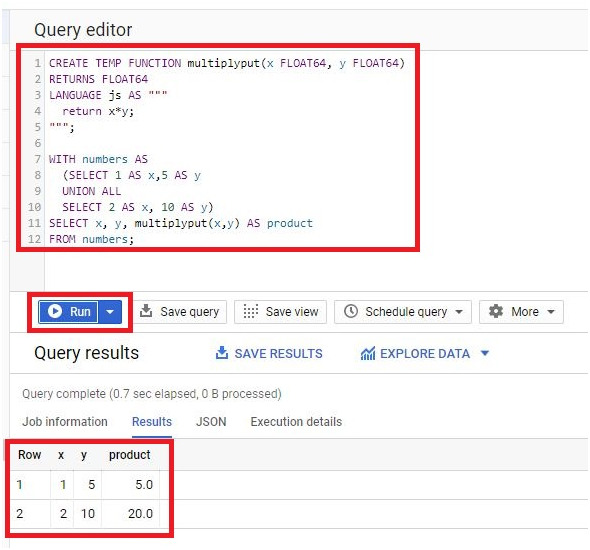
This function only exists for the query it was defined in. Once the query finishes, multiplyput is gone, and typing it into your next query means writing the whole thing out again.
Prefer SQL Over JavaScript When You Can
The example above uses LANGUAGE js, but the same logic can be written as a plain SQL function instead:
CREATE TEMP FUNCTION multiplyput(x FLOAT64, y FLOAT64) AS (x * y);
WITH numbers AS
(SELECT 1 AS x, 5 AS y
UNION ALL
SELECT 2 AS x, 10 AS y)
SELECT x, y, multiplyput(x, y) AS product
FROM numbers;
This is not just a style preference. Google’s own performance guidance for BigQuery states that a JavaScript UDF has to spin up a subprocess to run, which uses meaningfully more slot resources than the same logic written in SQL, and slows the query down as a result. Whenever your logic can be expressed as a SQL expression, a SQL UDF is the faster choice. JavaScript earns its place for genuinely complex logic, such as parsing an awkward text format, that SQL cannot express cleanly on its own.
Making a Function Persistent
A temporary function only lives inside the query that defines it. A persistent function, created with CREATE FUNCTION instead of CREATE TEMP FUNCTION, is saved into a dataset and can be called from any query afterward, the same as a built in function.
CREATE FUNCTION your_dataset.multiplyput(x FLOAT64, y FLOAT64) AS (x * y);
SELECT your_dataset.multiplyput(3, 4) AS product;
Google’s own best practice guidance recommends exactly this, building a shared dataset of persistent SQL and JavaScript functions that your whole team can call, rather than pasting the same temporary function definition into query after query. To remove a persistent function later, use DROP FUNCTION your_dataset.multiplyput.
Other Kinds of Routines Worth Knowing About
A scalar UDF, returning a single value, covers most everyday needs, but BigQuery supports a few related routine types worth knowing exist:
- Table functions, which return an entire table instead of a single value, useful when a piece of logic needs to produce multiple rows and columns rather than one result.
- Python UDFs, which let you write the function body in Python instead of SQL or JavaScript, including the option to use third party libraries from PyPI.
- Aggregate functions, which work like SUM or COUNT, combining many rows into a single summarized result, rather than transforming one row at a time.
Common Mistakes to Avoid
- Writing a JavaScript UDF for logic that SQL could express directly. Check whether a plain SQL function does the same job first, since it will almost always run faster.
- Copying a triple quoted JavaScript body from a document without checking the quote characters. Curly quotes inserted automatically by a word processor will not work, only straight quotes delimit a JavaScript UDF body correctly.
- Recreating the same temporary function in every query. If a function is used more than once, make it persistent in a shared dataset instead, so everyone calls the same definition and a fix only needs to happen in one place.
That covers creating a BigQuery function, choosing SQL over JavaScript when you can, and making one persistent so your whole team can reuse it. To go further, explore Prwatech’s Google Cloud training program, which includes placement assistance.