BigQuery Speed: Querying Terabytes of Data in Seconds
Analyzing Massive Datasets With BigQuery
BigQuery is built to scan enormous amounts of data quickly, and the clearest way to see that is to run a few queries against a genuinely huge public dataset and watch how little time it actually takes. This uses a public benchmark dataset of Wikipedia page view data to show that directly.
Step One: Open BigQuery
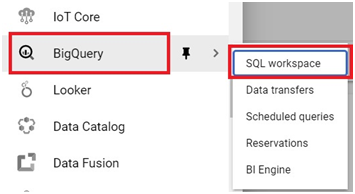
Open the console, then the Open Menu > Big Query > SQL Workspace.
Query One: A Full Table Scan
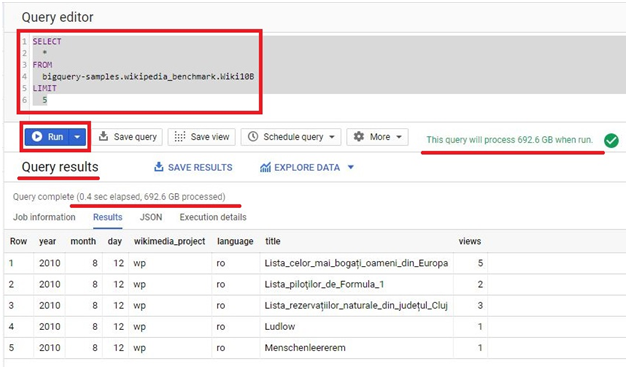
SELECT
*
FROM
`bigquery-samples.wikipedia_benchmark.Wiki10B`
LIMIT
5
Click Run. This query processes 692 GB and returns in under a second. It is fast because a LIMIT clause does not reduce how much data BigQuery has to scan to answer a SELECT star query, but the dataset itself is not being filtered or aggregated at all, just returned as is.
Query Two: Filtering and Grouping
SELECT
language,
title,
SUM(views) AS views
FROM
`bigquery-samples.wikipedia_benchmark.Wiki10B`
WHERE
title LIKE “%Google%”
GROUP BY
language,
title
ORDER BY
views DESC;
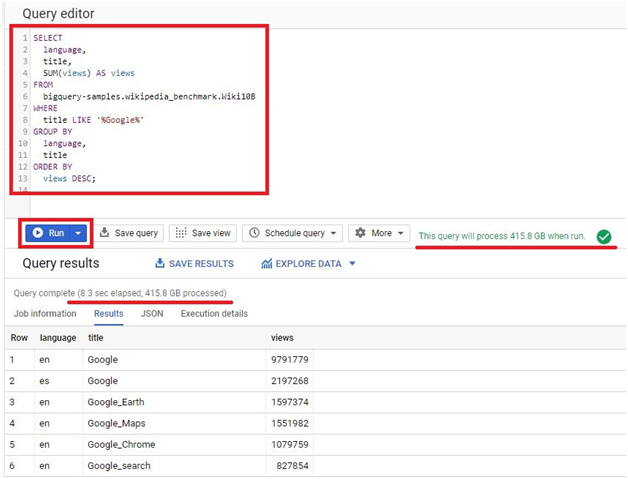
Click Run. This one processes 425 GB and finishes in 8.3 seconds, filtering down to Wikipedia titles containing Google, then totalling views by language and title.
Query Three: A Much Larger Table
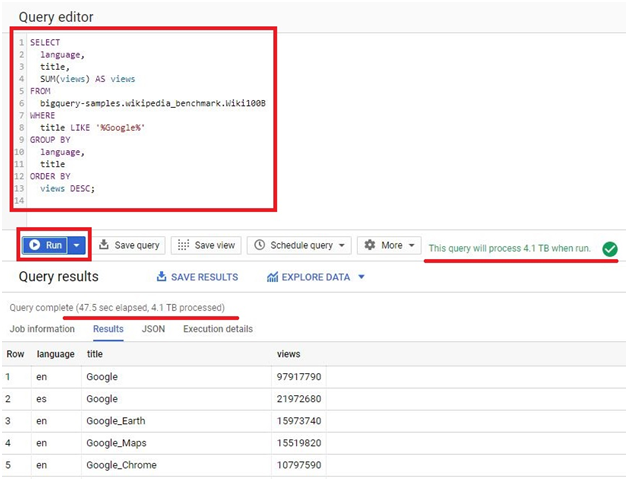
This is the same query as above, run against Wiki100B, a table roughly ten times the size:
SELECT
language,
title,
SUM(views) AS views
FROM
`bigquery-samples.wikipedia_benchmark.Wiki100B`
WHERE
title LIKE “%Google%”
GROUP BY
language,
title
ORDER BY
views DESC;
Click Run. This processes 4.1 TB and finishes in around 47.5 seconds, roughly ten times the data in less than six times the time.
If bigquery-samples ever stops resolving in your own project, bigquery-public-data is the current primary namespace Google uses for its public datasets, and is worth checking as the modern equivalent.
Why This Is Actually Fast
Two things make this possible. BigQuery stores data in a columnar format, so a query only has to read the specific columns it references, not every column in every row, which is a big part of why query two processes less data than query one despite querying the same table. On top of that, BigQuery spreads a query across a large number of machines running in parallel, so scanning 692 GB does not mean waiting for one machine to read through it sequentially, it means thousands of machines each reading a small slice of it at the same time.
Why Selecting Specific Columns Matters for Cost
Query one uses SELECT star, which reads every column in the table, and its 692 GB reflects that. Queries two and three only reference language, title, and views, and process less data as a result, even though they run against the same size or larger table. Since BigQuery bills by the amount of data a query actually processes, this is not just a performance detail, it directly affects cost. Selecting only the columns a query genuinely needs, instead of defaulting to SELECT star, is one of the simplest ways to keep both query time and cost down.
Common Mistakes to Avoid
- Wrapping a table name in single or double quotes instead of backticks. Quoting a table name turns it into a text string as far as BigQuery is concerned, not a reference to an actual table.
- Copying a query from a document without checking for curly quotes. They look almost identical to straight quotes on screen but are read completely differently by BigQuery.
- Defaulting to SELECT star out of habit. It is fine for a quick look at a small table, but on anything large, naming only the columns you need keeps both the query faster and the bill smaller.
That covers why BigQuery can scan terabytes of data in seconds, and how to write queries that take advantage of it. To go further, explore Prwatech’s Google Cloud training program, which includes placement assistance.