Creation and deletion of BI Engine
BigQuery BI Engine: Creating and Deleting a Reservation
BigQuery BI Engine is an in memory analysis service that accelerates queries, both from BigQuery SQL itself and from BI tools such as Looker Studio, down to sub second response times. It works by reserving a set amount of memory capacity that BigQuery uses to cache the data your queries touch most often.
What a BI Engine Reservation Actually Costs
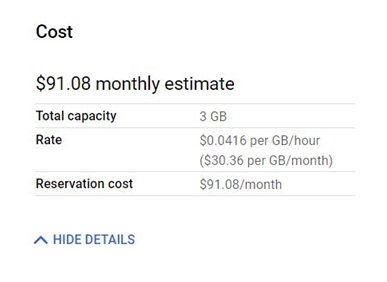
Reserved BI Engine capacity is billed at roughly 0.0416 US dollars per GiB per hour, and the first 100 GB of capacity is free. Past that, a reservation of an additional 50 GB runs in the neighborhood of 1,500 US dollars a month. Prices vary by region and change over time, so treat these as a starting point for budgeting rather than an exact quote, and always check the live cost estimate the console shows you before confirming.
The detail that matters most here: this is billed by the hour for as long as the reservation exists, regardless of whether a single query actually runs against it. A reservation you create for a one time test and forget about will keep charging you every hour until you delete it.
Step by Step Process of Creating and Deleting a Reservation
Step One: Open BI Engine
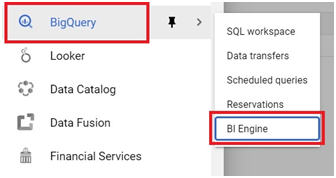
In the console, open the menu, then go to BigQuery, then BI Engine.
Click Menu > Big Query > BI Engine.
Step Two: Create a Reservation
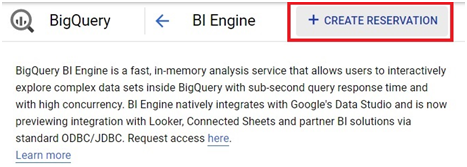
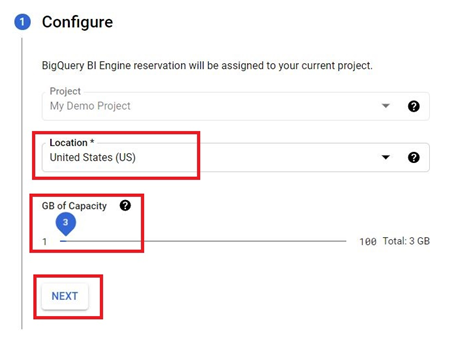
Step Three: Choose Location and Capacity
Choose the location for your reservation, and set the capacity you want to reserve. Click Next.
Step Four: Review the Estimated Cost
The right side of this screen shows the estimated cost for the capacity you have chosen. This is the number worth pausing on, since it reflects what you will be billed hourly for as long as this reservation exists, not a one time charge.
Step Five: Confirm Creation
Click Create.
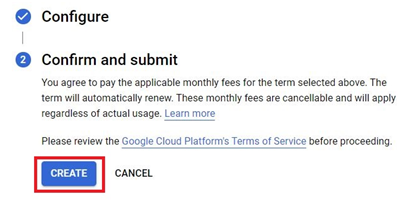
This will create the BI Engine.
Deleting a BI Engine Reservation
To delete a reservation, click the three dots to the right of it in the list.
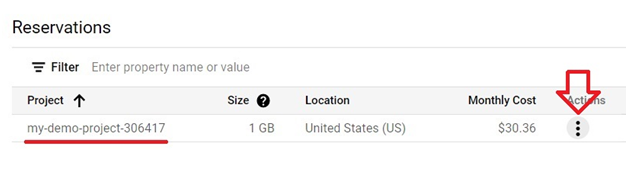
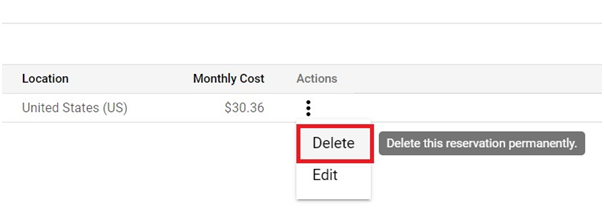
Click Delete.
Enter REMOVE to confirm deletion. Press proceed.
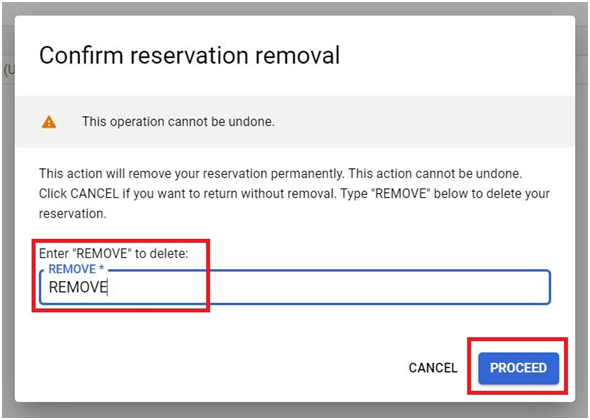
The reservation will be deleted, and billing for it stops from that point on.
BI Engine Compared to BigQuery Editions Slots
It is easy to mix these two up, since both involve reserving capacity in BigQuery. BigQuery Editions slot reservations reserve compute capacity for running your queries. BI Engine reservations, separately, reserve memory specifically for caching data so queries that hit that cached data run faster, closer to sub second response times. You can have one without the other, and many teams use plain on demand or Editions based query billing without ever touching BI Engine, since BI Engine is specifically for accelerating frequently repeated queries and dashboards, not for handling query volume in general.
Common Mistakes to Avoid
- Sizing a reservation for peak load and leaving it there permanently. Since billing is continuous and hourly, a reservation sized for an occasional spike costs you the same every idle hour in between, not just during the spike.
- Forgetting a test reservation exists. Because it bills whether or not it is used, a reservation created to test the feature and never deleted quietly adds up over weeks or months.
Assuming BI Engine capacity is the same thing as query slots. They are two separate reservations serving two different purposes, and confusing them can lead to paying for capacity that does not actually solve the performance problem you have.
That covers creating and deleting a BI Engine reservation, and what it actually costs to leave one running. To go further, explore Prwatech’s Google Cloud training program, which includes placement assistance.
