Sharing file from one project bucket into another project bucket.
Copying Files Between Cloud Storage Buckets in Different Projects
Every Google Cloud project is isolated from every other project by default, including its Cloud Storage buckets. Having access to a bucket in your own project does not give you access to a bucket sitting in someone else’s project, even if you personally own both. Moving a file directly between two buckets in different projects means explicitly granting permission on the destination side first.
This walks through hitting that access denied error, understanding exactly why it happens, and granting the one IAM role that actually resolves it.
Step by Step Process of Sharing File from One Bucket into Another Project Bucket
Step One: Attempt the Copy
gsutil cp gs://SOURCE_BUCKET_NAME/* gs://DESTINATION_BUCKET_NAME/
Run this from Cloud Shell or your local machine with the Cloud SDK installed.

Why This Fails by Default
The destination project has no reason to trust a request coming from outside it. Your account may have every permission it needs on the source bucket, but the destination bucket does not know who you are until you are explicitly added to its IAM policy. This is working as intended, not a bug, it is exactly the isolation that keeps one project’s data from being reachable by anyone with access to a different project.
Step Two: Open IAM in the Destination Project
Switch the console to the destination project, then open the menu, then IAM and Admin, then IAM.
Open Menu > IAM & Admin > IAM
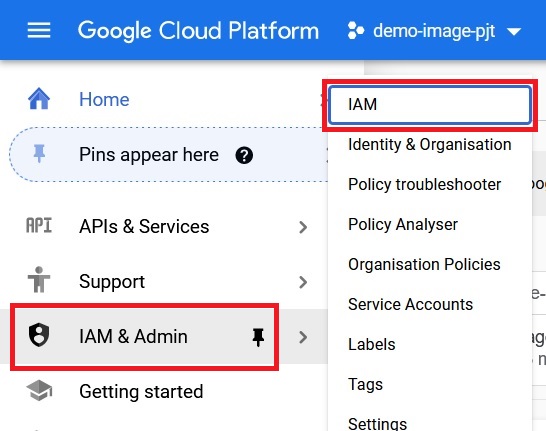
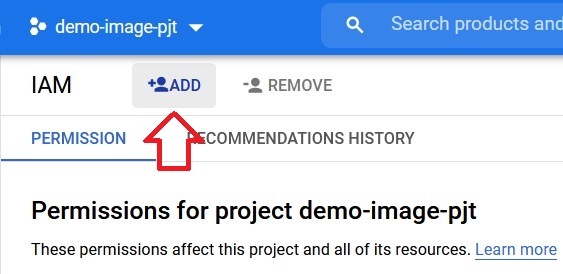
Step Three: Add a Principal
Click Add.
Enter the account that is actually running the copy command, your own account if you are running it yourself. Assign it the Storage Object Creator role, which allows writing new objects into the bucket without granting the ability to read, overwrite, or delete anything already there. Click Save.
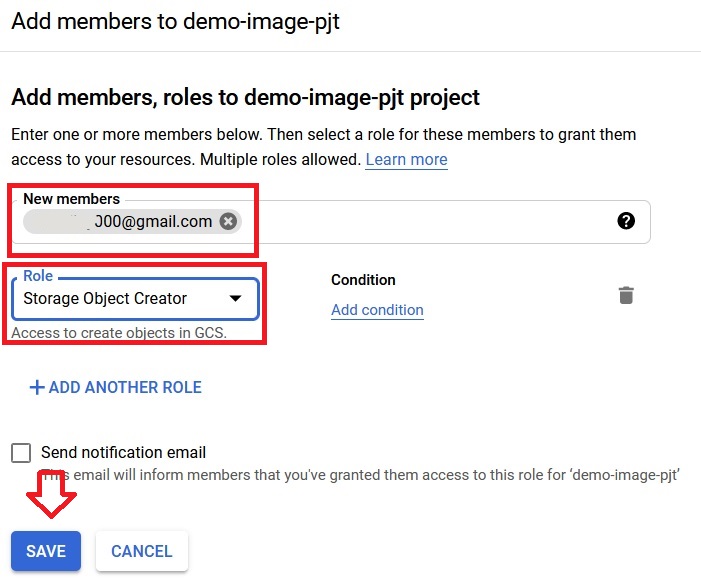
Step Five: Retry the Copy
gsutil cp gs://SOURCE_BUCKET_NAME/* gs://DESTINATION_BUCKET_NAME/
With the role in place, the same command now succeeds.
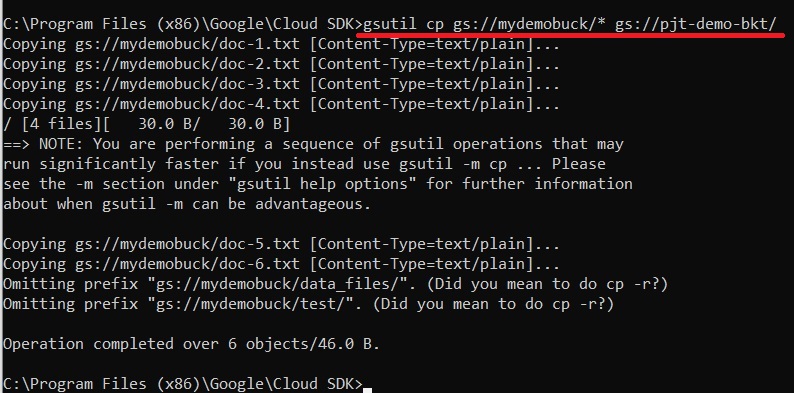
Choosing the Right Role for This Kind of Transfer
- Storage Object Creator, the role used above, for someone who only needs to write new files in, the least access needed for a one direction copy.
- Storage Object Viewer, if instead you need to read from a bucket you do not own, such as pulling files out of someone else’s bucket rather than writing into it.
- Storage Object Admin, only if the same account genuinely needs to overwrite or delete existing objects in the destination too, since this grants considerably more than a simple one way copy requires.
Why ACLs Are Not the Answer Here
Object level ACLs still exist as a legacy access system, but any bucket created with uniform bucket level access enabled, the default for new buckets since 2020, has ACLs disabled entirely. Any attempt to set one on a bucket like that fails outright. IAM is not just the cleaner option today, for most current buckets it is the only option, which is exactly why granting a role is the fix rather than adjusting an ACL.
Common Mistakes to Avoid
- Granting the role to the wrong account. It needs to go to whichever identity is actually authenticated when the copy command runs, not a generic reference to the source project’s owner.
- Granting Storage Object Admin by default. Start with Object Creator for a simple write only transfer, and only widen it if you genuinely need more.
- Trying to fix this with an ACL on a bucket that has uniform bucket level access enabled. The request will fail outright, since ACLs are disabled entirely on buckets configured that way.
That covers copying files between Cloud Storage buckets in different projects, and the exact role that fixes the access denied error. To go further, explore Prwatech’s Google Cloud training program, which includes placement assistance.