Creation and deletion of image of instance.
Creating and Deleting a Custom Image in GCP
A custom image is a saved copy of a disk, usually a VM’s boot disk, with its operating system and software. You can use it as the starting point for new disks and new VMs, so every machine built from it starts out identical. It is also how you keep a configured server around as a template.
It is worth being clear about what an image is not. It is not a full backup of a VM. It holds the disk’s contents only, not the machine type, network, or metadata of the VM it came from. For backing up and restoring a disk’s data, a snapshot is the tool, and for capturing a whole VM with all its disks and settings, a machine image is. The Creating a Machine Image guide in this series covers that difference in detail.
This walks through creating a custom image in the console, then deleting one, along with the safer option of deprecating an image instead, and what each choice costs.
Prerequisites:
- A Google Cloud account with billing enabled. The Enabling Billing guide in this series covers that.
- A VM with a disk you want to turn into an image. The Creating an Instance Using Developers Console guide in this series covers that.
Step by Step Process of Creating and Deleting a Custom Image
Step One: Open Images
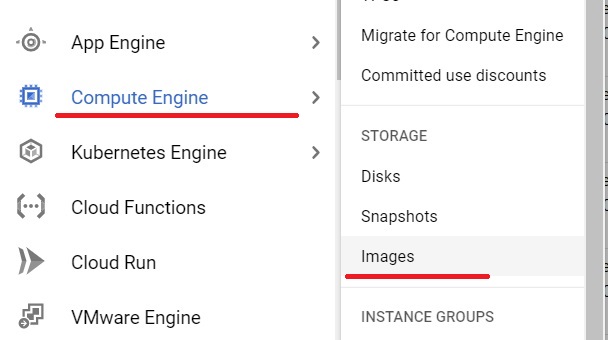
Open the console, then to create image click Compute Engine> Images
Step Two: Create an Image
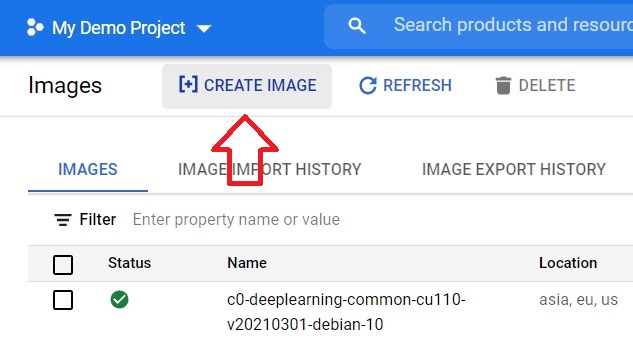
Click Create image.
Step Three: Name It and Choose the Source Disk
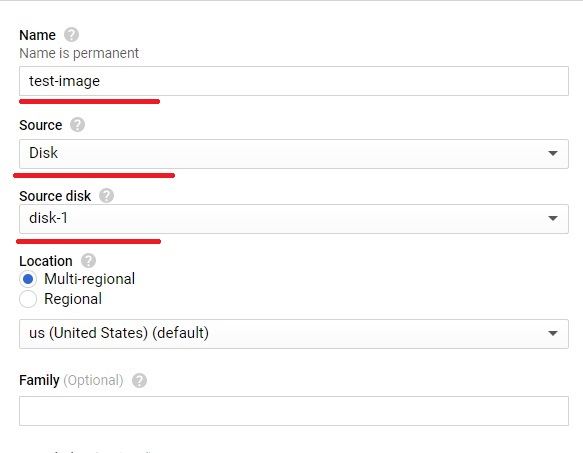
Give the image a name, then choose the source and the source disk, which is the disk you want to turn into an image. If that disk is attached to a running VM, Google recommends stopping the VM first so the disk is in a clean state. If you keep it running, the console asks you to confirm by selecting Keep instance running. For Windows VMs, stop the instance first.
Step Four: Choose Encryption and Create
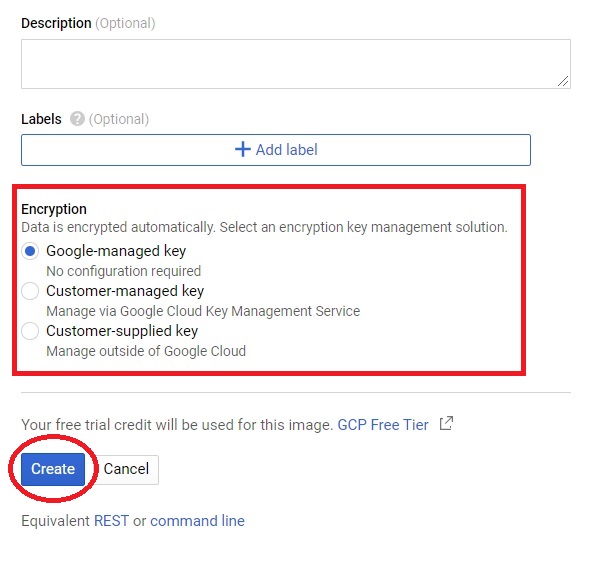
Choose the type of encryption you want, then click Create. By default Google manages the key, and you can choose a key you control instead. The image of the disk is created.
Other Choices on the Image Form
- Storage location. If you do not choose, Compute Engine stores the image in the multi region closest to the source.
- Optional. An image family groups related images, so new VMs created from the family get the latest image that is not deprecated. It is useful when you rebuild an image regularly.
Deleting an Image
Before you delete, check whether anything still refers to the image, such as an instance template or a script that creates VMs from it by name. Once an image is deleted, Google’s documentation says an error is returned if you try to use it. Stored images also cost money, which is a good reason to remove ones you no longer need.
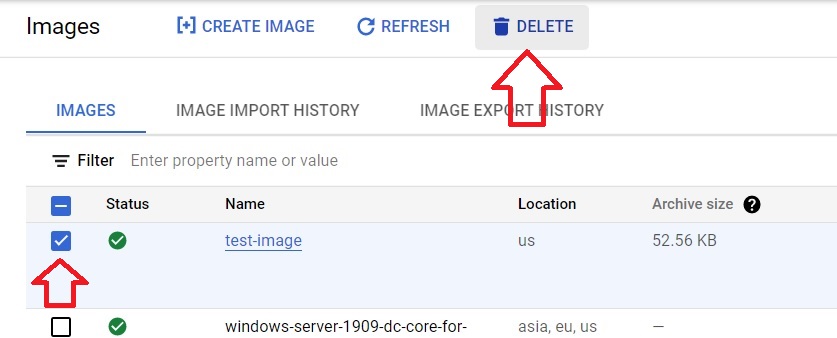
Step Five: Select the Image to Delete
Select the image you want to delete and click Delete.
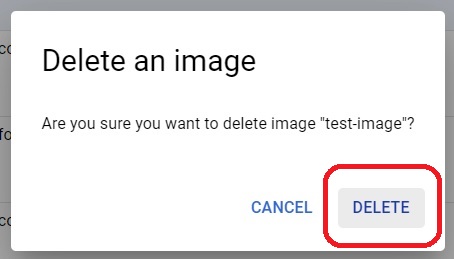
Step Six: Confirm the Deletion
Click Delete to confirm. The image is removed.
Deprecating an Image Instead of Deleting It
If you are retiring an image that other people or systems might still depend on, deprecating it is gentler. Google gives an image four states.
- Normal use. An image family points to the most recent active image.
- The image can still be used to create a VM, but image families no longer point to it. Creating a VM from it with the command line succeeds with a warning.
- The image is no longer available for use, though existing links to it are still allowed.
- Using it returns an error. Setting this state does not remove the image. You still have to delete it explicitly to remove it and its data.
Deprecation also works as a rollback. If a new image in a family turns out to be bad, deprecate it and the family points back to the previous one.
What It Costs?
Custom images are billed for the storage they use, based on their size and where they are stored. Creating a VM from an image also creates a disk, which has its own cost. Delete images and test VMs you no longer need.
Common Mistakes to Avoid
- Treating a custom image as a full backup of a VM. It holds the disk only. Use a snapshot or a machine image for backup.
- Creating an image from a running VM’s disk without thinking about consistency. Stop the VM first where you can.
- Deleting an image that an instance template or script still uses, then wondering why new VMs fail to start.
- Deprecating when you meant to delete. Deprecation retires an image in stages and does not remove it or its cost.
- Forgetting old images. They keep costing storage until you delete them.
That covers creating and deleting a custom image, and the safer option of deprecating one. To go further, explore Prwatech’s Google Cloud training program, which includes placement assistance.
