Creating Dataproc Metastore
Creating a Dataproc Metastore Service
A Dataproc cluster is meant to be disposable. You spin one up to run a job, then delete it once the job finishes, which is exactly what keeps Dataproc cost effective. The problem is that a Hive metastore, the catalog of table schemas, partitions, and locations that Spark, Hive, and similar tools rely on, normally lives on the cluster itself, and disappears the moment the cluster does. Dataproc Metastore solves this by running that catalog as its own separate, managed service, so your table definitions survive long after any specific cluster is gone, and multiple clusters or engines can share the same metadata at once.
This walks through creating a Dataproc Metastore service in the console, and explains the two decisions that actually matter once you get there, which tier to choose and which generation of the service you are creating.
Dataproc Metastore
This enables seamless integration between the metastore and data processing workflows, allowing users to query and analyze data using SQL-like queries and leverage advanced features such as table partitioning and data cataloging.
In addition to managing metadata for data processing workflows, Dataproc Metastore also provides features for data governance and security, including access controls, encryption, and auditing. This ensures that sensitive metadata is protected and compliant with regulatory requirements.
Step by Step Process of Creating a Dataproc
Step One: Open Dataproc Metastore
Open Menu > Dataproc > Metastore
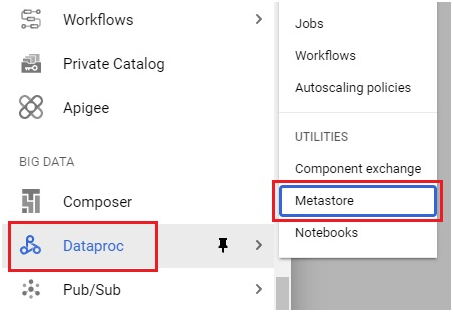
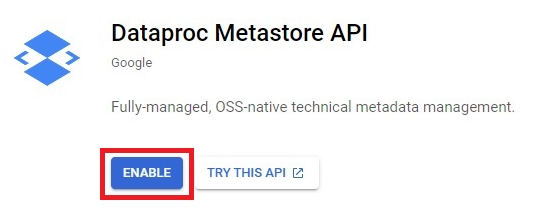
Step Two: Enable the Metastore API
Click Enable.
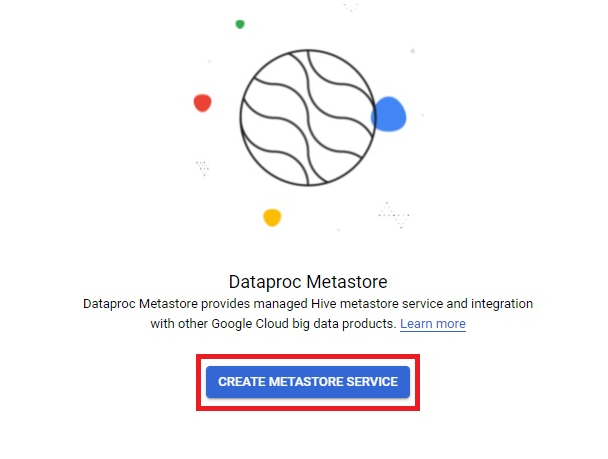
Step Three: Create a Metastore Service
Click Create Metastore Service.
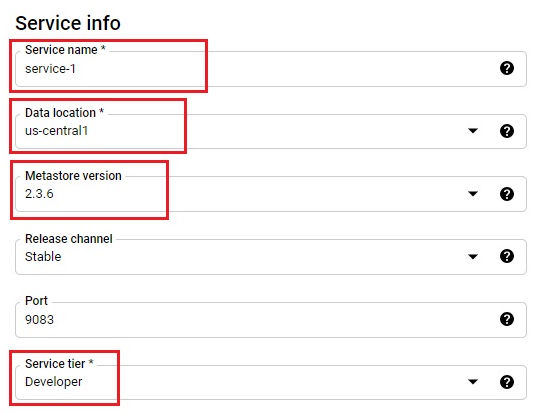
Step Four: Name It and Choose a Version and Tier
Give the service a name and location, choose a metastore version, and pick a service tier.
Developer Versus Enterprise Tier
Developer is the default tier, and it is exactly what it sounds like, limited scalability with no fault tolerance, meant for a low cost proof of concept rather than anything relied on in production. Enterprise provides multi-zone high availability and enough scalability for genuine production workloads, at a meaningfully higher hourly cost, commonly cited around 3.42 US dollars per hour for the service, billed whether or not any actual job is using it. Choose Developer while you are learning or testing, and only move to Enterprise once you have a real workload that needs the availability it provides.
Dataproc Metastore 1 Compared to Dataproc Metastore 2
Since this tutorial was first written, Google has introduced Dataproc Metastore 2, a newer generation of the service alongside the original, now referred to as Dataproc Metastore 1. The two configure very differently. Metastore 1 uses the fixed service tiers described above, Developer or Enterprise, each with its own fixed pricing. Metastore 2 instead uses a scaling factor, which you can adjust up or down after the service already exists, and can even be set to scale automatically based on demand, on a separate pricing model from Metastore 1. If your console offers a choice between the two generations during setup, Metastore 2 is the newer option and generally the more flexible one for a service you expect to grow.
Step Five: Choose a Network and Data Catalog Sync
Choose your network, using an existing VPC network if you have one. You can also enable Data Catalog Sync here, which automatically copies your database and table metadata into Data Catalog, letting you tag and search for these resources the same way you would search for any other resource in your project.
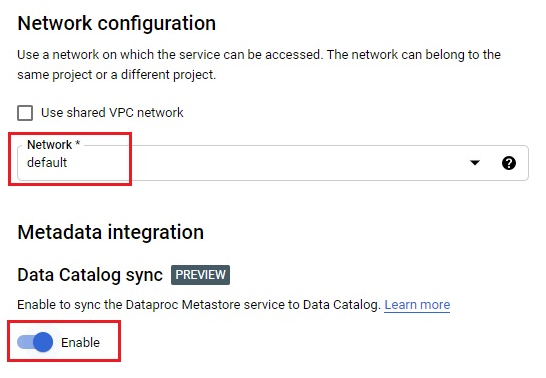
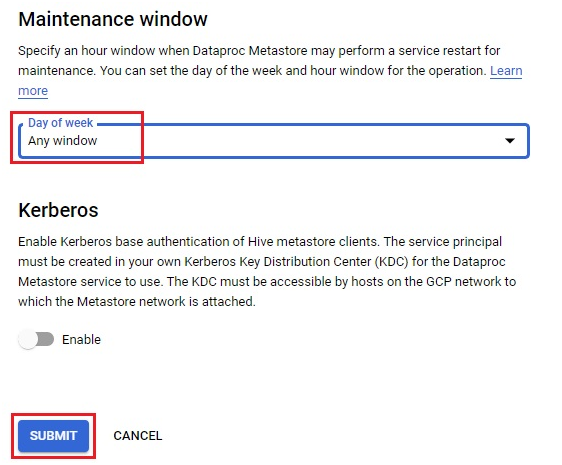
Step Six: Choose a Maintenance Window and Submit
Choose a maintenance window, then click Submit. The service will take a few minutes to finish creating.
An Alternative Worth Knowing About: BigLake Metastore
If your goal is a single metadata catalog shared across multiple engines, such as Spark, Flink, and BigQuery together, it is worth knowing that BigLake Metastore exists as a separate, newer option built for exactly that kind of cross engine sharing. It is not a straightforward replacement for Dataproc Metastore, the two solve overlapping but not identical problems, but it is worth a look if your setup already leans heavily on BigQuery alongside Dataproc.
Common Mistakes to Avoid
- Choosing Enterprise by default when Developer would do. Enterprise costs meaningfully more per hour, whether or not a job is actually running against it.
- Assuming Metastore 1 and Metastore 2 configure the same way. They do not, one uses fixed tiers, the other a scaling factor with its own pricing model.
- Creating a Developer tier service, then being surprised by a lack of fault tolerance in production. That tier is explicitly built for low cost testing, not for a workload you depend on.
That covers creating a Dataproc Metastore service and the tier and generation decisions that actually matter when you do. To go further, explore Prwatech’s Google Cloud training program, which includes placement assistance.
