Tensor Processing Units
Tensor Processing Units: Benefits, Limitations, and Creating a TPU
A Tensor Processing Unit, or TPU, is a chip Google designed to speed up machine learning. Neural networks spend most of their time multiplying large grids of numbers, called tensors, and a TPU is built around doing exactly that. Cloud TPU is the service that lets you rent TPUs by the hour from Google Cloud instead of buying hardware.
Whether a TPU is a good choice depends on the work. They are very strong for training and running large neural networks, and a poor fit for almost everything else. They also bill by the hour from the moment they are ready, and they are not available in every zone. So it is worth understanding the benefits, the limits, and the cost before you create one.
This covers where TPUs help and where they do not, then walks through creating a Cloud TPU in the console, connecting to it, deleting it, and what it costs.
Benefits of TPUs
- Built for tensor math. TPUs are designed around the matrix multiplications at the heart of neural networks, which is where most of the training time goes.
- They scale out. Multiple TPU chips can be connected into larger slices, so you can train bigger models and handle bigger datasets than a single chip allows.
- Modern framework support. JAX, PyTorch, and TensorFlow can all run on TPUs through a shared runtime library, although TensorFlow support depends on the TPU generation.
- Several generations to choose from. Google’s documentation names TPU versions including v2, v3, v4, v5e, v5p, v6e, which Google calls Trillium, and TPU7x, which Google calls Ironwood.
Limitations of TPUs
- Specialized, not general purpose. A TPU is optimized for machine learning. It is not a substitute for a CPU or a GPU for general computing.
- Your code has to suit them. Frameworks reach a TPU through a compiler and runtime, so models and libraries need to be compatible, and the software version you pick matters.
- Availability is limited. Not every TPU type is offered in every zone, and creating one needs quota. Google’s TPU locations page lists which zones offer which types.
- They cost real money by the hour. More on this below.
Complete Guide of Tensor Processing Units
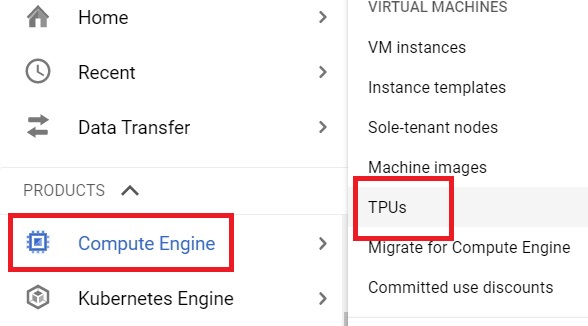
Step One: Open the TPUs Page
Open the console, then open Menu > Compute Engine > TPUs
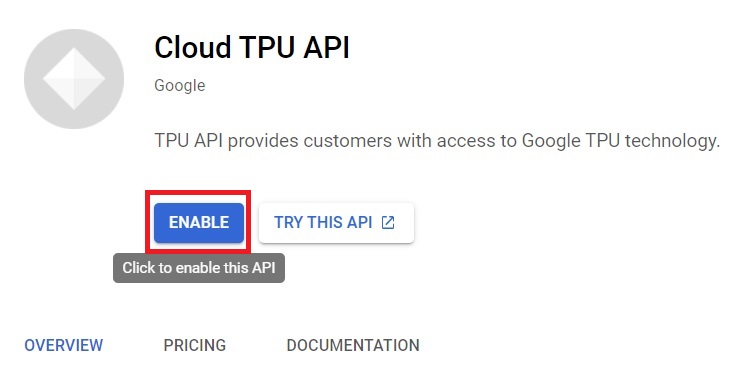
Step Two: Enable the API
If the Cloud TPU API is not enabled, click Enable.
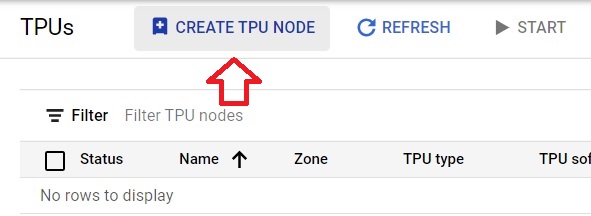
Step Three: Create a TPU
Click Create TPU. The original page called this Create TPU node, which belongs to the older TPU Node design. Google’s documentation lists the TPU VM design as the supported one, where your code runs directly on the TPU’s host machine.
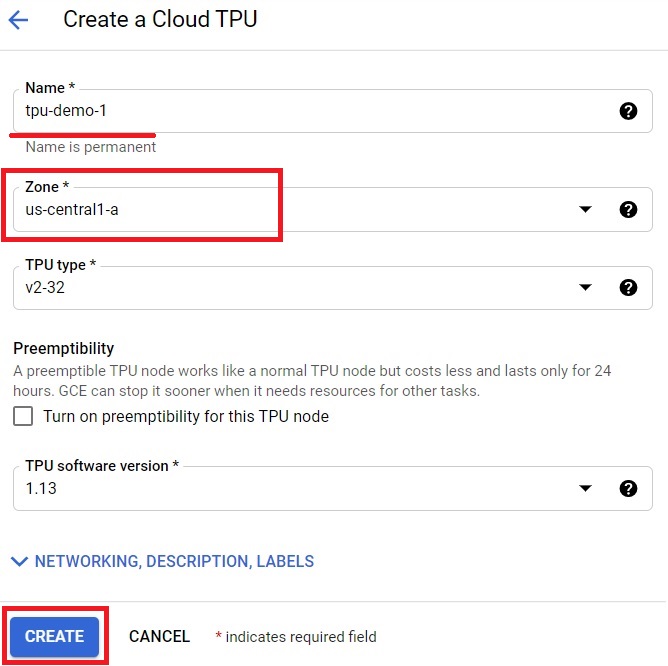
Step Four: Set the Name, Zone, Type, and Software Version
Give the TPU a name and choose a zone. Then choose the accelerator type, which sets the TPU version and how many chips you get. Finally choose the TPU software version, which is the runtime that gets installed. Click Create.
For PyTorch and JAX, Google’s documentation gives these software versions:
| TPU generation | TPU software version for PyTorch and JAX |
|---|---|
| Trillium (v6e) | v2-alpha-tpuv6e |
| v5e | v2-alpha-tpuv5-lite |
For TensorFlow, the version is written in a different form that includes the TensorFlow version you want. Check Google’s TPU software versions page for the exact value for your generation.
Connecting to and Deleting Your TPU
Once it is ready, you can connect to the TPU’s machine with SSH:
gcloud compute tpus tpu-vm ssh TPU_NAME –zone=ZONE
To see what you have running:
gcloud compute tpus tpu-vm list –zone=ZONE
When you are finished, delete the TPU, either from the TPUs page in the console or with:
gcloud compute tpus tpu-vm delete TPU_NAME –zone=ZONE
Deleting is what stops the charges, since they accrue for as long as the TPU is in the READY state.
What a TPU Costs?
Cloud TPU is priced per chip hour, and the price depends on the TPU generation, the region, and how you buy it, on demand, as a cheaper Spot option, or with a commitment. As a guide, a September 2026 pricing summary lists US on demand rates of about 1.20 US dollars per chip hour for v5e, 2.70 for Trillium, 4.20 for v5p, and 12.00 for Ironwood. Check Google’s own pricing page for current figures, since these change.
The chips add up quickly. A TPU with 8 v5e chips at about 1.20 dollars each costs about 9.60 US dollars an hour, which would use up a 300 dollar free trial credit in roughly 31 hours of being left on. Note too that the console bills in VM hours, so a single host with several chips shows as one larger hourly figure.
Quota and Availability
Creating a TPU needs quota for that TPU type in that region, and a new project often has to request it. Capacity is a separate matter, since a zone can run out of TPUs even when you hold quota, so people sometimes have to try a different zone. If you are a student, researcher, or hobbyist, Google runs a TPU Research Cloud program that offers free access, which is worth a look before you pay.
Common Mistakes to Avoid
- Following older steps for a TPU node. Use the current Create TPU flow with a TPU VM.
- Leaving a TPU running after a test. It bills per chip hour while it is ready.
- Assuming TensorFlow works on every TPU generation. Support depends on the generation.
- Choosing a zone at random. Check which zones offer the TPU type you want.
- Using a TPU for work that is not machine learning. It is not a general purpose processor.
That covers what TPUs are good and bad at, how to create and delete a Cloud TPU, and what to expect on the bill. To go further, explore Prwatech’s Google Cloud training program, which includes placement assistance.
