Deployment manager : Adding Templates
Adding Templates in Deployment Manager and What Replaces It
Deployment Manager is Google Cloud’s infrastructure deployment service. Instead of creating resources by hand, you describe them in files and let the service create and manage them together. A template is a reusable file, written in Jinja or Python, that describes one or more resources. A configuration file is a YAML file that imports templates and lists the resources you want to create from them.
Before you build anything, one fact matters more than any step below. Deployment Manager reached end of support on March 31, 2026. Google says people who already use it can keep managing, migrating, or deleting existing resources at their own risk, but Google no longer answers standard support tickets for it, and it does not support new customers or organizations using it. The replacement is Infrastructure Manager, which uses Terraform.
This walks through creating a template, a configuration file that imports it, and a deployment, which is how the service has always worked and what you will meet in any existing Deployment Manager project. It then covers what to use for new work and how to move an existing deployment.
Deployment Manager has Reached End of Support
- The end of support date was March 31, 2026, and Google’s documentation now describes the service as having reached it.
- Existing users can still manage, migrate, or delete existing resources, but Google calls that use at your own risk.
- Standard Deployment Manager support tickets are no longer answered.
- New customers and organizations are not supported. If you are learning Google Cloud today, treat this guide as background rather than a skill to build on.
Google’s deprecation page also refers to a maximum extension of support that ends on March 31, 2027, so read it if you depend on an existing deployment.
Template and Configuration: What Each File does
- The template, describes resources in a reusable way. It is written in Jinja or Python.
- The configuration file, is YAML. Its imports section names the template files to bring in, and its resources section lists what to create, where the type of a resource can be the imported template itself.
- The deployment, is what gcloud creates when you hand it either a configuration file or a template.
Step by Step Process of Adding Templates in Deployment Manager
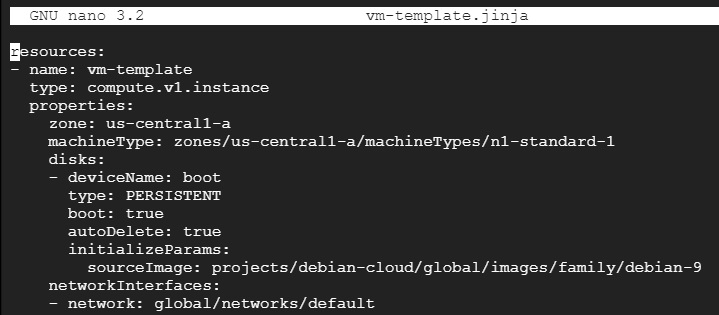
Step 1: Create the Template File
In Cloud Shell, create a file with the extension .jinja. The original page skips the command, so here it is:
nano my_vm_template.jinja

Paste in the following:
resources:
– name: vm-template
type: compute.v1.instance
properties:
zone: us-central1-a
machineType: zones/us-central1-a/machineTypes/n1-standard-1
disks:
– deviceName: boot
type: PERSISTENT
boot: true
autoDelete: true
initializeParams:
sourceImage: projects/debian-cloud/global/images/family/debian-12
networkInterfaces:
– network: global/networks/default
The only change from the original is the image family, now debian 12 instead of debian 9. The screenshots may still show the original code, so check them and retake any that do before you publish.
Press control x, then y, then enter. The file is saved.
Step 2: Check Where the File Is
pwd
This prints the folder the file is in, which you need when the configuration file refers to it.

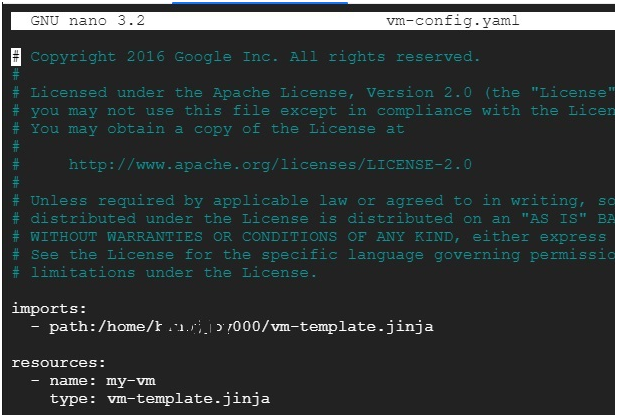
Step 3: Create the Configuration File
Create a configuration file with the extension .yaml:
nano vm-config.yaml

Paste in the following. The import path and the resource type must both match the template’s file name exactly, which the original page did not do:
imports:
– path: my_vm_template.jinja
resources:
– name: my-first-virtual-machine
type: my_vm_template.jinja
Press control x, then y, then enter. The file is saved.
Step 4: Deploy
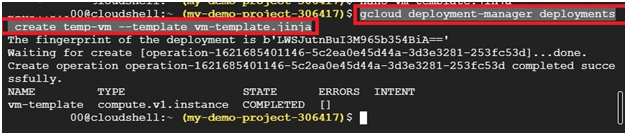
To deploy the configuration file that imports the template:
gcloud deployment-manager deployments create my-first-deployment –config vm-config.yaml
To deploy the template directly, without a configuration file:
gcloud deployment-manager deployments create a-single-vm –template my_vm_template.jinja
Both create a virtual machine. Because the service is now out of support, these commands may still work in a project that already uses Deployment Manager, but a new project may not be able to use it at all, and I have not tested either one.
What to Use Instead: Infrastructure Manager
Google’s recommended replacement is Infrastructure Manager, often shortened to Infra Manager. It runs Terraform for you, so you describe your infrastructure in Terraform configuration files, and Infra Manager deploys and manages them on Google Cloud. If you are starting something new, this is the route to learn.
The idea of reusable templates carries over, but under a different name. Deployment Manager templates become Terraform modules. One constraint is worth knowing, Infra Manager needs a valid Terraform root module, and templating or generating the Terraform for it is not supported.
Migrating an Existing Deployment
Google provides a tool called DM Convert that converts Deployment Manager configurations and templates into Infrastructure Manager. Its instructions are in the Deployment Manager deprecation page in Google’s documentation. Convert one small deployment first and compare what it creates with what you already have before moving anything important.
Common Mistakes to Avoid
- Starting new work on Deployment Manager. It is out of support, and new customers are not supported, so use Infrastructure Manager or Terraform instead.
- Using different names for the template in the import path, the resource type, and the deploy command. They must match the real file name exactly.
- Building a configuration file and then deploying the template directly. If you want the configuration file used, deploy it with the config option.
- Copying an old image family such as debian 9. Use a current family, because deprecated images are eventually deleted.
- Assuming the type in a configuration file must be a Google resource type. It can also be the name of an imported template.
That covers how Deployment Manager templates work, why Google ended support for it, and where to go next. To go further, explore Prwatech’s Google Cloud training program, which includes placement assistance.