GCP Service Account
Introduction to Service Accounts
A service account is an identity for something that is not a person, an application, a virtual machine, or a script that needs to call Google Cloud APIs on its own. Where your own Google account represents you logging in, a service account represents a piece of software acting under its own set of permissions, separate from any individual user. This walks through creating one, assigning it a role, and either disabling or deleting it when it is no longer needed.
Step by Step Process of Creating a Service Account in GCP
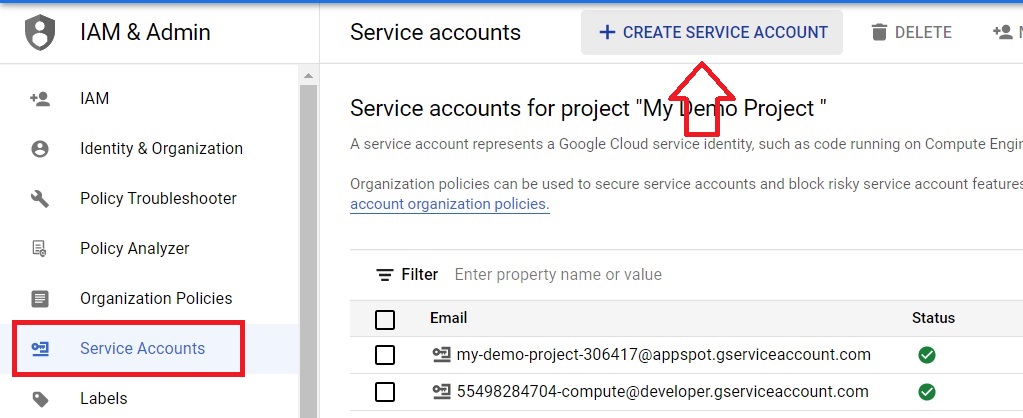
Step One: Open Service Accounts
Open the console, then
Open Menu > IAM & Admin > Service Accounts
Click on Create Service Account.
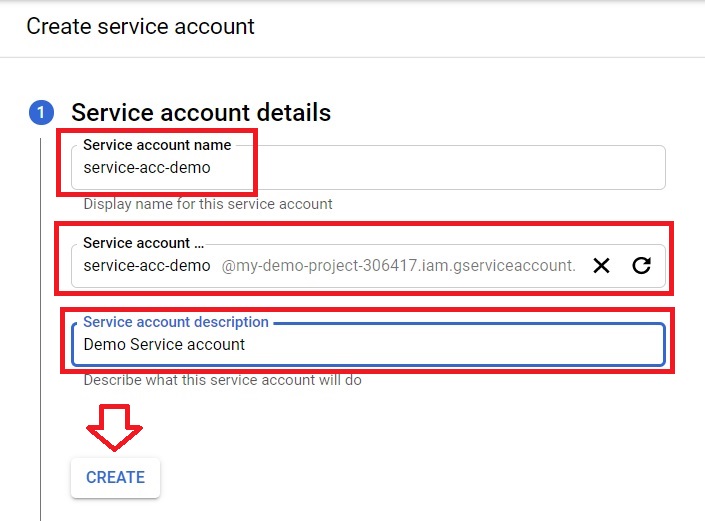
Step Two: Name and Describe It
Give it a name, a service account ID will be generated automatically, and add a description if you want one. Click Create.
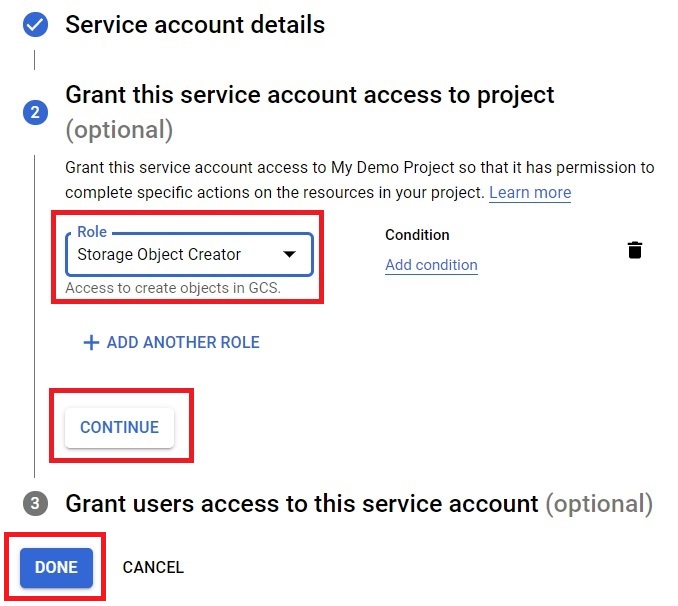
Step Three: Grant a Role
Give the service account an access role, then click Done.
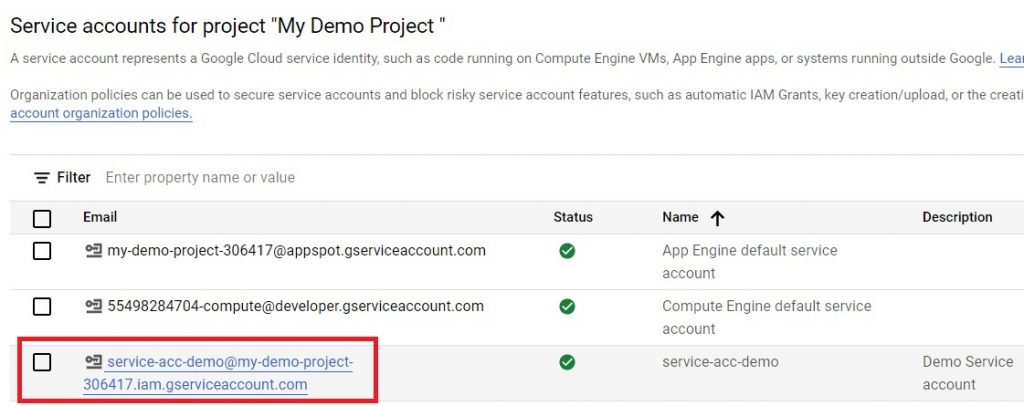
Step Four: Confirm Creation
The service account is created.
Avoid Downloadable Service Account Keys Whenever You Can
A service account key is a downloadable file containing a credential that lets whoever has it authenticate as that service account, with no time limit unless you set one and no built in link to any specific machine. If that file ends up in the wrong place, a public code repository, a laptop that gets lost, an email attachment, whoever finds it has exactly the same access the service account does, for as long as the key stays valid. This is a well known, common source of real cloud security incidents.
Google’s current recommendation is to avoid creating a key at all whenever there is another option. In most common situations there is one. A service account attached directly to a resource, such as a Compute Engine VM or a Cloud Function, can use that resource’s identity automatically without any key file existing anywhere. For workloads running outside Google Cloud entirely, Workload Identity Federation lets an external system authenticate using short lived tokens instead of a long lived key. Reach for a downloadable key only when neither of these genuinely fits your situation.
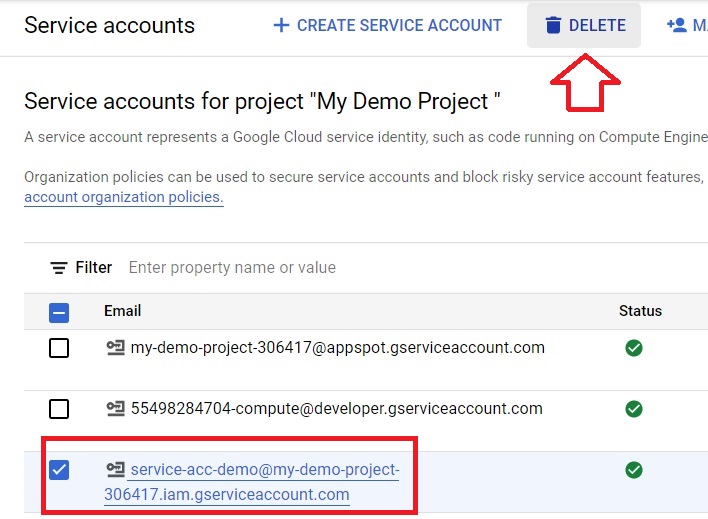
Step Five: Select a Service Account to Remove
Tick the checkbox next to the service account you want to remove, then click Delete.
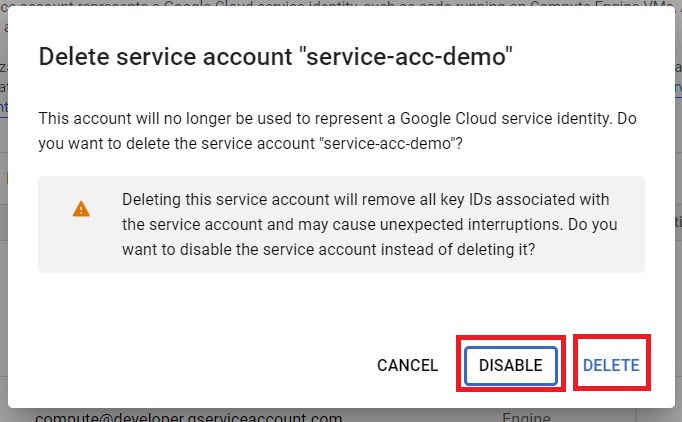
Step Six: Disable or Delete
Choose Disable or Delete.
Disable Versus Delete: Which to Choose
Disabling is reversible. The service account stops being able to authenticate immediately, but it still exists and can be re-enabled later if you decide you need it after all, which makes it the safer choice whenever you are not completely certain the account is no longer needed anywhere. Deleting is permanent. If anything you have forgotten about still depends on that identity, deleting it will break that thing immediately, and a deleted service account’s exact email address generally cannot be reused for a new one for some time afterward. When in doubt, disable first, confirm nothing breaks, and delete later once you are sure.
Common Mistakes to Avoid
- Creating a downloadable key as the default way to authenticate. Check whether attaching the service account directly to the resource, or using Workload Identity Federation, would work instead.
- Deleting a service account immediately instead of disabling it first. If something you forgot about was using it, disabling gives you a way back, deleting does not.
- Granting a broad role to a service account out of convenience. Give it only the access whatever is using it actually needs.
That covers creating a service account, assigning it a role, and the security choice that matters more than anything else covered here. To go further, explore Prwatech’s Google Cloud training program, which includes placement assistance.