Load data in BigQuery table from cloud shell
Load Data in BigQuery From Cloud Shell With bq Load
The bq command line tool, part of the Google Cloud SDK and available directly inside Cloud Shell, lets you create datasets, load data, and run queries against BigQuery without touching the console UI. This walks through creating a dataset, loading a CSV file into it, and querying the result.
Prerequisites
- A Google Cloud Platform account
- The Cloud Console open, with Cloud Shell available from it
Step by Step process of Loading Data in BigQuery
Step 1: Create a Dataset
In Cloud Shell, use the bq mk command to create a dataset. We will call ours bq_load_codelab:
bq mk bq_load_codelab

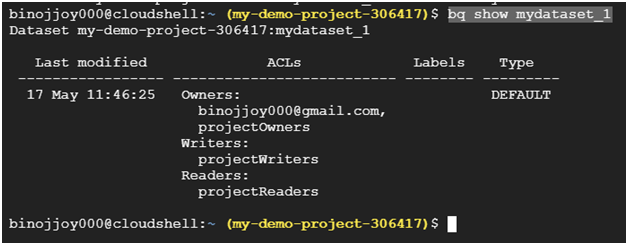
Step 2: View Dataset Properties
Confirm the dataset was created by checking its properties with bq show:
bq show bq_load_codelab
Step 3: Create a CSV File
Create an empty CSV file directly in Cloud Shell:
touch customer_transactions.csv
Open it in the Cloud Shell editor:
nano customer_transactions.csv

Paste in the following rows:
ID,Zipcode,Timestamp,Amount,Feedback,SKU
c123,78757,2018-02-14 17:01:39Z,1.20,4.7,he4rt5
c456,10012,2018-03-14 15:09:26Z,53.60,3.1,ppiieee
c123,78741,2018-04-01 05:59:47Z,5.98,2.0,ch0c0
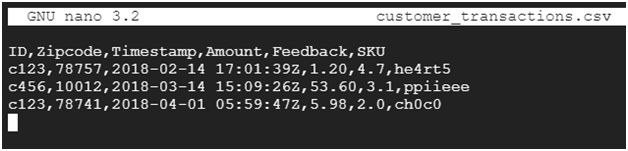
To exit from editor press ctrl + x then press y following enter.
Step 4: Load the CSV Into BigQuery
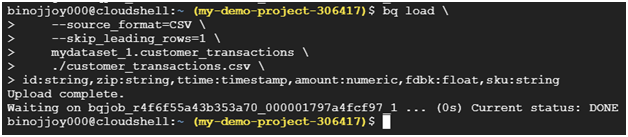
Use bq load to load the file into a new table inside your dataset:
bq load \
–source_format=CSV \
–skip_leading_rows=1 \
bq_load_codelab.customer_transactions \
./customer_transactions.csv \
id:string,zip:string,ttime:timestamp,amount:numeric,fdbk:float,sku:string
The skip leading rows flag tells BigQuery the first row is a header, not data. The final argument defines the schema directly, naming each column and its type, in the same order the CSV columns appear.
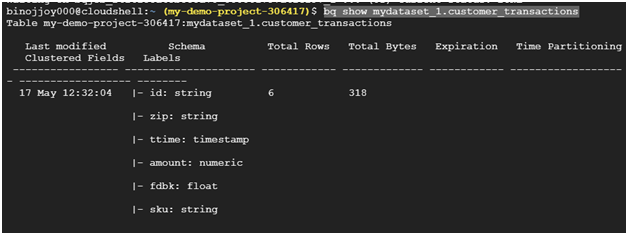
Step 5: Verify the Table
bq show bq_load_codelab.customer_transactions
Step 6: Query the Data
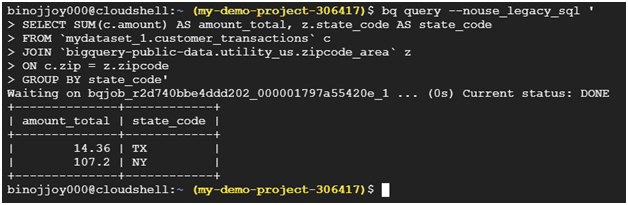
Run a query joining your new table against a public BigQuery dataset of US zip codes:
bq query –nouse_legacy_sql ‘
SELECT SUM(c.amount) AS amount_total, z.state_code AS state_code
FROM `bq_load_codelab.customer_transactions` c
JOIN `bigquery-public-data.utility_us.zipcode_area` z
ON c.zip = z.zipcode
GROUP BY state_code’
Step 7: Clean Up
Remove the dataset and everything in it once you are done:
bq rm -r bq_load_codelab

A Note on Legacy SQL
The –nouse_legacy_sql flag above tells bq query to use GoogleSQL, BigQuery’s standard SQL dialect, rather than the older legacy SQL dialect. Standard SQL has been the default for new queries for some time regardless, and Google has been restricting legacy SQL availability since June of 2026 based on usage it observed during an evaluation period. In practice, this means the flag is worth keeping in your commands for clarity, but relying on legacy SQL itself for anything new is no longer a safe long term choice.
Why Use bq Instead of the Console
- Repeatability, since a command you have already written can be rerun exactly, or dropped into a script, rather than clicked through in the console each time.
- Automation, since bq commands can run inside a CI pipeline or a scheduled job without anyone needing to open a browser.
- Speed for bulk or repeated loads, where typing one command is faster than navigating the console’s upload flow for every file.
Common Mistakes to Avoid
- Copying commands with the wrong dash character. If a command fails with an unrecognized flag error, check that every flag actually uses two real hyphens, not a single dash or an en dash picked up from a word processor.
- Mismatching the dataset name between your notes and your actual commands. Pick one name and use it consistently through every step, since bq will simply tell you the dataset does not exist if the name does not match exactly.
- Forgetting the schema has to match column order. The schema argument at the end of bq load is positional, so it needs to list types in the same order the CSV columns actually appear, not just include the right names.
- Joining across datasets in different locations. If your dataset and the public dataset you are joining against live in different regions, the query will fail. Check the location shown by bq show if a join like the one above throws a location related error.
That covers creating a dataset, loading a CSV file, and querying it using the bq command line tool. To go further, explore Prwatech’s Google Cloud training program, which includes placement assistance.