IAM Privacy and Security
IAM Security Best Practices
IAM security best practice comes down to a small number of concrete decisions repeated consistently, who gets access, how much access they get, how they prove who they are, and how long an unused credential is allowed to sit around. This covers the two console actions this page originally walked through, disabling third party access to a service and disabling a billing account, then the actual best practices around access, authentication, and credentials that make up the rest of the picture.
Complete Setup Process of IAM Security
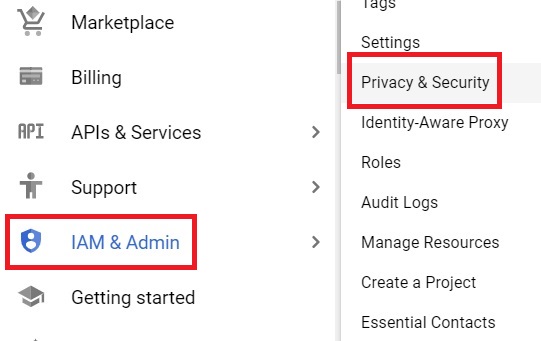
Step 1: Open Privacy and Security
Open the console, then
Open Menu > IAM & Admin > Privacy & Security
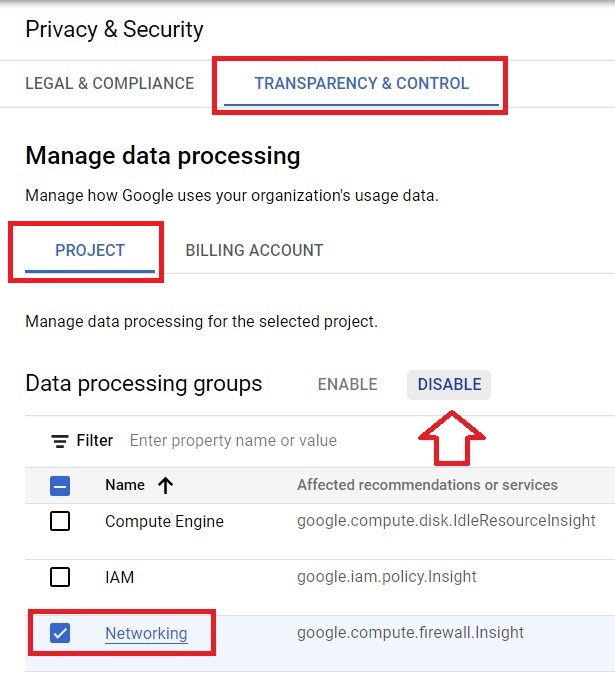
Step 2: Disable a Service Under Transparency and Control
This section shows which services and third party apps currently have access to your data. Select a project, choose the service you want to cut off, and press Disable.
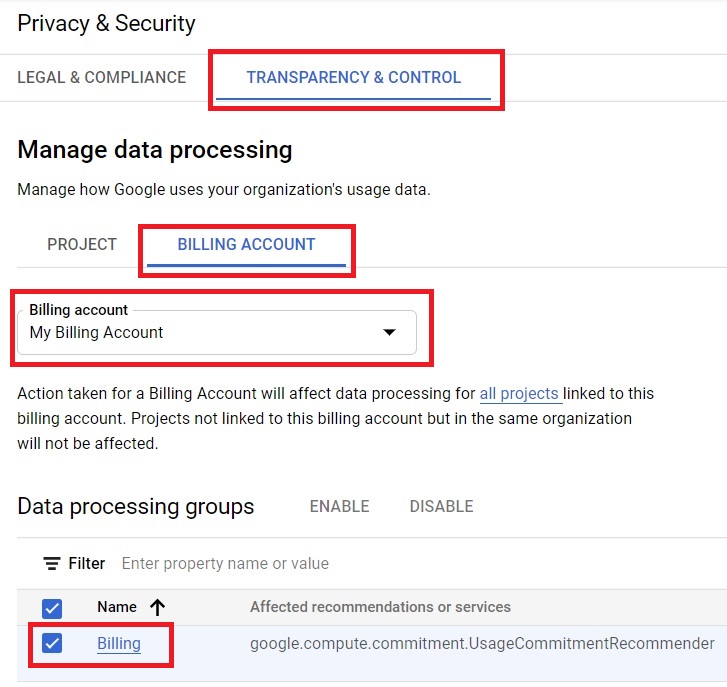
Step 3: Disable a Billing Account
In Billing, select the account you want to disable and click Disable. If it is the only billing account associated with your resources, you will not be able to disable it until that dependency is resolved.
Least Privilege: Choosing the Right Role
The single biggest lever for IAM security is which role type you actually grant. Basic roles, Owner, Editor, and Viewer, are broad and best kept to testing rather than production. Predefined roles, maintained by Google, are the right default for most real work. Custom roles fill in the remaining gaps. The IAM Roles guide in this series covers this decision in full.
Avoiding Long Lived Service Account Keys
A downloaded service account key is a credential with no expiry and no link to a specific machine, which makes it one of the most common ways cloud environments actually get compromised. Google’s current guidance is to avoid creating one whenever a service account can instead be attached directly to the resource using it, or authenticated through Workload Identity Federation. The GCP Service Account guide in this series covers this in more depth.
Organizations that want this enforced rather than left to individual discipline can apply the disableServiceAccountKeyCreation organization policy constraint, which blocks new service account keys from being created at all across the organization.
Google Now Requires Two Step Verification for Many Organizations
This has moved from a recommendation to something Google enforces directly. Organizations using Enterprise Cloud Identity without single sign on are now required to have two step verification enabled, with only a one time, temporary extension available for organizations that existed before this requirement took effect. Opting out entirely is possible for that specific setup, but Google’s own guidance explicitly advises against it. If your organization has not already set this up, treat it as active policy to comply with, not a future item on a checklist.
Reviewing Access Regularly
Permissions accumulate quietly over time, someone gets temporary access for a project and it is never removed once the project ends. A periodic review, comparing who has access against who actually still needs it, is what catches this before it becomes a real exposure. IAM Recommender, built into the console, will surface roles that look broader than a principal’s actual usage pattern, which is a reasonable place to start a review rather than going through every binding by hand.
Common Mistakes to Avoid
- Treating multi factor authentication as optional. For many organizations it is no longer optional at all, and Google’s own guidance is not to opt out even where that choice still exists.
- Leaving service account key creation unrestricted at the organization level when nothing actually needs it. The disableServiceAccountKeyCreation constraint closes that door for everyone at once.
- Granting access for a temporary project and never revisiting it once the project ends. A periodic review is what catches this, not memory.
- Disabling the only billing account tied to active resources without first moving or shutting those resources down.
That covers the Privacy and Security console section, and the actual IAM security practices worth putting in place around it. To go further, explore Prwatech’s Google Cloud training program, which includes placement assistance.